
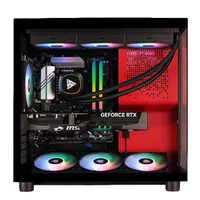
I'd buy this Intel 270K Plus, RTX 5080 gaming PC over anything with a Ryzen 9800X3D and no, I'm not joking
I've not lost the plot either. Just hear me out.
Keep up to date with the most important stories and the best deals, as picked by the PC Gamer team.
You are now subscribed
Your newsletter sign-up was successful
Want to add more newsletters?
Join the club
Get full access to premium articles, exclusive features and a growing list of member rewards.
AMD's Ryzen 7 9800X3D might be the best CPU for pure gaming, but good luck finding a similar RTX 5080 desktop PC with one at this price. With Intel's best chip in years, lots of memory and storage, this is a top-end rig to keep you happy for a very long time.
Key specs: Core Ultra 7 270K Plus | RTX 5080 | 32 GB DDR5-6000 | 2 TB SSD
While lots of PC enthusiasts use their beloved rigs for nothing but gaming, there are plenty of folks—myself included—who rely on their beefy PCs for work and other hobbies. AMD's Ryzen 7 9800X3D is the CPU of choice if you're in the former camp, but everyone else should be giving Intel's Core Ultra 7 270K Plus serious consideration.
And thanks to a healthy $400 discount, you can get one right now in a well-specified Stormcraft RTX 5080 desktop PC that's $2,700 at Newegg.
- Join us on WhatsApp for daily deals, direct to your phone.
After the disappointment of the initial batch of its Arrow Lake processors (the Core Ultra 200S series), I must confess that I was a little wary of Intel's claims for the pair of refreshed processors: the Core Ultra 5 250K Plus and Core Ultra 7 270K Plus. As it turned out, they're both superb chips, and the latter is by far the best desktop CPU that Intel has made in a very long time.
Gaming performance
Cyberpunk 2077 (1080p RT Ultra + DLSS Balanced)
| Product | Value |
|---|---|
| Intel Core Ultra 7 270K Plus | 119 Avg FPS, 98 1% Low FPS |
| Intel Core Ultra 9 285K | 118 Avg FPS, 95 1% Low FPS |
| Intel Core Ultra 7 265K | 117 Avg FPS, 90 1% Low FPS |
| AMD Ryzen 9 9950X3D | 111 Avg FPS, 67 1% Low FPS |
| AMD Ryzen 7 9800X3D | 112 Avg FPS, 76 1% Low FPS |
| AMD Ryzen 7 9700X | 99 Avg FPS, 59 1% Low FPS |

| Product | Value |
|---|---|
| Intel Core Ultra 7 270K Plus | 113 Avg FPS, 66 1% Low FPS |
| Intel Core Ultra 9 285K | 108 Avg FPS, 67 1% Low FPS |
| Intel Core Ultra 7 265K | 102 Avg FPS, 63 1% Low FPS |
| AMD Ryzen 9 9950X3D | 147 Avg FPS, 84 1% Low FPS |
| AMD Ryzen 7 9800X3D | 146 Avg FPS, 76 1% Low FPS |
| AMD Ryzen 7 9700X | 94 Avg FPS, 56 1% Low FPS |
| Product | Value |
|---|---|
| Intel Core Ultra 7 270K Plus | 101 Avg FPS, 57 1% Low FPS |
| Intel Core Ultra 9 285K | 97 Avg FPS, 53 1% Low FPS |
| Intel Core Ultra 7 265K | 95 Avg FPS, 53 1% Low FPS |
| AMD Ryzen 9 9950X3D | 101 Avg FPS, 54 1% Low FPS |
| AMD Ryzen 7 9800X3D | 117 Avg FPS, 55 1% Low FPS |
| AMD Ryzen 7 9700X | 91 Avg FPS, 49 1% Low FPS |
| Product | Value |
|---|---|
| Intel Core Ultra 7 270K Plus | 143 Avg FPS, 79 1% Low FPS |
| Intel Core Ultra 9 285K | 149 Avg FPS, 79 1% Low FPS |
| Intel Core Ultra 7 265K | 142 Avg FPS, 78 1% Low FPS |
| AMD Ryzen 9 9950X3D | 148 Avg FPS, 91 1% Low FPS |
| AMD Ryzen 7 9800X3D | 148 Avg FPS, 91 1% Low FPS |
| AMD Ryzen 7 9700X | 146 Avg FPS, 77 1% Low FPS |
| Product | Value |
|---|---|
| Intel Core Ultra 7 270K Plus | 173 Avg FPS, 139 1% Low FPS |
| Intel Core Ultra 9 285K | 173 Avg FPS, 139 1% Low FPS |
| Intel Core Ultra 7 265K | 174 Avg FPS, 136.9 1% Low FPS |
| AMD Ryzen 9 9950X3D | 150 Avg FPS, 79 1% Low FPS |
| AMD Ryzen 7 9800X3D | 152 Avg FPS, 79 1% Low FPS |
| AMD Ryzen 7 9700X | 151 Avg FPS, 79 1% Low FPS |
| Product | Value |
|---|---|
| Intel Core Ultra 7 270K Plus | 20252 CPU index score, 17548 Overall index score |
| Intel Core Ultra 9 285K | 19293 CPU index score, 17430 Overall index score |
| Intel Core Ultra 7 265K | 18822 CPU index score, 17377 Overall index score |
| AMD Ryzen 9 9950X3D | 17099 CPU index score, 17084 Overall index score |
| AMD Ryzen 7 9800X3D | 16116 CPU index score, 17052 Overall index score |
| AMD Ryzen 7 9700X | 13239 CPU index score, 16437 Overall index score |
Yes, the 9800X3D can be massively faster in some games, but it's not like the 270K Plus is some kind of slouch. I use a Core Ultra 7 265K in my own main rig, paired with an RTX 4080 Super, and there are only a couple of instances where I wish I'd bought a 3D V-Cache processor instead.
But the moment I start to do any content creation or productivity workloads, I'm instantly reminded that I made the right choice. For example, just filling in a massive blank canvas with a color gradient in GIMP is genuinely quick on Arrow Lake, thanks to the huge number of threads it can throw at the problem.
In the case of the 270K Plus, that number is 24, eight of which are hosted by its P-cores and the rest by the very capable E-cores.
AMD's Ryzen 9 9950X3D is generally better, of course, as it sports 32 threads and a lot more L3 cache, but it's also practically twice the price of the 270K Plus. Hence why this particular Stormcraft gaming PC is good value for an RTX 5080 desktop PC.
Content creation performance
Cinebench 2024
| Product | Value |
|---|---|
| Intel Core Ultra 7 270K Plus | 143 Single-core index score, 2435 Multi-core index score |
| Intel Core Ultra 9 285K | 145 Single-core index score, 2383 Multi-core index score |
| Intel Core Ultra 7 265K | 135 Single-core index score, 1989 Multi-core index score |
| AMD Ryzen 9 9950X3D | 139 Single-core index score, 2347 Multi-core index score |
| AMD Ryzen 7 9800X3D | 133 Single-core index score, 1307 Multi-core index score |
| AMD Ryzen 7 9700X | 131 Single-core index score, 1148 Multi-core index score |
| Product | Value |
|---|---|
| Intel Core Ultra 7 270K Plus | 179 |
| Intel Core Ultra 9 285K | 174 |
| Intel Core Ultra 7 265K | 146 |
| AMD Ryzen 9 9950X3D | 201 |
| AMD Ryzen 7 9800X3D | 101 |
| AMD Ryzen 7 9700X | 93 |
| Product | Value |
|---|---|
| Intel Core Ultra 7 270K Plus | 179 Compressing (GIPS), 200 Decompressing (GIPS) |
| Intel Core Ultra 9 285K | 173 Compressing (GIPS), 195 Decompressing (GIPS) |
| Intel Core Ultra 7 265K | 159 Compressing (GIPS), 165 Decompressing (GIPS) |
| AMD Ryzen 9 9950X3D | 212 Compressing (GIPS), 273 Decompressing (GIPS) |
| AMD Ryzen 7 9800X3D | 132 Compressing (GIPS), 141 Decompressing (GIPS) |
| AMD Ryzen 7 9700X | 112 Compressing (GIPS), 131 Decompressing (GIPS) |
| Product | Value |
|---|---|
| Intel Core Ultra 7 270K Plus | 123 |
| Intel Core Ultra 9 285K | 121 |
| Intel Core Ultra 7 265K | 115 |
| AMD Ryzen 9 9950X3D | 134 |
| AMD Ryzen 7 9800X3D | 92 |
| AMD Ryzen 7 9700X | 83 |
Sure, $2,700 is hardly what you'd call cheap, but it is cheaper than an awful lot of 9800X3D, 5080 rigs I've seen so far. All of the rest of the specs are top-notch, too. You get 32 GB of dual-channel DDR5-6000, plus a 2 TB PCIe 4.0 NVMe SSD, with two spare M.2 slots on the motherboard for even more storage.
The 270K Plus doesn't get very hot in gaming, as it generally uses around 110 W in most games, and it only hits its 250 W limit when every core is maxed out. But even that's not a problem, as the Stormcraft Phantom comes with a 360 mm AIO liquid cooler, and four 120 mm case fans to blast air over everything.
Perhaps the one thing you could moan about is the fact that the PSU is 'only' 850 W. That's more than enough for all the hardware in the Phantom, but if you wanted to upgrade the graphics card in the future to something like an RTX 6090 or 7090, then you'll probably want to upgrade it to a 1,000 W unit.
Personally, I'd just leave everything as it is, and only add in more SSDs when (if?) they become more sensibly priced. After all, this is one seriously capable PC and you'll enjoy years of gaming and content creation with it.
👉Check out all of Newegg's gaming PC deals here👈

1. Best gaming laptop: Razer Blade 16
2. Best gaming PC: HP Omen 35L
3. Best handheld gaming PC: Lenovo Legion Go S SteamOS ed.
4. Best mini PC: Minisforum AtomMan G7 PT
5. Best VR headset: Meta Quest 3

Keep up to date with the most important stories and the best deals, as picked by the PC Gamer team.

Nick, gaming, and computers all first met in the early 1980s. After leaving university, he became a physics and IT teacher and started writing about tech in the late 1990s. That resulted in him working with MadOnion to write the help files for 3DMark and PCMark. After a short stint working at Beyond3D.com, Nick joined Futuremark (MadOnion rebranded) full-time, as editor-in-chief for its PC gaming section, YouGamers. After the site shutdown, he became an engineering and computing lecturer for many years, but missed the writing bug. Cue four years at TechSpot.com covering everything and anything to do with tech and PCs. He freely admits to being far too obsessed with GPUs and open-world grindy RPGs, but who isn't these days?
You must confirm your public display name before commenting
Please logout and then login again, you will then be prompted to enter your display name.


