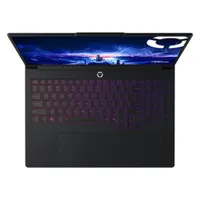
Let's get the obvious things out of the way first. To start with, this isn't the cheapest RTX 5080 gaming laptop you can buy—at $2,399 on Newegg, this MSI Vector undercuts it by quite a bit—and secondly, you're only getting 1 TB of storage, which is pretty miserly for such a high-end rig. But truth be told, that's pretty much it for the downsides; everything else about this Lenovo Legion 7i is superb, and for the $2,600 Best Buy is asking, it's well worth considering.
The star of the whole show has to be the display panel. It's big and beautiful to behold: 16 inches of OLED lusciousness, with a 16:10 aspect ratio, 1600p resolution, and a 240 Hz peak refresh rate. Such a lovely screen really needs a great graphics chip to get the best from it, and that's precisely what you're getting here.
- Join us on WhatsApp for daily deals, direct to your phone.
Nvidia's GeForce RTX 5080 mobile GPU is roughly equivalent to an RTX 5070 Ti desktop graphics card, and given that it's brilliant at 1440p and 4K gaming, you'll have no concerns over gaming performance with this laptop. The MSI Vector might seem to have the edge over the Lenovo in terms of raw frame rate, but the Legion is far more consistent, especially when it comes to minimum performance.
That's helped greatly by the fact that there's 32 GB of dual-channel DDR5-6400 and the processor is an Intel Core Ultra 9 275HX, a full-fat Arrow Lake chip with eight P-cores, 16 E-cores, and a peak boost clock of 5.4 GHz.
Gaming performance
| Product | Value |
|---|---|
| Lenovo Legion 7i Pro Gen10 | 44 Avg FPS, 22 1% Low FPS |
| MSI Vector A18 HX | 45 Avg FPS, 34 1% Low FPS |
| Gigabyte Aorus Master 16 | 39 Avg FPS, 29 1% Low FPS |

Naturally, being such a powerful laptop with a huge OLED screen, it doesn't have the best of battery lifespans—it barely cracks 70 minutes in the PCMark gaming test—and it's not something that you can easily slip into a backpack and carry around with you. Oh, and it's an absolute magnet for fingerprints, though that just gives you the perfect excuse to endlessly clean it and make oochy-coochy noises at your beloved new purchase.
As for the disappointing amount of storage, the good news there is that the Lenovo Legion 7i Pro has a spare M.2 slot inside, so funds permitting, it's very easy to throw another 1 or 2 TB NVMe drive in there, purely to house games.
If you're going to spend a whole heap of cash on a new RTX 5080 gaming laptop, you can do far worse than this one. In fact, it's actually very hard to beat the Lenovo. Certainly on price, but in every other area that matters, the Legion 7i Pro is absolutely top-notch.
👉Check out all of Best Buy's gaming PC deals here👈
1. Best overall:
Razer Blade 16 (2025)
2. Best budget:
Lenovo LOQ 15 Gen 10
3. Best 14-inch:
Razer Blade 14 (2025)
4. Best mid-range:
MSI Vector 16 HX AI
5. Best high-performance:
Lenovo Legion Pro 7i Gen 10
6. Best 18-inch:
Alienware 18 Area-51