

The best gaming PC is not necessarily a $3,000+ powerhouse with an inflated price thanks to the global memory shortage. In fact, although prices are obviously higher than they were a year or two ago, there are still great options for almost any budget.
Our top pick is the iBuyPower RDY Element 9 Pro, thanks not only to its powerful CPU-GPU one-two punch, but also thanks to a surprisingly capacious set of RAM and storage. And if you're on a tighter budget, the ABS Cyclone Aqua also has configurations with a decent amount of RAM alongside a great budget GPU like the RTX 5060 Ti.
In fact, when on sale, many of these prebuilt gaming PCs now actually match or beat on price what you could get if you were to build DIY. Strange times we live in, I know. We have a host of machines we've tested in this guide, and a ton of new systems on the way from various manufacturers to keep it topped up with fresh potential winners.
The quick list

Expect to pay: $2,300

Expect to pay: $1,050

Expect to pay: $3,400

Expect to pay: $5,600 / £7,499

Expect to pay: $1,495 / £1,359

Expect to pay: $3,954 / £3,954 (128 GB ver.)
July 16, 2026: This guide has been completely overhauled with new picks and a new design. At the top of the list is the iBuyPower RDY Element 9 Pro, which offers great high-end bang for your buck, also with a bunch of RAM and storage. Our new budget pick, the ABS Cyclone Aqua, also comes in configurations with 32 GB of RAM, which is fantastic during this global memory shortage. In addition to some other new picks, we've also added a section with the Framework Desktop as the best for local AI, given that's the era we're in now, thanks primarily to a whopping 128 GB of LPDDR5X in a stylish little chassis.
August 11, 2025: We have updated our guide to include the Corsair A7500 as the best high-end PC and the Alienware Area-51 as the best Alienware. Alongside this, we have also gone through the page to check that everything is accurate. We have also updated our benchmarks at the bottom of the page to align with recent PC reviews. There have been some big shakeups for those with a big budget, but our top pick remains the same.
June 17, 2025: Added the Apple Mac Studio M4 Max to the 'Gaming PC reviews' section below. The M4 Max is, of course, technically not a gaming PC, but we found it to do surprisingly well playing the games that actually work with it. Apart from that, the guide remains the same as before, because these are still the best gaming PCs out there right now.

Ever since building my first gaming PC as a teen I've been fascinated by their guts and have turned poking, prodding, and testing systems into a profession. Over the last 20 years or so I've tested hundreds of gaming PCs and have always been more interested in how a manufacturer squeezes the best parts and the best performance out of their budget. But I can't lie, I do love an over-the-top big rig, too.
The best gaming PC


We tested: Ryzen 7 7800X3D | RX 9070 XT | 32 GB DDR5-6000 | 2 TB SSD
Our favorite config:
PC Gamer's got your back Our experienced team dedicates many hours to every review, to really get to the heart of what matters most to you. Find out more about how we evaluate games and hardware.
✅ You want a powerful prebuilt from a trusted manufacturer: This build not only comes with some seriously powerful AMD chops, but also iBuyPower's quality stamp, which we've found to hold up very well in this case.
❌ You want Nvidia: The configuration that we recommend and which we tested has an AMD CPU and GPU. That makes it great value for money, but if you want Nvidia's more widespread and slightly-ahead upscaling and frame gen, for instance, there might be better options elsewhere.
The best gaming PC is the iBuyPower RDY Element 9 Pro. When you add the requisite R07 or R08 on the end it's a bit of a mouthful of a name, but the price-to-quality proposition here is incredibly easy to swallow.
The R07 version, specifically, is the one that our Jacob Ridley tested and our Jacob Fox uses as his daily driver. That said, the R08 is practically identical and, more importantly, isn't discontinued . Even just looking at its specs alone, the Element 9 Pro is a fantastic value proposition, thanks primarily to the specific AMD CPU/GPU combo at its heart.
The Ryzen 7 7800X3D might be a previous-gen chip, but it's still rocking 3D V-Cache, which makes it better for gaming than almost any other non-X3D option . And the RX 9070 XT might not be able to match an Nvidia card's full upscaling and frame gen capabilities, but it's an incredibly performant card. Crucially, opting for these seems to have allowed iBuyPower to keep the price for this PC very reasonable. All with 32 GB of (admittedly high-latency) RAM and 2 TB of storage, which is great to see at this price during a global memory shortage.
The bow on top is its chassis and cooling aesthetics. The gridded bottom looks stylish under the fish tank top, and while the offset intake might prevent temps from being quite as cool as they could be otherwise, that face-on RGB alongside the RAM and AIO RGB sure does look nice. In all, it's a very solid build that's managed to maintain a pretty reasonable price throughout pretty significant market fluctuations.

Click through to read our full iBuyPower RDY Element Pro R07 review for all the performance and benchmark details.
The best budget gaming PC


We tested: Core i7 14700F | RTX 4060 Ti | 32 GB DDR5-6000 | 1 TB SSD
Our favorite config:
✅ You're happy dropping your settings: If you don't mind playing at medium or high settings to keep a high frame rate in some games, the ABS Cyclone Aqua is a great option. And let's face it, games look plenty gorgeous even at lower settings these days.
❌ You need lots of ports: This PC unfortunately doesn't come with a lot of ports, so if you use lots of peripherals and external drives, you might need to get a USB hub.
The best budget gaming PC is the ABS Cyclone Aqua. Not only does it have some great specs for a budget rig, but it also just happens to be one of the PCs we notice is most frequently stocked and on sale. It goes for some of the best prices over at Newegg—which is unsurprising, given that this is the company that actually makes the PCs and owns the ABS brand.
You won't find extra bells and whistles such as liquid cooling or jaw-dropping aesthetics, here. Unfortunately, you also won't find many I/O ports. But what you will find is some very solid gaming performance for a budget price.
Even better, many of the configurations for the Cyclone Aqua come with 32 GB of RAM. A lot of those are DDR4 these days, but some are DDR5. Either way, 32 GB is fantastic in a budget gaming PC during a global memory shortage. That's especially true when many manufacturers are not only dropping down to 16 GB, but even to just a single stick.
The ABS Cyclone Aqua is a simple build, no doubt, but it sacrifices exactly the things you'd want it to sacrifice to keep its price, rather than the important stuff that could seriously compromise your gaming or day-to-day desktop performance. Don't expect to play the latest titles at 4K on ultra—but for more moderate 1080p and 1440p gaming, it's ideal.

Click through to read our full ABS Cyclone Aqua review for all the performance and benchmark details.
The best high-end gaming PC


We tested: Ryzen 7 9800X3D | RTX 5080 | 32 GB DDR5-6000 | 2 TB SSD
Our favorite config:
✅ You want something real powerful: This is a true high-end experience without having to go all the way above that $5k mark, and its clean and ready to go straight out of the box.
❌ You want a professional rig: The 9800X3D chip is undeniably a gaming one, and productivity lags behind similarly priced or even cheaper CPUs. It's still not a bad productivity choice, but you can get better and cheaper.
Corsair's Vengeance A7500 is the best high-end gaming PC because it's much more than just a pretty face. The Corsair 3500X mid-tower case has plenty of glass on the front and side, which actually gives a lovely look at those gorgeous internals. With a couple of light-up fans, lighting in the RAM and liquid cooler, flick the on button, and it beams with light.
The RTX 5080 in the configuration we recommend is, of course, capable of handling any game you throw at it. Plus, it has all of Nvidia's latest and widely adopted frame gen and upscaling tech to boot.
Then, that CPU is a bit of a marvel. The 9800X3D is unquestionably the best gaming CPU right now, and our tests show the A7500 is a good performer too. That does mean it lacks in the productivity side somewhat. It's certainly not a bad rig for productivity work, but you can get better and cheaper if gaming isn't a major focus.
The A7500 is also an easy rig to set up and use. It comes with zero bloatware, so you don't have to worry about programs taking up your resources or screen space (except the ones you choose to download).
It pairs this with an 850 W PSU, 2 TB of SSD storage and 32 GB of DDR5-6000 memory. This is all to say, while it costs a pretty penny, you are getting a very beefy rig in return, and arguably the best value on a high-end rig out there. If you want something powerful, but can't stomach the thought of paying RTX 5090 prices, the A7500 is our recommendation.

Click through to read our full Corsair Vengeance A7500 review for all the performance and benchmark details.
Alienware


We tested: Core Ultra 9 285K | RTX 5090 | 64 GB DDR5-6400 | 2 TB PCIe 5.0 SSD
Our favorite config:
✅ You just want plug and play: Alienware machines will just work out of the box, and with the might of Dell behind it, you can be relatively confident that you'll be looked after if something goes awry.
❌ You want to upgrade easily: Though most of the specs can be upgraded with ease, the ATX12VO power supply means the list of compatible motherboards is rather small. This means swapping out the motherboard will most likely require swapping out the PSU too.
Alienware is one of the biggest names in gaming PCs, with a heritage stretching back to the dawn of time. Well, 1996 anyway. But that hasn't necessarily meant those economies of scale have been passed on to the consumer, as Alienware has always kept itself as a premium-tier brand within the Dell portfolio, and often its parts aren't upgradable.
The Alienware Area-51 was billed as a return to form of sorts, with an upgradable approach, and even that price doesn't feel totally ridiculous when you consider the price of individual parts inside it right now, during the global memory shortage. Surprisingly, we've seen similar prices from competitors for similar rigs, which is a bit of a rarity for Alienware.
Unfortunately, the upgradability is a two steps forward, one step back approach for Alienware. Most of the parts can be swapped easily, but the PSU has a very limited range of compatible motherboards, so changing that will likely require ripping out the PSU, too. We also noticed a rather bizarre fan setup, with all fans pointing inwards, though whether we flipped them or left them, it ran practically frosty for us in gaming tests.
It is a bit disappointing that there's no AMD option here, especially when Team Red make the best gaming CPUs right now. We did notice some quite impressive scores, though. Black Myth Wukong on Very High settings, run on 1440p got an average fps of 91, and a minimum of 64. Cyberpunk 2077, on RT Medium with Quality upscaling and FG on, got all the way up to an average of 256 fps. Needless to say, this rig is a beast
It's worth saying, though: never buy a full-price Alienware. Rigs get regularly discounted, so we still wouldn't recommend this at over $5000, despite it being really rather good. However, with a little bump off the top of that price, this Alienware rig is worth considering, should you have the will (and the cash).

Click through to check out the full Alienware Area 51 review for all the performance and benchmark details.
The best mini PC for gaming


We tested: Ryzen 9 8945HX | RTX 5060 (low profile) | 32 GB DDR5-5200 | 1 TB SSD
Our favorite config:
✅ You're after high performance in a tiny footprint: The combination of a 16-core Ryzen CPU and the RTX 5060 makes this a powerful computational beast as well as a decent, tiny 1080p gaming rig.
❌ You want something that stays cool: This machine will stay cool enough to churn out frames, but if you want something that runs very efficiently and can handle hard productivity tasks without breaking a sweat, such a small PC as this isn't it.
The best mini PC for gaming is the AtomMan G1 Pro. Whether you're wanting to take your desktop with you on your travels or just tuck it away on a crowded desk, or heck, even use it as a living room console replacement, the G1 Pro will serve you well. Plus, it'll look rather dashing while doing so.
Mini PCs have become surprisingly powerful for their stature, and that's certainly the case with this one. Despite its diminutive chassis holding just 3.8 L of internal capacity, it manages to crank out decent performance, thanks in large part to the efficiency of the RTX 5060 in the configuration we tested and recommend.
You shouldn't expect to max out new AAA games at 1440p and dizzying frame rates, but for some mainstream 1080p and 1440p gaming on medium or high settings, you're well set.
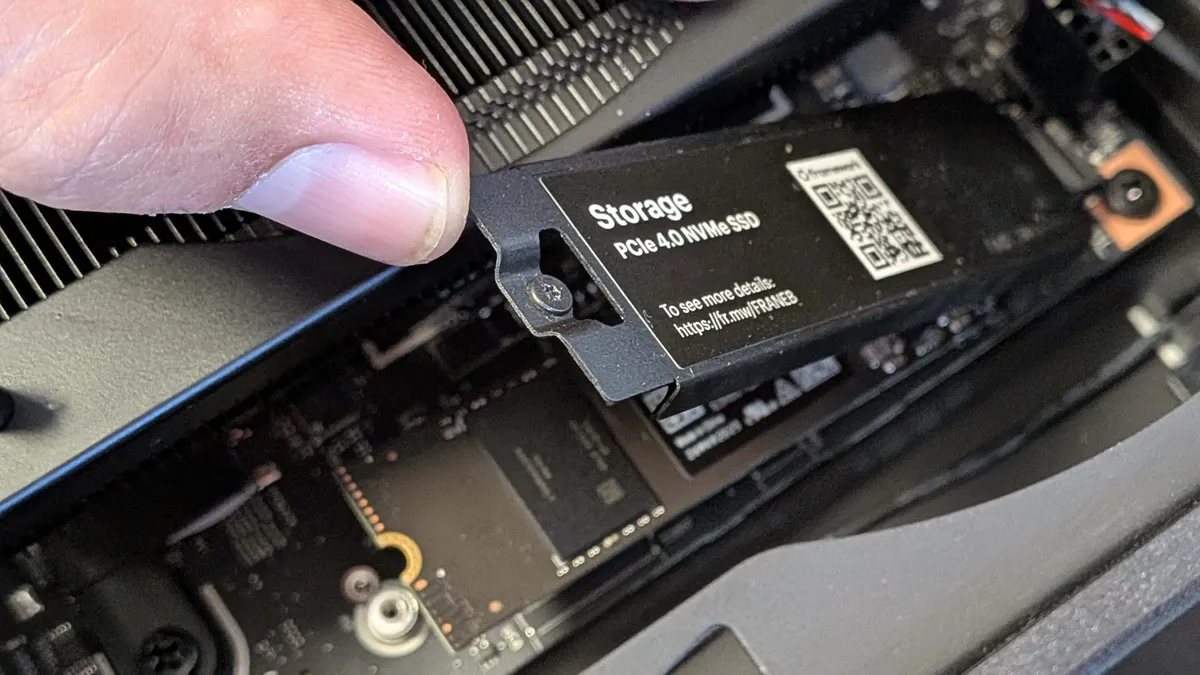
The G1 Pro also comes with plenty of RAM and even an extra M.2 slot for storage expansion, which is kind of fantastic for such a small PC. You will have to pay the usual mini PC tax, meaning it's more expensive than similar spec, standard-sized counterparts, but if you're looking for a small build, it's well worth it.
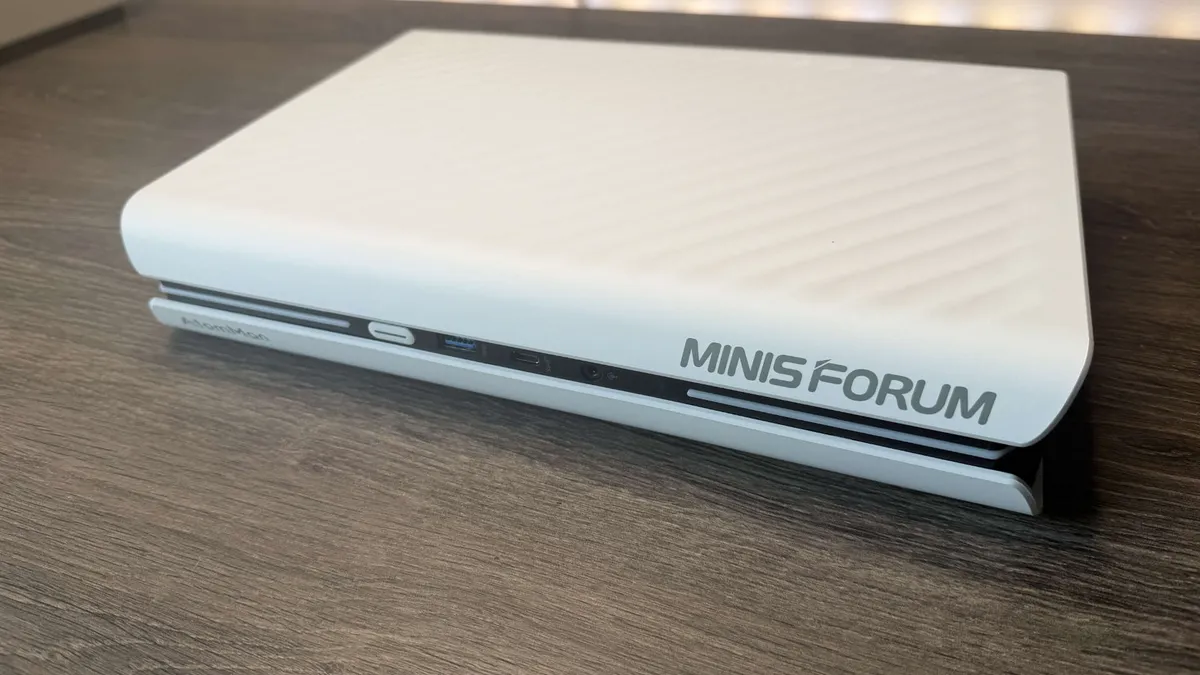
Click through to our full Minisforum AtomMan G1 Pro review to see all the performance and benchmark details.
The best PC for local AI




We tested: Ryzen AI Max+ 395 | 128 GB LPDDR5x | 2 TB SSD
Our favorite config:
✅ You're after high performance in a tiny footprint: The combination of a 16-core Ryzen CPU and the RTX 5060 makes this a powerful computational beast as well as a decent, tiny 1080p gaming rig.
❌ You want something that stays cool: This machine will stay cool enough to churn out frames, but if you want something that runs very efficiently and can handle hard productivity tasks without breaking a sweat, such a small PC as this isn't it.
The best PC for running local AI is the Framework Desktop. Its charmingly diminutive and moddable chassis isn't all about looks, as inside, the Framework Desktop is rockin' some quality components too.
The cheapest version is great if you want a Linux-compatible PC for everyday use, but things become really spicy when you bump its memory up to max in the most expensive configuration, as the Framework Desktop then becomes a real local AI powerhouse. With that, you're getting the top AMD Strix Halo chip and a whopping 128 GB of LPDDR5x RAM. Obviously this makes the machine far from cheap, but for 2026's global memory shortage prices, it isn't outrageous.
Opting for the top config also bags you a Ryzen AI Max+ 395, and its Radeon 8060S iGPU hosts 40 compute units (CUs), which in turn offers RTX 4060-level performance. Of course, you could get a much more powerful PC for gaming at this price tag if that's your main focus. Otherwise, here you'll still be able to manage some moderate 1080p and even 1440p gaming with your settings lowered slightly.
The reason you'd do this is to get all that memory handy for some local AI use. Our Dave tested this PC out and found it to work a charm: "I spent the day thrashing at an Alibaba model with 235B parameters and that almost entirely filled the 128 GB of system memory—I had maybe 4 GB free at any point—and it was thoroughly usable."
The icing on the cake is that gorgeous little chassis. You can customise the tiles however you want on the front, and can even add on a carry handle for a few extra dollars. See, even the AI boffins can add a little flair to their PC setup.

Click through to our full Minisforum Framework Desktop review to see all the performance and benchmark details.
How we test gaming PCs

We spend a lot of time testing gaming PCs to ensure that we know what sort of experience you would get should you spend your hard-earned cash on one. Experience is an important factor—you want to know when pulling your new rig from its box that it's going to work as soon as you plug it in, and let you get up and gaming as soon as possible.
But the general feel of using a PC is merely one part of it. It's also important to get the relative performance numbers to be able to see how a given machine performs in games compared with other systems. We run a selection of benchmarks to gauge CPU performance, storage performance, and, of course, gaming performance.
We have a new gaming PC benchmarking gauntlet, which we're putting every new system we get through. We test native gaming performance as well as upscaled, and with frame interpolation, too.
The games we test are:
- Avatar: Frontier of Pandora
- Cyberpunk 2077
- Baldur's Gate 3
- Black Myth: Wukong
- Metro Exodus Enhanced Edition
We use Frameview to capture both the average and 1% Low frame rates, to help us highlight how smooth the experience might be, or how janky in some cases. We also use it to capture temperatures on both the CPU and GPU in gaming scenarios.
In terms of the wider system performance, we use 3DMark Time Spy Extreme and Storage benchmarks to check CPU, GPU, and SSD performance with the industry-standard UL benchmarking suite. We also use Cinebench 2024 and Blender 4.2.0 to test CPU rendering performance and Handbrake to test video encoding. We also test file handling with the built-in 7-Zip benchmark.
We get inside the machine to see how well built it is, and how well the builder has tidied up the mass of cabling that always lurks inside a gaming PC. It's also important to know how much of an upgrade path a system might have, whether there is space inside for extra storage, or more memory, etc.
Value is also a key concern for us. A gaming PC represents a large outlay, and no matter whether it's a $900 or a $5,000 machine, it still needs to be able to justify its cost by the quality of the build and the components inside it.
Check out how we test all PC gaming hardware.
Selection criteria
Our selection criteria for picking the best gaming PC come down to the brands we've used and have had good experience with, and the ones that we know consistently put together good-value, well-specced machines.
It's not possible to review every single gaming PC on sale, but we have tested PCs from all the major manufacturers and have experienced the shipping processes they use.
But the biggest thing is always going to be the mix of core configuration and the overall price. If there's a machine with a great GPU and CPU combination but is priced well beyond the competition, then it's not going to get the nod from us. Equally, if a PC maker consistently pairs its gaming PCs with single-channel memory (*cough* Alienware* cough*) or reliably sticks 512 GB SSDs in with $1,500 systems, they're not going to get a recommendation from us, either.
How to choose a gaming PC

As a PC gamer, your primary point of reference for picking your new gaming PC should be around what graphics card it has inside it. That is the key component when it comes to getting the highest frame rates for your games and is the first decision you must make... once you know what budget you have to work with.
Check out our list of the best graphics cards for a rundown of the current state of the GPU market, but we've also got our graphics card hierarchy list below, where you can see in a quick snapshot how they perform against each other.
Once you've got your GPU picked, then it's about finding the best-value gaming PC sporting that graphics card. And, as I said before, you want to make sure you get a balanced PC for all that you might want to focus on the GPU at its heart. You need to have a processor that can keep your graphics card fed with data, and memory enough that your system doesn't collapse under a weight of Chrome tabs.
The minimum we would recommend on the memory front today would be 16 GB, but we would also suggest making sure that comes in two separate sticks (often denoted for a 16 GB kit as 2x8 GB). That ensures you get the highest memory bandwidth possible from so-called dual-channel memory. With a single stick of memory, you will only get half that bandwidth.
While you do need to have a processor, or CPU, that's able to keep your GPU running at optimal pace, that doesn't mean you need to have a million cores to do it. Unless you're engaging in a lot of video editing or 3D graphics work, a CPU with six or eight cores will absolutely be enough for a gaming PC. Don't be desperate to bag a 16-core chip if all you're going to be doing is playing games. We've picked the best CPUs for gaming from the current chips available, so it's worth checking out any build you're interested in against that list.
Finally, storage. This is an area where a lot of system integrators cheap out on, and with games taking up an inordinate amount of capacity today, it's worth making sure you're set from the off. The minimum today—unless it's a super bargain rig—should be a 1 TB SSD. It's the easiest upgrade, but one you don't want to have to be doing as soon as you set up Steam on a new machine.
GPU hierarchy: How do the GPUs stack up?
The most important component for any gaming PC build will always be the graphics card. That will give you the best idea about how one machine matches up with another just in terms of raw gaming performance.
Below, we've listed the slew of GPUs we've had over the past couple of years in terms of their Time Spy Extreme index score as a way to put them in some consistent hierarchy.
This doesn't cover the performance difference between graphics cards in every instance, as differences in how they handle ray tracing and other graphical effects can play a part. But this is a handy one-shot method of getting a rough idea of how the various cards from these various generations of GPUs stack up against each other.
Rank |
Graphics card |
3DMark Time Spy Extreme score |
Header Cell - Column 3 |
|---|---|---|---|
1 |
Nvidia RTX 5090 |
25206 |
Row 0 - Cell 3 |
2 |
Nvidia RTX 4090 |
19453 |
Row 1 - Cell 3 |
3 |
Nvidia RTX 5080 |
16252 |
Row 2 - Cell 3 |
4 |
AMD RX 9070 XT |
14315 |
Row 3 - Cell 3 |
5 |
Nvidia RTX 4080 Super |
14219 |
Row 4 - Cell 3 |
6 |
Nvidia RTX 4080 |
14067 |
Row 5 - Cell 3 |
7 |
Nvidia RTX 5070 Ti |
13534 |
Row 6 - Cell 3 |
8 |
AMD RX 7900 XTX |
12751 |
Row 7 - Cell 3 |
9 |
AMD RX 9070 |
12647 |
Row 8 - Cell 3 |
10 |
AMD RX 7900 XT |
12686 |
Row 9 - Cell 3 |
11 |
Nvidia RTX 4070 Ti Super |
11887 |
Row 10 - Cell 3 |
12 |
Nvidia RTX 3090 Ti |
11249 |
Row 11 - Cell 3 |
13 |
Nvidia RTX 4070 Ti |
10973 |
Row 12 - Cell 3 |
14 |
Nvidia RTX 5070 |
10670 |
Row 13 - Cell 3 |
15 |
Nvidia RTX 3090 |
10217 |
Row 14 - Cell 3 |
16 |
AMD RX 6950 XT |
10199 |
Row 15 - Cell 3 |
17 |
Nvidia RTX 3080 Ti |
9946 |
Row 16 - Cell 3 |
18 |
Nvidia RTX 4070 Super |
9890 |
Row 17 - Cell 3 |
19 |
AMD RX 6900 XT |
9003 |
Row 18 - Cell 3 |
20 |
AMD RX 7800 XT |
8953 |
Row 19 - Cell 3 |
21 |
Nvidia RTX 3080 10GB |
8692 |
Row 20 - Cell 3 |
22 |
Nvidia RTX 4070 |
8573 |
Row 21 - Cell 3 |
23 |
AMD RX 6800 XT |
8454 |
Row 22 - Cell 3 |
24 |
AMD RX 9060 XT |
7664 |
Row 23 - Cell 3 |
25 |
AMD RX 7700 XT |
7653 |
Row 24 - Cell 3 |
26 |
Nvidia RTX 3070 Ti |
7281 |
Row 25 - Cell 3 |
27 |
Nvidia RTX 5060 Ti |
7261 |
Row 26 - Cell 3 |
28 |
AMD RX 9060 XT 16 GB |
7229 |
Row 27 - Cell 3 |
29 |
AMD RX 6800 |
7095 |
Row 28 - Cell 3 |
30 |
AMD RX 9060 XT 8 GB |
6944 |
Row 29 - Cell 3 |
31 |
Intel Arc B580 |
6849 |
Row 30 - Cell 3 |
32 |
Nvidia RTX 3070 |
6803 |
Row 31 - Cell 3 |
33 |
Nvidia RTX 2080 Ti |
6422 |
Row 32 - Cell 3 |
34 |
Nvidia RTX 5060 |
6379 |
Row 33 - Cell 3 |
35 |
AMD RX 6750 XT |
6341 |
Row 34 - Cell 3 |
36 |
Nvidia RTX 4060 Ti |
6296 |
Row 35 - Cell 3 |
37 |
AMD RX 6700 XT |
5879 |
Row 36 - Cell 3 |
38 |
Nvidia RTX 3060 Ti |
5841 |
Row 37 - Cell 3 |
39 |
Intel Arc B570 |
5790 |
Row 38 - Cell 3 |
40 |
Nvidia RTX 2080 Super |
5360 |
Row 39 - Cell 3 |
41 |
AMD RX 6700 |
5146 |
Row 40 - Cell 3 |
42 |
AMD RX 7600 |
4993 |
Row 41 - Cell 3 |
43 |
Nvidia RTX 5050 |
4949 |
Row 42 - Cell 3 |
44 |
Nvidia RTX 4060 |
4930 |
Row 43 - Cell 3 |
45 |
AMD RX 6650 XT |
4743 |
Row 44 - Cell 3 |
46 |
AMD RX 6600 XT |
4310 |
Row 45 - Cell 3 |
47 |
AMD RX 5700 XT |
4217 |
Row 46 - Cell 3 |
48 |
Nvidia RTX 3060 |
3961 |
Row 47 - Cell 3 |
49 |
AMD RX 6600 |
3719 |
Row 48 - Cell 3 |
50 |
Nvidia RTX 2060 |
3346 |
Row 49 - Cell 3 |
51 |
Nvidia GTX 1660 Ti |
2887 |
Row 50 - Cell 3 |
52 |
Nvidia GTX 1660 Super |
2812 |
Row 51 - Cell 3 |
53 |
Nvidia RTX 3050 |
2743 |
Row 52 - Cell 3 |
54 |
Nvidia GTX 1660 |
2466 |
Row 53 - Cell 3 |
55 |
AMD RX 6500 XT |
2287 |
Row 54 - Cell 3 |
56 |
AMD RX 5500 XT |
2267 |
Row 55 - Cell 3 |
57 |
Nvidia GTX 1650 Super |
2071 |
Row 56 - Cell 3 |
58 |
Nvidia GTX 1650 |
1594 |
Row 57 - Cell 3 |
Gaming PC FAQ
Why buy a prebuilt gaming PC?
One of the most significant advantages of building your PC is the ability to hand-pick every single component in the system. This enables you to take your time shopping around for deals and finding the best combination of parts to fit your budget and performance needs. The downside for most inexperienced builders is that this process can take some time and cause quite a headache if something goes wrong. You only get warranties on the individual components, not your finished build, and this is where the best prebuilt gaming PCs shine.
What do you get for your money in a prebuilt PC?
When you pay the premium to configure or purchase a prebuilt PC, you pay for more than just the parts. You pay for warranty service, support, and peace of mind that professionals put your system together. These are some of the things we value highly when considering what the best gaming PC is. We also look at other selling points, like design, upgradability, and anything you wouldn't be able to do when building it yourself. There's also the fact that right now prebuilts are actually often going for just as cheap as (if not cheaper than) it would cost to build the parts yourself, with the market being as it is.
What sets a prebuilt machine apart from a DIY build?
One of the most significant factors that makes PCs stand apart from the competition is the design. Prebuilt systems like the Alienware Area-51, for instance, use unique in-house chassis designs that you wouldn't be able to purchase when building it yourself. You can take some comfort in knowing that these systems were designed and built specially to house your configuration, though that can make upgrading more awkward later on down the line.
When we set out to choose our top choices of prebuilt gaming PCs, we look at almost every major manufacturer and system integrator to find the best combination of value, reliability, customer feedback, design, and performance for various budgets and needs.