
 Join The Club





The best PC cases are easy to use, offer excellent airflow, and look great. We spend hour after hour testing as many as we can get our hands on, before the best ones end up right here. Building PCs over and over again in cases great and small is a gauntlet, but it sorts the best from the rest.
The best PC case right now is the Corsair Air 5400. It's an outstanding upgrade of a much-loved chassis, and delivers some of the best-looking gaming rigs you will ever build. Though it is on the pricey side, it's a great package. The best budget PC case is also from the same stable, the Corsair 3200D delivers an impressively affordable chassis where the bundled fans easily account for half of its price-tag, but at no point does it feel like a cheap PC case.
The quick list

Expect to pay:
LX-R RGB: $310/£285 / RS-R ARGB: $230/£240

Expect to pay:
$70 / £70 (RS120) / $80 / £80 (120 ARGB)

Expect to pay:
$120 / £90

Expect to pay:
$89 / £62

Expect to pay:
$200 / £170

Expect to pay:
$50 / £52

Expect to pay:
$100 / £70

Expect to pay:
$230 / £170
May 15, 2026: I've updated the page to include a suite of new recommendations, including a new overall top pick, in the Corsair Air 5400, a new budget pick, in the Corsair 3200D, and a new mid-range option, in the Thermaltake View 380.
October 23, 2025: We've switched some of our recommendations due to price changes.
October 16, 2025: We've added the Havn BF 360 as the best PC case for airflow after its stellar run through our testing.

Jacob builds a gaming PC most months. That might sound like a nightmare for some but, for our Jacob, it's a joy. At least when said PCs boot first time. In all of those builds, he's cataloging what makes a PC case one of the best, and what's a nuisance to avoid, and he uses that knowledge to build this guide of the greats.
The best PC case


✅ You loved the Air 540: Much like its forebear, the Air 5400 is a sturdy cube with heaps of cooling potential.
❌ You want bigger fans: Due to its unusual ducts, the Air 5400 is limited to 120 mm fans throughout.
The old Corsair Carbide Air 540 was a classic of its time. Multiple people on the PC Gamer hardware team encased their beloved gaming PCs in one of those pleasingly chunky cubes. But it wasn't just about making a squat chassis, it was one of the pioneers of a dual-chamber design that has become almost standard for modern PC cases. The Corsair Air 5400 is more than just an update of that original design, however, and has become our recommendation as the best PC case you can buy today.
How do you improve on a dual-chamber design? That's right, make it triple chamber. But this isn't number marketing here, the separation ends up with the main chamber housing the 'show off' components, the secondary chamber at the rear for your PSU and ample space for cable management, and the new third chamber dedicated to your water-cooling radiator. This stops the radiator inhibiting airflow around the main components, and avoids the toastier parts heating up the radiator itself. Okay, it does make the actual cooler installation a little more involved than other designs, but aside from that the Air 5400 is a pretty tool-free design all told.
That's true for the insides as well as the side panels, which are some of the most pleasing you will find on any PC chassis. Not only is the windowed side panel hinged to easily swing open, but so are the front and rear panels, giving you almost unfettered access to the main chamber and the messy place of buried cables.
It's remarkably easy to build a great-looking gaming PC in the Corsair Air 5400, though you might well want to add to the three included fans (of either 120mm iCUE Link or ARGB persuasion) to make the most of the chassis' potential airflow. You might need a forklift to get the final build onto your desk, however, as this damn thing is a weighty beast, especially when filled with parts. The front panel selection is surprisingly weak, and it is a rather pricey thing, too, but there are so many other positives to this squat, spacious case that it's an easy recommendation.

Read our full Corsair Air 5400 review.
The best budget PC case


✅ You don't want to spend much on a PC case: the Corsair 3200D is great for the money. Looks good, feels good, easy to build into.
❌ You're sensitive to noise or going to put the case next to you on a desk: The fans are loud. Budget fans do tend to be like that, but Corsair's definitely hit a screech that's more noticeable than some.
It doesn't look cheap, it doesn't feel cheap, but the Corsair 3200D is our pick as the best budget PC case because it absolutely is for what you're getting in the package. Sure, there are much cheaper cases you can buy, but none with the build quality you're getting with this Corsair case, nor ones that come with three solid 120 mm fans. Those would cost more than half the price of the 3200D alone if you bought them separately. So, if you want an affordable case that still makes your gaming PC look great, and keeps your parts cool and safe, this is it.
Because that's the potential risk you're taking with very cheap cases; a lack of airflow and therefore cooling, can both put your components under unnecessary stress and make your rig unbearably noisy, too. Though it is worth noting the bundled RS120 fans do get pretty loud themselves when pushed above the 60 - 70% mark, so some replacement fans might be on your upgrade list down the line.
As well as the included fans, you're also getting three dust filters, one at the front, one up top, and one protecting your PSU. These are magnetic options, so easy to remove and clean, but they can slide about a bit.
Because it's a budget case, there are inevitable cost-cutting measures, and the bundling of Corsair's cheaper, noisier fans is one. The paucity of velcro straps for cable management are another. But these are minor concerns when we're talking about a PC case that feels like a lot of chassis for the money.

Read our full Corsair 3200D review.
The best midrange PC case


✅ You care about aesthetics: The View 380 WS looks like it costs a million dollars. Or at least, like, $130–150.
✅ You want a cuboid case: I think cuboid cases are some of the best designs out there, and if you're in the same camp, this is one of the cheaper options with everything you need included in the box.
❌ You want to be cool: You can find affordable cases with more direct airflow, such as the Phanteks Eclipse G400A or Corsair 3200D.
Multi-chamber. Lots of bundled ARGB fans. A touch of wood. The View 380 looks like a chassis that costs a whole lot more than it really does, which is why the Thermaltake View 380 is now our choice as the best mid-range PC case you can buy. It is feature-rich, but you don't need to be rich to clothe your components in it.
With support for mobos from mini-ITX up to standard ATX formats, it's a versatile, but perhaps surprisingly compact case. But though smaller chassis can make for a cramped building experience, the dual-chamber design actually makes that a straightforward process. The side and front panels come away completely, giving you greater access to the innards, and that design means you can jam the messy PSU and its requisite cabling into the dark recesses of the second chamber.
While you're getting lots of fans into the bargain (reversible ones, no less, allowing you get that sweet full lighting effect from the three fans pulling in air from the back of the case, without the frame getting in the way) there are inevitable signs of cost-cutting. The metal plates that cover the motherboard expansion slots your graphics card ports stick out of are one and done, meaning you have to pry them out and snap them off. You're also not getting any dust filters, either, something the cheaper Corsair 3200D does offer.
But that doesn't stop the Thermaltake View 380 from feeling like really great value for money. It's super-easy to build a good-looking case with minimal effort, and more importantly, for minimal outlay.

Read our full Thermaltake View 380 review.
The best budget compact PC case


✅ You want a budget white build: This case is very reasonable priced and looks great. It also has plenty of room for a compact build.
❌ You plan on upgrading the whole thing: The expansion slots can't be replaced, and the cable management is a tad awkward, so replacing all of the internals is a chore that may leave the back of your rig looking a little ugly.
Perhaps the single most noticeable thing about the Thermaltake S100 TG is its price. It's a pleasant surprise, and thanks to this version's all-white color and those spacious insides in combination with the small outlay, it's our pick for the best budget compact PC case.
Described by Thermaltake as a 'micro case', the S100 TG will only fit Micro-ATX motherboards or smaller. This does limit your rig somewhat, but plenty of the best motherboards will fit just fine. Mini-ATX motherboards fit into this case, but given that you don't really see the benefits of it in a chassis of this size, we'd recommend a good Micro-ATX pick instead.
The shroud for the PSU in this one is rather large, and the 330 mm clearance for a GPU means something like a Gigabyte GeForce RTX 5070 Ti Eagle OC Ice SFF fits with no problem, but we couldn't quite squeeze in the XFX Switch RX 9070 XT. We did notice when putting in the GPU that the expansion slots on the case have to be pried apart.
This isn't a problem should you use the slots you pry off indefinitely, but if you swap from a three-slot card to one that needs two slots, you're left with an ugly hole in the back of the rig.
We also noted in our review that the one included fan (rated at 1000 rpm) won't be good enough for most gaming rigs. You will want to pick up a few more, but even then, this is still a very cheap case. It's surprisingly capacious, which we proved when we installed a Cooler Master Hyper 612 Apex, which we called a 'massive cooler'. This case has support for up to three 120 mm fans on the front, up to two 120 mm fans on the top and one 120 mm fan on the rear.
The fact that expansion slots can't be replaced, plus a slightly awkward lack of cable management options, makes this a difficult case to fully upgrade a rig in. Despite this, it looks clean and is arguably the cheapest way to start a pretty all-white rig right now.

Read our full Thermaltake S100 TG Snow Edition review.
The best Mini-ITX PC case


✅ You want a truly tiny PC: This is about as small as a PC can get with any reasonable amount of room leftover for a discrete graphics card.
❌ You want space to expand: You won't find much spare room inside this case for future expansions, nor on a Mini-ITX motherboard.
The best Mini-ITX PC case is the Fractal Design Terra. You can use every inch of this chassis for a powerful small form factor PC case—be that a multithreaded monster or a frame-flinging machine.
The Terra is one of my favourite PC cases of all time. I built a tiny PC inside one recently and nearly shed a tear when I had to rip it back down a few weeks later. Goodbye, sweet prince. The case obviously looks fantastic once fully assembled—that's a panel made of real wood on the front there—though its beauty is more than just skin-deep.
To access the inside of the Terra, you need only give either of the full-length panels running either side a light pull. Each one swings upwards, though for truly unimpeded access, you can remove them altogether with the simple clip on the inside of each panel. It's a solid system, as the panels sit flush against the case and look grea,t but don't get in the way during the build process, or when you want to take a look under the hood just for fun.
The motherboard tray is the key structural element within the Terra, as its position decides what you can install inside it. The tray can be shifted a few centimetres one way or the other, offering either more room for your CPU cooler or for your GPU. The CPU side can be set to either 48 – 77 mm, while the GPU can be 43 – 72 mm. Generally, it's a good idea to keep your GPU as small as possible to give yourself more leeway on the CPU side—a Noctua NH-L12S is 70 mm in height, which is close to the maximum size offered by the Terra on the CPU side.
With limited space for a CPU cooler, you have to choose a CPU with a reasonable TDP, ie not a 14900K. You probably knew that already. I used a Ryzen 7 9700X inside my build, and this sort of 65 W chip or thereabouts is a good pick overall.
There's room for an SFX or SFX-L PSU inside the Terra. I'd recommend picking up a modular unit to keep the cables to a minimum and only use the ones you need. That's because the PSU hangs above the only slot for a case fan, a single 120 mm. You don't need the fan, though it's nice to have to keep temperatures at bay beyond the one on the CPU cooler. With one installed, it's a bit of a tight fit. If you had a much shorter GPU than most, you can also fit a radiator in here on the GPU side, though it's not a very practical solution with most of today's larger-than-life cards.
For such a small case, it does get the heat out surprisingly well. This will depend on your choice of card and cooler, though the entirely vented side panels and two-chamber design keep the hottest components away from one another.
The Terra is one of the smaller Mini-ITX cases on the market (with room for a discrete graphics card, anyway) and yet is one of the more convenient to build in. Even compared to other great cases like the Fractal Design Era 2, we came away feeling the Terra is still on top.

Read our full Fractal Design Terra review.
The best Micro-ATX PC case


✅ You want a small case that's easy to work in: This is a relatively compact case but it still has much of the ease of building that you'd enjoy with a standard sized chassis.
❌ You want easy cable management: To keep costs low, NZXT has done away with some nice-to-have's like a lot of cable channels.
The best Micro-ATX PC case is the NZXT H3 Flow. Micro-ATX might seem to be a niche form factor, after all, if you want a small rig, why not go for a Mini-ITX like the Fractal Design Terra? The answer is that Mini-ITX cases can often be too small, both for easy building and for low temps.
If you want something pretty compact but that still maintains many of the benefits of regular-sized PC cases, the H3 Flow has tons to offer for an incredibly reasonable price. Sure, for that low price, you sacrifice some nice-to-haves, such as a plethora of cable channels and easy-install mechanisms for fans. But if you're happy spending a little more time and effort during the building process, the value on offer here is fantastic.
This is essentially a redesign of the old H210 line, but it truly is a redesign rather than a simple update. It can hold pretty much any graphics card you want to throw at it, any that are up to 377 mm in length, which includes the RTX 5090. And most importantly, you get some decent airflow, meaning you won't have to deal with the thermal throttling that some SFF cases will leave you with.
There's been a big focus on temperature and air flow with the H3 Flow: perforated front panel, a ventilated PSU bay, and support for cooling up top. You don't get a lot included on the fan front—just one rear 120 mm fan, to be precise—but again, the price tag is kept low here. Also don't go looking to fit a 360 mm radiator up top, as it won't fit.
Ultimately, the H3 Flow straddles a tripartite boundary between pricing, size, and function. Don't get one and expect it to cram in absolutely every ease-of-build and air flow function on the market, but equally, for the money you're getting quite a lot, and it's a nice middle ground between standard cases and truly SFF ones. That's what makes it the best Micro-ATX PC case right now.

Read our full NZXT H3 Flow review.
The best full-tower PC case
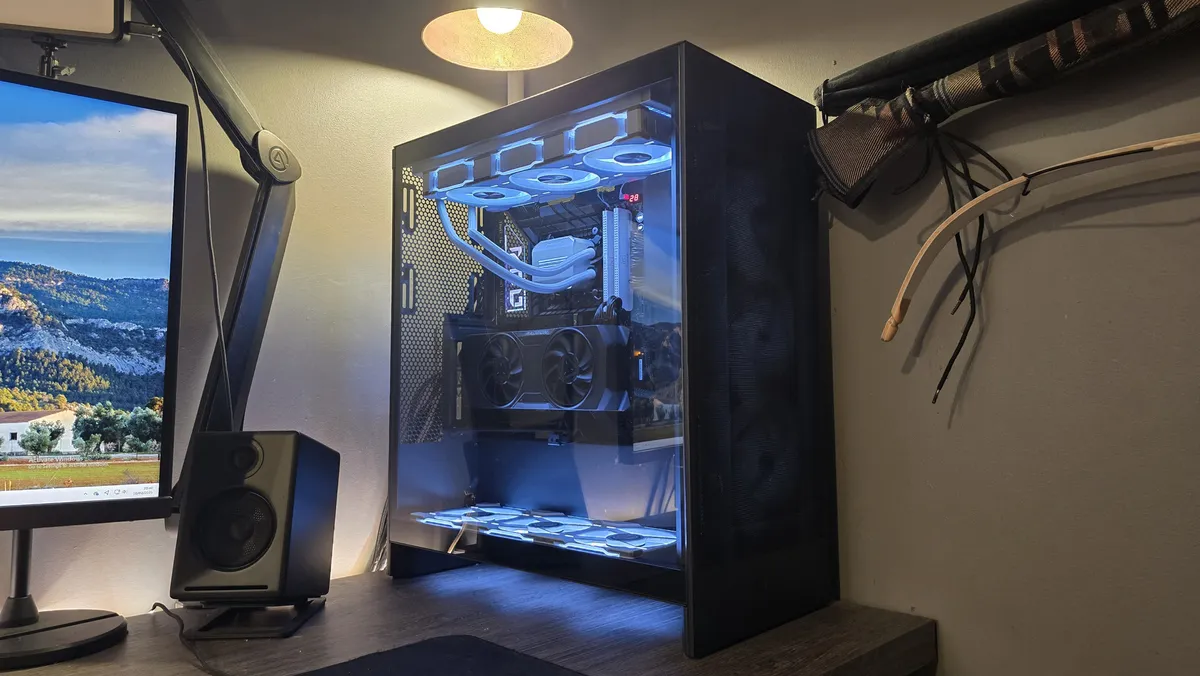


✅ You're after expansive cooling support: With support for ten fans and up to a 420mm radiator, the H7 Flow has got some serious legs in the cooling department.
❌ You want something flashy: NZXT's design language is clean and simple—maybe too simple. If you're looking for something with a little more extravagance, you might want to look elsewhere.
Full tower PC cases are always massive in size, space, and price tag. Well, that's how it always used to be but these days, what makes a PC case 'full tower' varies from manufacturer to manufacturer. Take this NZXT H7 Flow (2024 edition), for example—the maker classes it as a mid-tower but for us, it's the best full tower PC case you can buy right now.
That's because NZXT has done some kind of magic to make the exterior mid-tower in size but offer the space and versatility inside worthy of it being 'full' in nature. Can you have a pseudo-full tower? Who cares when it's this good?
NZXT has given its traditional H7 Flow design a thorough overhaul and oh boy, have they done a good job. Not only is there space for three cooling radiators (up to 420, 360, and 140 mm on the front, top, and rear respectively), but you can also add a further three 120 mm fans on the bottom—perfect for keeping your power-hungry graphics card fed with cool, clean air.
It's very easy to work with, too, as all the panels are tool-less. That means you can pop the sides, top, and front off to change things around in the blink of an eye. Cable management has been NZXT's forte for many years, and that's still the case now, with Velcro straps everywhere around the back to keep things neat and tidy.
Some things are a little annoying, though, such as having to use NZXT's dedicated bracket if you want to install your GPU vertically, and it does a relatively poor job of stopping heavier cards from sagging. And there are no removable brackets for cooling radiators, so having to juggle the case, a big lump of aluminium, screws and screwdrivers is quite fiddly.
And the H7 Flow isn't going to win any awards for looks, as it's as plain as they come by the standards of today's glass-and-RGB-everywhere designs.
But full tower PC cases are all about space and ease of access, and this is something the H7 Flow does extremely well. Sure, there are much bigger cases than this one, but if you're looking to have something that won't destroy your bank balance and desk, then the NZXT H7 Flow should be at the top of your full tower case list.

Read our full NZXT H7 Flow (2024 edition) review.
The best PC case for airflow


✅ You want heaps of airflow: With three fans included in the Flow version (2x 180 mm, 1x 140 mm) you won't be caught short. These fans perform well and the case's scoop also helps get that air flowing onto your critical components.
❌ You want a compact case: The Havn BF 360 is pretty huge. You can get a good idea by looking at the PSU cut-out on the back. Look at all the space either side of it!
With huge fans, a big scoop, and lots of room for chunky coolers, the Havn BF 360 is our top pick for maximising airflow through your PC.
Let's start with those huge fans. There are two versions of the BF 360: one with fans (BF 360 Flow) and one without (BF 360). In the front of the Flow, two 180 mm fans of Havn's own design. The bigger the fan, the higher the airflow—or at least that's the general idea for PCs—and they needn't spin quite as fast for great results. In the rear of the Flow, one H14 fan. That's also a 140 mm, which has these same big fan benefits to a smaller degree.
The non-Flow version is worth a look if you already have your own fans or plans of eye-melting RGB lighting. Though the H-series of fans are pretty good. I ran the H12 (the 120 mm version) through our fan test and it performed really great, hitting an impressive amount of airflow as rated on my anemometer through the rpm range.
Onto the big scoop, which I'm told by Havn has been shaped to peak scoop shape. I'll have to take its word for that. The scoop is well-placed to hit your graphics card once installed—more direct airflow over your motherboard than some popular fishtank-style cases at the very least.
The BF 360's unique front grille offers something for both airflow and aesthetics. The BF 360 is available in both black and white, and the front grille is made to match each option, in either a light stoney grey or a darker granite look. In a rare show of class, I prefer the understated black version to the white, though they're both good-looking.
As with the Havn HS 420, our top pick for PC cases, the BF 360 does a superb job with cable management options. There are deep channels and lots of points to tiedown cables with the included velcro straps, including some down the rear for the pesky CPU power cable. On the right, HDD cages that double as 2.5-inch SSD bays. You can fit lots and lots of SSDs here, if you're still into that sorta thing.
So, good-looking, great airflow and easy to build into—that's why the Havn BF 360 gets our pick for the best airflow. We still prefer its bigger sibling, the HS 420, on pure looks alone, but if you don't care for the fishtank style, the BF 360 is all you need and more.

Read our full Havn BF 360 review.
Best PC case FAQ
What size case do I need?
The main thing to consider when choosing a PC case is the size motherboard you intend to use in the build. This is perhaps the most important thing, as some cases only fit certain sized motherboards.
In size order, from largest to smallest, the motherboard standards are: E-ATX / ATX / M-ATX / Mini-ITX.
Providing you get a case that supports the same standard as your motherboard, you're good. And note that most cases that support up to E-ATX size will fit all the others, too. They have the same general screw layouts.
Then, you want to be sure that your cooling solution will fit, which means checking for either plenty of clearance above the CPU for an air cooler (most fit inside most standard-sized cases) or whether there's room for a liquid cooling radiator. Most cases will have somewhere to install a radiator; just make sure your tubes are able to run the length between the motherboard and the mounting point. Again, most cases are designed for this, so it's not usually an issue.
A couple of other things to keep an eye on are GPU length and PSU requirements. With larger and larger GPUs becoming more of a thing these days, you have to be a little more careful in choosing a case to accommodate them. If you are planning a front-mounted fan or radiator, that might gobble up some room from the GPU, too.
Then, PSU requirements. These are pretty simple, as almost any reasonably sized case can fit any sensibly sized PSU. Small form factor cases often require SFX or SFX-L PSUs, however, and there are some massive PSUs that might extend too far for smaller cases. Just make sure to check the lengths.
What's the difference between a mid-tower and full-tower case?
No one knows. It's lost knowledge now. Some say the Aztecs buried the secret deep in the Earth, but who can say for sure?
Seriously, though, it's not really all that scientific. Manufacturers just slap 'full-tower' on any goliath PC case they make and call it a day. If it's a bit smaller, it's a mid-tower.
Though, in reality, the blurred lines have led to some weird calls. For example, the Thermaltake CTE C750 Air is hardly a towering chassis. It has a lot of room, but it's not like the full-towers of yore with room for 20 HDDs on top of one another. Maybe this is emblematic of the downfall of society—our full-tower PC cases aren't as big as they used to be. Probably not.
Moral of the story: mid-tower and full-tower are merely suggestions of size, which can help narrow down your search. It's more important to check the actual dimensions, though.
How do we test PC cases?
We build into them. Simple as that. We get our hands dirty, so to speak.
This means we're always able to offer you our opinion from first-hand experience, and that's important for a PC case. The best ones are a dream to build into, the worst ones leave you with cuts on your fingers. We test them all here, from building to benchmarking, and we only put the best ones in this guide.


