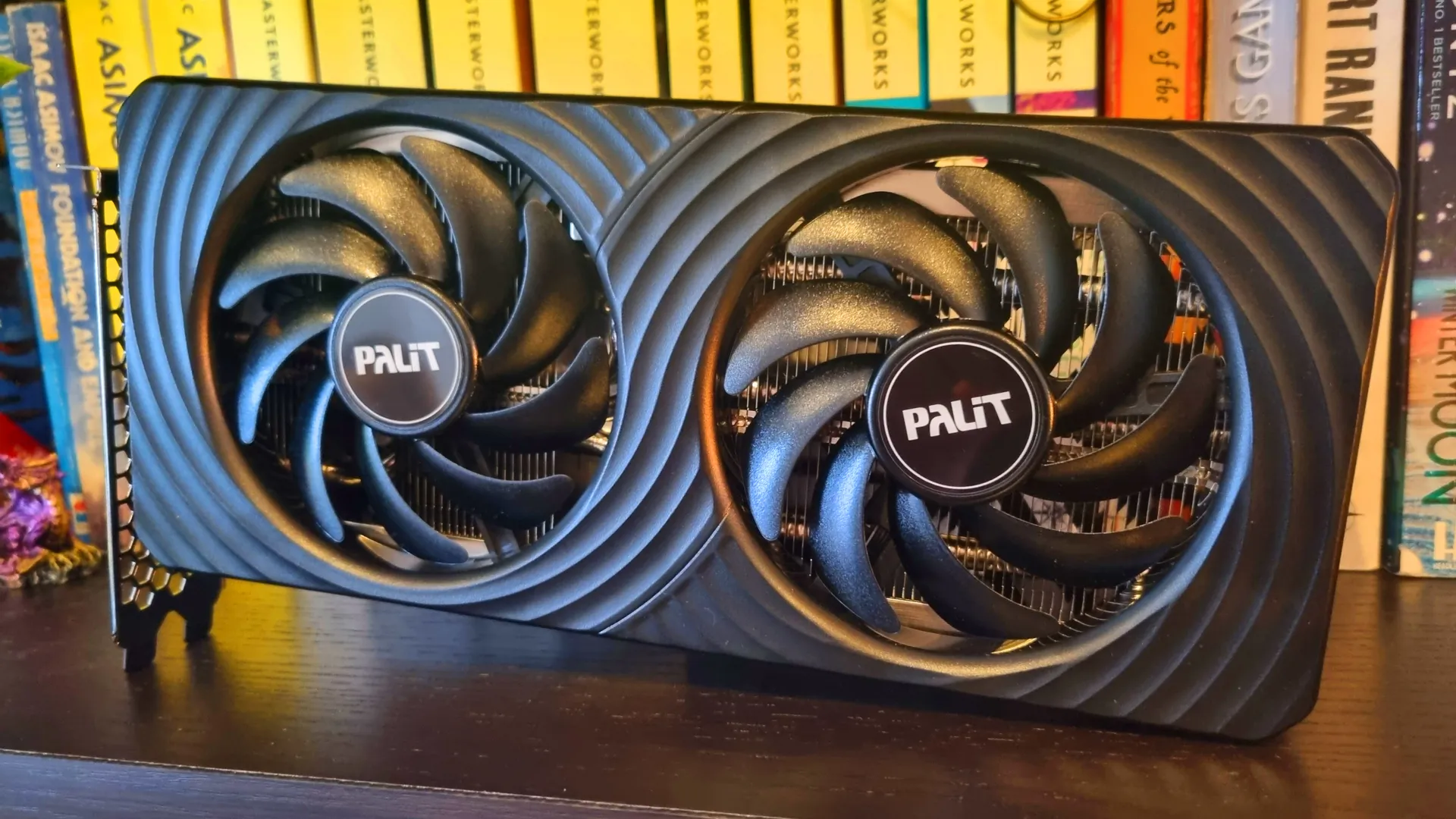
Our Verdict
For
- Good 1080p and 1440p performance
- Quiet as a mouse
- Reasonable value
Against
- 8 GB of VRAM trips it up in certain games
- Runs warmer than the AMD competition
- Still pricier than I'd like
PC Gamer's got your back Our experienced team dedicates many hours to every review, to really get to the heart of what matters most to you. Find out more about how we evaluate games and hardware.
The RTX 5060 Ti has been around for a while now, in both 8 GB and 16 GB variants. However, with the RAM crisis pushing up the price of everything with a memory module, including graphics cards, the significantly-cheaper RTX 5060 Ti 8 GB is looking like more and more of an attractive proposition.
After spending the past few weeks testing the life out of a Palit GeForce RTX 5060 Ti Dual 8 GB sample, I can tell you that it's a punchy little GPU for its $380 MSRP—but a mere 8 GB of VRAM does hold the card back in certain scenarios. And yes, you'll be paying significantly more than the MSRP at the checkout. 2026 really hasn't been a great year for PC gaming hardware prices all round.
Arguably, all the RTX 5060 Ti 8 GB needs to do is deliver performance somewhere near the $50-$100 more expensive RTX 5060 Ti 16 GB at 1080p and 1440p, for less cash. And, for the most part, it does. It's also fairly power efficient, runs reasonably chilled with a dual-fan cooler, and beats its closest competition, the $350 AMD Radeon RX 9060 XT 8 GB, on average in terms of gaming performance.
But those of you considering this 8 GB card should be aware that the benchmarking tools don't always tell the whole story. I've included some examples of my real world 8 GB vs 16 GB VRAM testing here to demonstrate, but the short version is that, in certain games with the settings turned up, the 8 GB cards often fall behind their 16 GB equivalents, sometimes by a considerable amount.
Is the RTX 5060 Ti 8 GB a good graphics card for the cash? Yes, I think so. Keep the resolution and settings reasonable, and it's a great little performer. Be aware, though, that pushing either too far will sometimes show the flaws, thanks to that VRAM constraint.
Buy if:
✅ You can't afford something with more VRAM: The 8 GB variant of the RTX 5060 Ti punches hard at 1080p and 1440p, although the 16 GB version delivers better performance overall.
✅ You game at 1080p and 1440p: 4K is too much for any 8 GB card, and the RTX 5060 Ti is best at lower resolutions.
Don't buy if...
❌ You're a "maximum settings or bust" kind of gamer: This little card does a pretty good job with the settings turned up, but it's at its best when it's given some room to breathe.
❌ You play a lot of VRAM-heavy games: Heavyweight open world games have a tendency to show this card's 8 GB weakness, and performance can drop as a result.

The RTX 5060 Ti 8 GB is a speedy little graphics card at 1080p and 1440p, and manages to best its nearest competition, the AMD Radeon RX 9060 XT 8 GB, in most of my benchmarks. However, it's worth noting that 8 GB graphics cards will occasionally deliver lower performance than their 16 GB equivalents in certain games at certain settings—and this Nvidia GPU is no exception.
RTX 5060 Ti 8 GB - Features
| Row 0 - Cell 0 | RTX 5060 Ti 8 GB |
GPU |
GB206 |
VRAM |
8 GB GDDR7 |
CUDA cores |
4608 |
Boost clock (MHz) |
2572 |
Base clock (MHz) |
2407 |
TMUs |
144 |
ROPs |
48 |
Tensor Cores |
144 |
RT Cores |
36 |
Shader Modules |
36 |
L1 Cache |
128 KB per SM |
L2 Cache |
32 MB |
MSRP |
$379 |
The RTX 5060 Ti 8 GB uses the same GB206 Nvidia graphics chip as its 16 GB sibling, albeit with, you guessed it, 8 GB of GDDR7 rather than 16 GB. It's a Blackwell-generation GPU built on TSMC's 4N FinFET process node, with a base clock of 2,407 MHz and a boost clock of 2,572 MHz.
The 8 GB variant of the RTX 5060 Ti has the same 128-bit memory bus as the 16 GB card, but the relative speediness of GDDR7 means they've both got a peak bandwidth rate of 448 GB/s. The chip itself has 4608 CUDA cores, 144 TMUs, 48 ROPS, and a shader module count of 36 in total. That's alongside 144 Tensor Cores, 36 dedicated RT Cores, and 32 MB of L2 cache, with 128 KB of L1 cache per shader module.
The Palit Dual card I have in front of me is a dual-slot, twin-fan model, which is a fairly common example of what you'll find strapped to most RTX 5060 Ti 8 GB variants.
Around the back you'll find a single HDMI 2.1b port, alongside three DisplayPort 2.1b connections. The top power limit for this particular card is a spec-standard 180 W, and unlike some of the other models, this variant appears to have a hard limit on the power tweakery within its BIOS. Variants from other manufacturers can be pushed further in this regard, but without some BIOS-swapping shenanigans, the little Palit is more of a sipper than a guzzler.
Being a lower-midrange card, its power demands are well-weighted for this particular market and shouldn't give most modern PSUs much trouble, provided they're rated 600 W or higher. Power is delivered via a single 8-pin connector located on the top of the card.
This Palit model is a fine example of the form—and while it won't be winning any awards for extra features, it's a good base GPU with which to test the RTX 5060 Ti 8 GB's capabilities.

Score: 3.5
It's not a super-impressive specs sheet, but the RTX 5060 Ti 8 GB still has a lot of what you need, and little of what you don't.
RTX 5060 Ti 8 GB - Performance

At 1080p, the RTX 5060 Ti 8 GB puts on a pretty impressive showing in the gaming benchmarks for a somewhat-reasonably-priced card. In Black Myth Wukong at High settings, it's within a single frame of its 16 GB sibling on average, albeit 3 fps off the pace in the 1% lows. A 74 fps average results in very smooth gameplay, although it must be said, all of my tested cards deliver similar results in this particular game at this resolution.
1080p gaming benchmarks | RTX 5060 Ti 8 GB
| Product | Value |
|---|---|
| RTX 5060 Ti 8 GB Palit Dual | 74 Avg FPS, 62 1% Low FPS |
| RX 9060 XT 8 GB Asus Prime | 71 Avg FPS, 58 1% Low FPS |
| RTX 5060 Ti 16 GB Palit Infinity 3 | 75 Avg FPS, 65 1% Low FPS |
| RX 9060 XT 16 GB XFX | 73 Avg FPS, 63 1% Low FPS |

It's in Cyberpunk 2077 where we start to see some real differences. While the 8 GB card manages to beat the 16 GB variant by a single frame on average (call that benchmark margin of error, if you will), the 1% lows are significantly… well, lower.
It must be said, however, that the RTX 5060 Ti 8 GB gives its closest competition, the AMD RX 9060 XT 8 GB, a pretty thorough thrashing at Ultra RT settings. These are the settings we use for testing all our graphics card samples, but in truth, you'll likely be happier lowering things down to Medium RT and enabling some upscaling for a smoother experience overall.
Cyberpunk 2077 - VRAM usage and performance
In-game testing, Medium RT settings
| Product | Value |
|---|---|
| RTX 5060 Ti 8 GB Palit Dual | 91 Avg FPS, 44 1% Low FPS, 7.32 Avg. VRAM |
| RX 9060 XT 8 GB Asus Prime | 72 Avg FPS, 51 1% Low FPS, 7.68 Avg. VRAM |
| RTX 5060 Ti 16 GB Palit Infinity 3 | 91 Avg FPS, 63 1% Low FPS, 8.76 Avg. VRAM |
| RX 9060XT 16 GB XFX | 85 Avg FPS, 67 1% Low FPS, 9.46 Avg. VRAM |
Which I've already demonstrated as part of my 8 GB vs 16 GB VRAM testing with this very card. In fact, the 8 GB GPU manages to beat out the AMD RX 9060 XT 16 GB at both 1080p and 1440p at these settings—although not by much in terms of the latter, and with much lower 1% lows. Throw some frame gen into the mix, though, and the 16 GB AMD card edges in front.
On average, the 16 GB cards have a tendency to pull ahead of their 8 GB equivalents in the benchmarks, although it's much closer at 1080p than you might expect. Switch things up to 1440p, and the numbers tell a similar story.
1440p gaming benchmarks | RTX 5060 Ti 8 GB
| Product | Value |
|---|---|
| RTX 5060 Ti 8 GB Palit Dual | 50 Avg FPS, 43 1% Low FPS |
| RX 9060 XT 8 GB Asus Prime | 48 Avg FPS, 43 1% Low FPS |
| RTX 5060 Ti 16 GB Palit Infinity 3 | 51 Avg FPS, 45 1% Low FPS |
| RX 9060 XT 16 GB XFX | 48 Avg FPS, 44 1% Low FPS |
Again, it's a close-run thing between the 8 GB and 16 GB cards in terms of average frame rate, although with more inconsistent 1% lows. It's also worth noting the battle between the RTX 5060 Ti 8 GB and the RX 9060 XT 8 GB at this resolution. In Black Myth Wukong, Cyberpunk 2077, F1 24, and Homeworld 3, the Nvidia card pulls ahead.
Significantly so in Cyberpunk, in fact, where the 8 GB 5060 Ti actually manages to top my chart, even beating out the 16 GB cards by a nose. In the Talos Principle 2 and Total War: Warhammer 3, however, the little Nvidia card falls off the pace.
Still, in the real-world gaming benches, where Quality upscaling and the odd dose of frame gen enters the fray, the RTX 5060 Ti 8 GB edges ahead of the RX 9060 XT 8 GB once more overall.
Real-world gaming performance | RTX 5060 Ti 8 GB
1440p with 'Quality' upscaling and 2x frame gen. where available
| Product | Value |
|---|---|
| RTX 5060 Ti 8 GB Palit Dual | 79 Avg FPS, 68 1% Low FPS |
| RX 9060 XT 8 GB Asus Prime | 76 Avg FPS, 68 1% Low FPS |
| RTX 5060 Ti 16 GB Palit Infinity 3 | 86 Avg FPS, 72 1% Low FPS |
| RX 9060 XT 16 GB XFX | 78 Avg FPS, 69 1% Low FPS |
Notable exceptions are F1 24 and The Talos Principle 2, both of which seem to love what AMD's upscaling tech brings to the table. Still, an overall win is still a win for the 8 GB Nvidia card, at least over its nearest competition. And the figures aren't too far off the 16 GB cards in most cases, either.
Before you get too excited by these benchmark figures, though, I'd ask you to hold your celebrations for a moment. In actual gameplay testing, the difference between a cheaper 8 GB card and a more-expensive 16 GB variant can be much more significant, even if they're using the same graphics chip.
The Last of Us Part 1 - VRAM usage and performance
In-game testing, Ultra settings
| Product | Value |
|---|---|
| RTX 5060 Ti 8 GB Palit Dual | 89 Avg FPS, 48 1% Low FPS, 6.92 Avg. VRAM |
| RX 9060 XT 8 GB Asus Prime | 79 Avg FPS, 52 1% Low FPS, 6.61 Avg. VRAM |
| RTX 5060 Ti 16 GB Palit Infinity 3 | 113 Avg FPS, 92 1% Low FPS, 9.84 Avg. VRAM |
| RX 9060XT 16 GB XFX | 113 Avg FPS, 93 1% Low FPS, 11.47 Avg. VRAM |
Take this testing of notorious VRAM hog, The Last of Us Part 1, for example. These numbers were recorded in game rather than using built-in benchmarking tools. While the frame rates of all our contenders remain reasonably high in this game, it's clear that the 8 GB cards can suffer in VRAM-heavy scenarios compared to their 16 GB counterparts.
All of which is to say, benchmark numbers can be misleading. And while the RTX 5060 Ti 8 GB is still faster than the equivalent RX 9060 XT 8 GB overall, it has a tendency to fall behind the 16 GB cards once you give it a big, VRAM-hogging game to contend with. Or if you up the resolution to 4K in certain games, as this chart shows:
4K gaming benchmarks | RTX 5060 Ti 8 GB
| Product | Value |
|---|---|
| RTX 5060 Ti 8 GB Palit Dual | 26 Avg FPS, 21 1% Low FPS |
| RX 9060 XT 8 GB Asus Prime | 25 Avg FPS, 22 1% Low FPS |
| RTX 5060 Ti 16 GB Palit Infinity 3 | 28 Avg FPS, 25 1% Low FPS |
| RX 9060 XT 16 GB XFX | 25 Avg FPS, 22 1% Low FPS |
The RTX 5060 Ti 8 GB is often around $100 cheaper than the 16 GB version, though. And it delivers better performance overall than the 8 GB AMD card, which isn't that much cheaper. So, while the Nvidia offering is still a good performer for the cash, there are caveats to be aware of when you buy an 8 GB GPU in 2026.
You'll save some money, but VRAM-related performance constraints may raise their ugly head in some games at high settings.
PC Gamer test platform
Supplied by Cyberpower | MSI
CPU: AMD Ryzen 7 9800X3D | Motherboard: MSI MPG X870E Edge Ti WiFi | RAM: Kingston Fury Beast RGB 32 GB (2 x 16 GB) @ 6,000 MT/s | Cooler: MAG CoreLiquid i360 White | SSD: Spatium M480 Pro 2 TB | PSU: MPG A1000GS PCIe 5 | Case: MAG Pano 100R White

Score 3.5
Faster than its 8 GB competition overall, but still behind the pace of the 16 GB GPUs with the settings turned up.
RTX 5060 Ti 8 GB - Thermals & Power

Being such a small and svelte graphics card (with a case-friendly twin-fan cooler), it's perhaps no surprise that the Palit Dual tops out my thermal benchmark table with a 68 °C peak result. What's interesting to note, however, is that the much larger, tri-fan equipped Palit Infinity 16 GB version runs only a single degree cooler in the peaks, and a single degree hotter on average.
Gaming temperatures| RTX 5060 Ti 8 GB
Thermals
| Product | Value |
|---|---|
| RTX 5060 Ti 8 GB Palit Dual | 68 Peak temperature (°C), 64 Average temperature (°C) |
| RX 9060 XT 8 GB Asus Prime | 51 Peak temperature (°C), 48 Average temperature (°C) |
| RTX 5060 Ti 16 GB Palit Infinity 3 | 67 Peak temperature (°C), 65 Average temperature (°C) |
| RX 9060 XT 16 GB XFX | 57 Peak temperature (°C), 48 Average temperature (°C) |
Both the 8 GB and 16 GB RX 9060 XT cards are significantly more chilled out under duress, although no temperature here is anywhere near worrying levels. Still, in a small form factor build (something this RTX 5060 Ti would be particularly good at given its diminutive size), those higher thermal figures may contribute to some toastier case temperatures.
It's nothing to be concerned about for most users, but those looking to build a small yet cool-running build would perhaps be better off considering the AMD GPUs instead. Given the performance difference between the 8 GB Nvidia and AMD cards, though, I'd be tempted to simply keep my eye on the RTX 5060 Ti's higher temps, and rake in the extra frames as a trade off.
Power benchmarks | RTX 5060 Ti 8 GB
Higher is better
Performance per watt
| Product | Value |
|---|---|
| RTX 5060 Ti 8 GB Palit Dual | 0.23 4K frames per J, 0.56 1080p frame per J |
| RX 9060 XT 8 GB Asus Prime | 0.22 4K frames per J, 0.56 1080p frame per J |
| RTX 5060 Ti 16 GB Palit Infinity 3 | 0.23 4K frames per J, 0.62 1080p frame per J |
| RX 9060 XT 16 GB XFX | 0.28 4K frames per J, 0.65 1080p frame per J |
And as for power usage, this particular Palit card regularly bumps into its 180 W limit under heavy load, but refuses to push past it in the peaks. This gives it a performance per watt score of 0.56 frames per joule at 1080p, which is identical to the RX 9060 XT. In terms of efficiency, though, the RX 9060 XT 16 GB rules the roost here with a mega 0.65 frames per joule at 4K, thanks to its much better 4K performance and similar 180 W limit.
That being said, I don't think any of these cards are suitable for smooth 4K gaming in general (and definitely not the 8 GB variants, which can struggle badly at this resolution), so it's something of a hollow victory.
Score: 3
This dual-fan RTX 5060 Ti 8GB is not the coolest of cards, but it's still not what you'd call a hot-runner.
RTX 5060 Ti 8 GB - Sound

As a relatively small, twin-fan, dual-slot graphics card, the Palit Dual is remarkably quiet under test conditions. While the thermals might run a touch higher than the tri-fan Palit Gaming Trio 16 GB version in terms of peaks, and much higher than both the AMD cards I've compared it to here on average, I still struggle to hear this particular card under 100% load. The fans never sound like they're pushed to their limits, even at top whack.
Certainly, if you've got a decently-sized CPU cooler (or a complete monster like the 360 mm AIO I have equipped in my test machine), this GPU is very unlikely to make itself heard over your other air-movers. It's so hushed up, in fact, that it comes across as downright polite.

Score: 5
Graphics cards don't come much quieter than this.
RTX 5060 Ti 8 GB - Software
Palit's Thundermaster GPU overclocking software is… perfectly serviceable. It's got an MSI Afterburner-style interface that rings of familiarity, although like most GPU overclocking programs, it really should be wearing wrap-around early-2000's shades and waggling its thumb and little finger at you. Totally radical, dude.
Which it isn't. It is instead a relatively straightforward overclocking interface wrapped in a garish UI, and doesn't offer anything particularly different to the more popular alternatives.
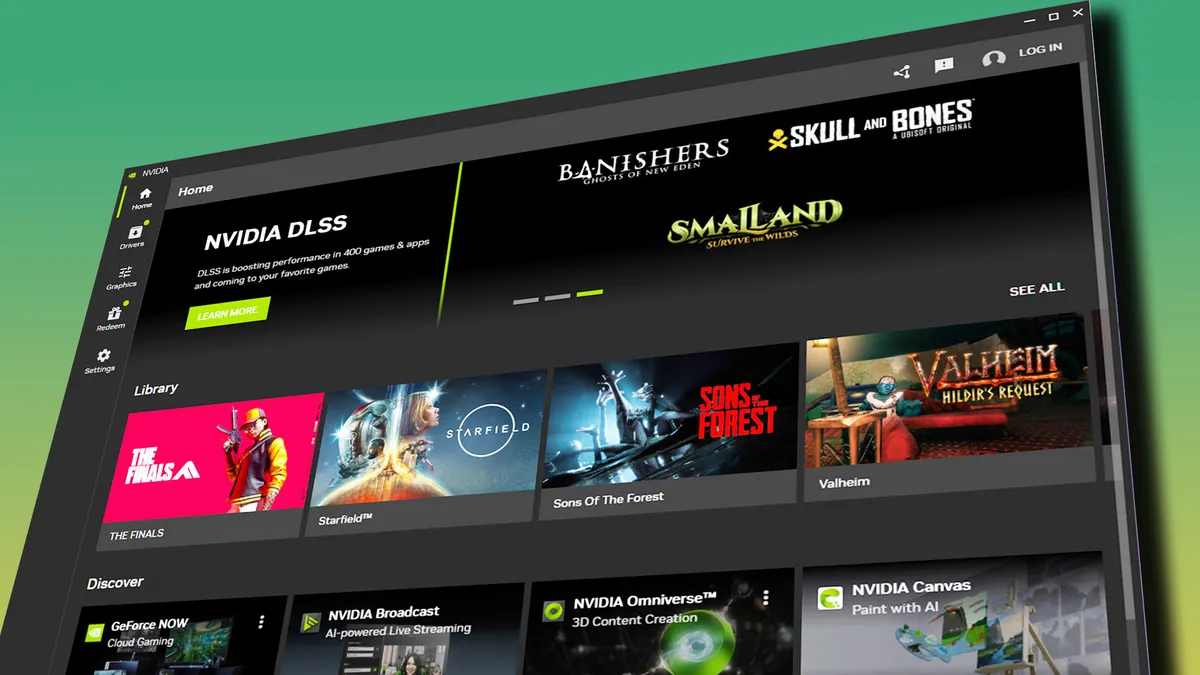
As for the drivers, I've experienced no issues with this card using Nvidia's GeForce Game Ready driver version 595.97, the most recent stable version at the time of writing. The Nvidia App is a straightforward way of accessing your game settings and handling updates, with the added benefit of being able to tweak DLSS and Frame Generation versions to your heart's content in many supported games.
AMD Adrenaline is pretty good these days, too (with many equivalent features), which makes the software side of things much of a muchness when comparing the two. Still, with no software nasties to report, I can confirm that this card, and its software/driver suite, makes for a very hassle-free gaming experience. Which is all you really want, let's be honest

Score: 4
The Nvidia App is pretty straightforward these days, and I've had no driver issues to speak of.
RTX 5060 Ti 8 GB - Value

Here's where I need to make a clear differentiation between the Palit GPU I have in front of me, and other RTX 5060 Ti 8 GB cards you'll find on the market. This particular variant is a little hard to source right now, and the few sellers that have one in stock are selling it for over-inflated prices, like this listing for $567.
That's nearly RTX 5070 money, and nowhere near what you should be paying for this particular card. The good news, however, is that many RTX 5060 Ti 8 GB GPUs with very similar cooler designs (and the exact same GB206 Nvidia chip and VRAM loadout underneath) can be found for around the $400 mark at the time of writing.
Like this $400 Gigabyte variant, for instance. It's a good example of a card that should perform near-identically to our test sample, currently listed for a fairly reasonable sum.
That being said, the RX 9060 XT 8 GB can often be found for around $50 cheaper. Still, while it's tempting to suggest saving some cash with the AMD card, particularly at this end of the market, I think the better performance of the 8 GB Nvidia GPU on average (combined with its better handling of VRAM-constrained situations) tips the odds firmly in the RTX 5060 Ti's favour.
It's not as cheap as you or I would like it to be, but that's the unfortunate reality of the current GPU market. The fly in the ointment, however, comes in the form of the RX 9060 XT 16 GB.

You can still pick up one of those for around $450, and that muddies the waters a little. The RTX 5060 Ti 8 GB often goes toe-to-toe with the RX 9060 XT 16 GB, but there are scenarios where the extra VRAM allows the AMD card to pull a long way ahead.
The same is true of the RTX 5060 Ti 16 GB, which also provides better performance overall—but also ends up being around $100 more expensive at current prices.
How long these 16 GB cards remain within $50-$100 dollars of their 8 GB equivalents is anyone's guess. But looking at the state of affairs right now, I'd say that the RTX 5060 Ti 8 GB is relatively good value for the performance you receive, even if its VRAM loadout holds it back in some scenarios.
Providing 1080p and 1440p gaming is your goal, it punches hard within its weight class, and the savings over the 16 GB versions of both the Nvidia and AMD competition are just about worth it. Ask me again in six months, and I've got a feeling the 8 GB cards will look like better value still—and the RTX 5060 Ti 8 GB card's better performance over its AMD equivalent will still likely be worth paying for.
Score: 3.5
In a world of ever-climbing GPU prices, the RTX 5060 Ti 8 GB actually makes a fair bit of sense.
1. Best overall: AMD Radeon RX 9070
2. Best value: AMD Radeon RX 9060 XT 16 GB
3. Best budget: Nvidia RTX 5050
4. Best mid-range: Nvidia GeForce RTX 5070 Ti
5. Best high-end: Nvidia GeForce RTX 5090