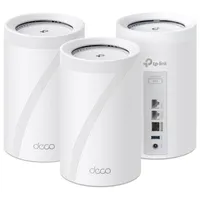
Of all the various upgrades and PC tweaks I've done in recent years, nothing has given me a great sense of 'wow, this is so much better' than converting my basic home Wi-Fi setup to a full-blown Wi-Fi 7 home mesh network.
And thanks to this great deal on the TP-Link Deco 7 Pro BE14000, you can make the switch too, as it's just $500 at Amazon for a three-node pack.
Yes, I know that 'just' and $500 might not seem to make a lot of sense here, but you're basically getting three separate Wi-Fi 7 routers for the money. At this price, that puts them at $167 apiece, and when you consider just how good they are, it's genuinely good value for money.
I reviewed this exact kit last year, under its alternate name of Deco BE68, and came away seriously impressed. While you can have just one router, the whole point of a mesh network is that it gives you seamless Wi-Fi coverage throughout your house. You can hardwire the nodes directly together via one of the LAN ports, or as you can the same as me: Plug all of my PCs directly into one router and have the link to the others via the 5 GHz and 6 GHz bands.


The internet connection to my home tops out at 1.1 Gbps, and with my Deco BE68 setup, I never get anything less than that. It also avoids the problem that some of my rigs are only Wi-Fi 6 or 6E capable; by using the LAN ports and a wireless node-to-node mesh, I get the best of everything.
There is just one drawback to using TP-Link's mesh routers, and that's the fact that you can no longer configure them from a computer: You have to use its phone app. While it's actually very easy to use, networking specialists won't like the basicness of it all, and few people will like how TP-Link sticks some features behind a paywall.
But now that I have it all set up, with various networks for guests and IoT devices, and main PCs tucked away safely in the network, I rarely go anywhere near the app now. Instead, I just enjoy perfect downloads on my gaming rigs and a perfect Wi-Fi connection everywhere in the house.
👉Check out all of Amazon's router deals here👈
1. Best overall: TP-Link Archer GE800
2. Best mid-range: TP-Link Archer BE9700
3. Best budget: Asus TUF AX4200
4. Best mesh: TP-Link Deco BE68
5. Best budget mesh: TP-Link Deco BE25
6. Best for wired: Asus RT-BE88U
7. Best Wi-Fi 6E: TP-Link Archer AXE75
👉Check out our full gaming router guide👈