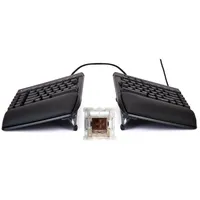
I reviewed this exact keyboard last November (as well as its predecessor in 2024), and came away mightily impressed. Not simply content with giving it a score of 92%, I've been using the Kinesis Gaming FreeStyle Edge RGB Plus every day since then, and I still think it's the best ergonomic keyboard for gaming.
And now that you can get it for just a quarter over $149 at Amazon, it's the perfect time to step into the world of ergo keebs and give your shoulders, wrists, and overall posture relief from cramped, awkward gamer button bashers.
The Edge Plus is quite old-school in some ways, with a slightly dated design and feature set. But while you're not getting rapid trigger or snap tap keys, or even a simple media wheel, what you are getting is a highly adjustable and exceptionally comfortable ergonomic keyboard.
The permanently split structure means you can spread out the two halves such that your shoulders never have to rotate in slightly to accommodate a compact layout. The included lift kit offers three levels of tenting (raising the inside edge of each half) to prevent wrist strain from dealing with a flat keyboard.
Add in the fact that the tactile switches are lovely to use, the RGB lighting is subtle rather than overwhelming, and the extra keys on the left are easy to program for macros, and you've got a solid platform with which to work all day on, and then game for hours afterwards.


There are some aspects I'm not keen on, though. The wrist pad material is a sweat magnet, the delete key is a heck of a reach, the lift kit flaps about when you move the keyboard, and I'd prefer it if the cables were removable. But these are minor quibbles when you consider the whole package.
If you prefer linear to tactile switches, you can buy that version of the FreeStyle Edge RGB Plus for a fraction over $159 at Amazon, but since all the switches are hot-swappable, you can fit anything you like as long as they match Gateron's pin layout (which is pretty standard).
If you're a heavy PC user like me, you owe it to yourself to go ergo, and Kinesis' keyboard is a great way to do just that.
👉Find all of Amazon's ergonomic keyboard deals here👈
1. Best overall:
Wooting 80HE
2. Best budget:
Gamakay x Naughshark NS68
3. Best 60%:
Wooting 60HE v2
4. Best 75%:
Keychron K2 HE
5. Best mechanical:
Asus ROG Strix Scope II 96 Wireless
6. Best silent:
Be Quiet! Light Mount
7. Best ergonomic:
Kinesis Freestyle Edge RGB
8. Best membrane:
Glorious GMBK 75%