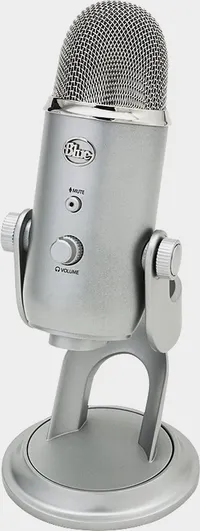
The Blue Yeti might be the most popular USB microphone ever made, and you know what, it earned it. At its usual price, this is a great USB microphone. At $69.99 (its lowest price ever), it's simply one of the best bangs for your buck in this category.
The original Blue Yeti released in 2009, and in 17 years it has barely changed. I've had mine for a decade, and as I look around, I'm realizing it is the longest-lasting gadget on my desk. That's because it just works: I plug in, adjust the gain, and my voice comes through clear.
These days there are more advanced microphones than the Yeti, like its official sequel the Yeti 2, and certainly mics that are just as competitively priced. Those are good too, and I encourage you to check out cheaper options (like the $26 Amazon Basics mic that we surprisingly love) before making any decisions.
- We're curating all the Black Friday PC gaming deals right here
But with the Yeti, you absolutely get what it says on the tin. I also think it's still an attractive mic, but it is quite large, so make sure it'll fit on your desk without blocking the corner of your monitor. I've had mine on a mic arm for the past few years, and while it does feel like I'm cosplaying a podcaster just to chill with friends on Discord, it's very convenient.
At this price, it's firmly on the high end of "budget" territory while still sounding as good as mics that cost twice as much. If you do use it for long sessions and prefer to keep your mic open, play with the gain levels and make sure software noise cancelling is on in your chat app of choice (Discord's is pretty good out of the box).
If that's not enough, consider pairing it with dedicated noise cancelling software like Nvidia Broadcast (assuming your GPU can handle the extra toll).
👉Check out Amazon's Black Friday gaming mic deals here👈
1. Best gaming chair: Secretlab Titan Evo
2. Best gaming desk: Secretlab Magnus Pro XL
3. Best gaming headset: Razer BlackShark V3
4. Best gaming keyboard: Asus ROG Strix Scope II 96 Wireless
5. Best gaming mouse: Razer DeathAdder V4 Pro
6. Best PC controller: GameSir G7 Pro
7. Best steering wheel: Logitech G Pro Racing Wheel
8. Best microphone: Shure MV6 USB Gaming Microphone
9. Best webcam: Elgato Facecam MK.2