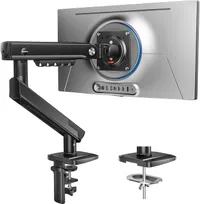
I said this in 2024 and I'm back to say it again in 2026: Get a monitor arm. They are so much nicer than the crap-ass stand your monitor came with: You can put your display at whatever height you want, whatever distance from your face, rotate it vertically or horizontally, whatever you like. They're nice. I wouldn't be without one and I don't think you should be either.
There are all sorts of them available from various online retailers, but here's one I think is worth your eyes: The Huanuo FlowLift Pro, for up to 32-inch monitors, on for $28.48 on Amazon—that's 43% off the $49.99 regular price.
I suggest this one because I have Huanuo monitor arms—three of them, actually—and I really like them. They're the same ones I had when I wrote about monitor arms in '24, and there's still not a bit of sag or looseness to any of them. This FlowLift Pro is, I believe, a newer model than mine, but looks to be essentially the same thing.
- We're curating all the Black Friday PC gaming deals right here
They're really quite simple: You get a plate that mounts on the back of your monitor (if you've ever wondered what those four screw holes are for, now you know), which then slides and locks on the end of the arm, which attaches to your desk with a C-clamp or, if that's not practical, a grommet mount on your desk. That's a bit more involved and you'll need a drill, but I figured it out so you can too.
Being able to yoink your monitor around however you like is great, particularly if you occasionally like to stand up while you're using your PC. A less obvious benefit is that having your monitors floating free opens up quite a lot of desk space for other things, like speakers, a power bar, several old HDDs, a bar of Tuff Soap (where the hell did that come from?), a light bulb, your glasses, that extension cord you were looking for, or, you know, whatever.

Seriously, monitor arms are great and you should get one. I don't even care if you get this one, although the Huanuo is a good deal from a reliable brand and getting the monitor arm experience for less than 30 bucks is a no-brainer. But whatever, just get one. You'll be glad you did.
👉 Check out all of Best Buy's Black Friday monitor deals 👈
1. Best overall / 4K:
MSI MPG 322UR X24
2. Best budget 4K:
Asus ROG Strix XG27UCG
3. Best budget OLED
Alienware AW2726DM
4. Best 1440p:
MSI MPG 271QRX
5. Best budget 1440p:
KTC H27T22C-3
6. Best 1080p:
AOC Gaming C27G4ZXE
7. Best Ultrawide:
Gigabyte MO34WQC2
8. Best budget ultrawide:
Koorui 34E6UC
9. Best competitive
KTC 25M1