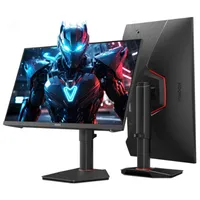
I'm currently reviewing the Koorui G2741L, and I was pleasantly surprised to see a big chunk taken off the MSRP. That means you can get yourself a 4K dual-mode IPS I personally quite like, for a sweet discount.
If you want to pick up the monitor for yourself, you can get it for $280 at Amazon right now, which is a saving of $70.
- Join us on WhatsApp for daily deals, direct to your phone.
I look over our roundup of the best cheap gaming monitor deals every week, so I'm happy to report this Koorui pick is among the cheapest 4K monitors I'd personally recommend. You can, if you want to go very cheap, pick up the Acer Nitro VG270K L1 for $180, which is a strong saving, but you are getting just 72 Hz at 4K, which is really rather low. There's also the MSI Mag 275UPD E14 with a max refresh rate of 288 Hz for $250, but after a few weeks with the Koorui, my money would be going there.
First off, you are getting a punchy IPS panel, with a just-above-the-norm 400 nits of brightness. Though the HDR 400 compatibility is technically pretty barebones, I can attest that HDR performance is surprisingly good here. Color accuracy and consistency are super solid, and contrast is good for an IPS too. It does have a matte finish, which means less contrast than a glossy one, but you get better performance in natural lighting.
You are missing any sort of USB hub function, but you do get two DP ports, one HDMI, and one aux jack. The stand itself is also pretty strong, and despite being mostly made of plastic, it doesn't look or feel too cheap.

The main selling point here is the fact that, with just a few buttons, it can swap from 4K at 160 Hz to 1080p at 320 Hz. That means when you want your game to look good, or just plan on watching videos, I'd switch to 4k, and when you want to play competitively, I'd bump it down to 1080p for higher frame rates. In practice, dual-mode works well, though 1080p performance in dual mode is a little blurrier than the 1080p performance you would expect from a native, finely tuned 1080p panel (that's the norm for dual-mode right now).
If I were picking out a budget-oriented 4K gaming monitor for my personal setup, Koorui would be getting my money right now. The only opportunity cost I'd really have to think about is whether I'd want to throw an extra $20 on and get an OLED panel like the ASRock Phantom Gaming PGO27QSA instead. This only goes up to a max of 1440p, but you are getting deeper blacks and more vibrant colours. As has been the case for a while now, the hardest part of buying a gaming monitor is picking just one. Oh, and having the cash for it.
👉 Check out all of Amazon's gaming monitor deals 👈
1. Best overall / 4K:
MSI MPG 322UR X24
2. Best budget 4K:
Asus ROG Strix XG27UCG
3. Best budget OLED
Alienware AW2726DM
4. Best 1440p:
MSI MPG 271QRX
5. Best budget 1440p:
KTC H27T22C-3
6. Best 1080p:
AOC Gaming C27G4ZXE
7. Best Ultrawide:
Gigabyte MO34WQC2
8. Best budget ultrawide:
Koorui 34E6UC
9. Best competitive
KTC 25M1