June 26, 2026 (update 2): I've actually spotted another listing for this monitor on Amazon that's even cheaper, for a sub-$300 price tag. Even better. I've swapped out the deal links for this new one.
June 26, 2026: The deal on this one is still going strong as we roll into the last day of Prime Day (week). I've been using it to play Counter-Strike 2 all week and have very few complaints, if any. For the price I'd say it's a steal if you're into competitive shooters that will benefit from the high refresh rate.
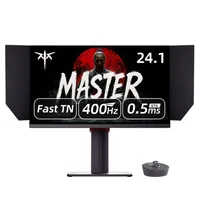
Monitors are one of the few kinds of hardware that's actually doing well during the current market, which to my eyes, means now is a great time to get a competitive gaming upgrade. I just highlighted a 320 Hz panel for $230, and that's ideal if you're on a stricter budget, but if you can spend a bit extra, I really think this 400 Hz panel for $297 at Amazon is where it's at.
I've only been using it for a couple of days, so I haven't had time to get into the nitty-gritty with it, but what I can say is that my first impressions are ones of, well, being impressed. Very impressed.
It's a TN panel, and usually that means a less-than-spectacular experience when it comes to colour accuracy and general clarity, but I've been surprised to find the KTC does pretty well on this front. Better, I think—and dare I say it?—than a much more expensive Zowie TN panel I tried.
Enemies are so crisp and clear in Counter-Strike when on FPS1 mode, and general browsing and YouTubing seem pretty crisp, too. For sure, you're not going to be getting the kind of colour accuracy that you'd get on a good IPS, but it's not bad.
None of that should distract us from the main allure here: a 400 Hz refresh rate for under $300. If you don't play competitive shooters, and of course, if you don't have a system capable of churning out a high frame rate, this might not mean much to you. But if you do play games like CS2, Valorant, or Apex Legends, and if your system can churn out enough frames, 400 Hz feels unreal.

I've argued elsewhere that 360 Hz is a bit of a sweet spot for competitive FPS refresh rates, and 400 Hz is just about in that kind of range. Again, especially at this price point. Crucial movements like peeking (or spotting enemies that are peeking) in Counter-Strike are very clear and defined on this KTC panel, and more than anything, it feels like it just gets out of the way, so to speak, letting me play the game unhindered.
If you can stretch your budget up from the $230 Alienware monitor to this $323 KTC one, I'd say it's worth it for that extra 80 Hz and improved clarity. Plus, you'll be at a point with your refresh rate where you won't be wondering whether another upgrade (to, say, 600 Hz) is worth it. That'll only be worth it if you're rich and have an unlimited budget; otherwise, 400 Hz should be more than enough.
👉 Check out all of Amazon's gaming monitor deals 👈
1. Best overall / 4K:
MSI MPG 321URX
2. Best budget 4K:
Asus ROG Strix XG27UCG
3. Best 1440p:
MSI MPG 271QRX
4. Best budget 1440p:
KTC H27T22C-3
5. Best 1080p:
AOC Gaming C27G4ZXE
6. Best Ultrawide:
Gigabyte MO34WQC2
7. Best budget ultrawide:
Xiaomi G34WQi
8. Best 32:9:
Samsung Odyssey OLED G9
9. Best dual-mode:
Alienware AW2725QF