
Google's Chrome browser has been quietly downloading a 4 GB local AI model onto user's devices without asking permission. What's more, if you manually delete the model, Chrome will simply download it again.
It was security researcher Alexander Hanff, who runs the ThatPrivacyGuy website, who discovered Chrome's dubious behaviour. He found a weights.bin file measuring around 4 GB stored in Chrome's local AppData folders. As the filename implies, it's a weights file for Google's Gemini Nano AI model. And as Hanff notes, it is downloaded without the user's permission.
"It is the weights for Gemini Nano, Google's on-device LLM. Chrome did not ask. Chrome does not surface it. If the user deletes it, Chrome re-downloads it," Hanff says.
As he explains, "Chrome uses it to power features Google has marketed under names like 'Help me write', on-device scam detection, and other AI-assisted browser functions."
Regarding the permissions issue, there is no explicit checkbox in Chrome Settings for the model download. It's part of Chrome's broader AI functionality, which is enabled by default where present. This is where things get a little tricky.

By Google's own admission, AI features are enabled according to the capabilities of a given device. I understand at least 16GB of memory is required, for instance. However, a poll of the PCG massif revealed very mixed results. Most of us do not have the weights file, even on devices that likely meet the hardware requirements, while some of us have no sign of AI functions and features at all.
Google's response to Hanff's report reveals that this has been going on for some time. Indeed, back in February, Google says it added a option in Chrome settings to disable AI features, which in turn will prevent the model from being downloaded.
Long story short, it seems that Google has been rolling out this functionality to a limited subset of Chrome users with machines that meet the hardware requirements. How many isn't known and it's just one of several elements that lack transparency.
Indeed, apart from the obvious lack of user permission and those transparency issues, there are plenty of other problems. 4 GB is a significant chunk of data, both in terms of local storage and also bandwidth. Anyone with a metered internet connection, for instance, really needs to know about 4 GB being downloaded.
There's also the energy footprint of this kind of roll-out. Hanff has calculated that if this AI model were pushed to one billion users, the distribution of the data would guzzle 240 gigawatt-hours of energy and generate 60,000 tons of CO2 equivalent. Note, that's just getting the model out onto devices, never mind any energy used by the models locally on said devices.
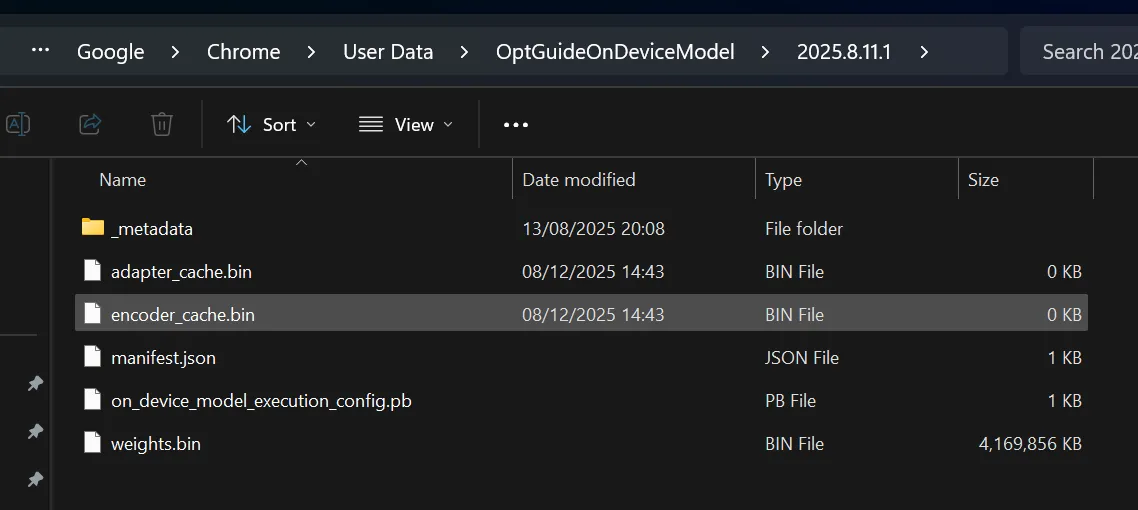
As per the screenshot we've uploaded from our own Nick Evanson's machine, if your PC does have the weights files, it'll be located in subfolder of the local AppData files for your Chrome installation.
Similarly, you should find a toggle switch for "On-Device AI" in the System subsection of Chrome's setting menu. As I understand it, if you don't see that toggle switch it's because your machine either doesn't meet the hardware requirements or, if it does, you haven't been included in the roll out.
In response to Hanff's research, Google Chrome VP and GM Parisa Tabriz also posted on X explaining that, "on-device AI is core to our developer and security strategy."
We’ve seen some questions about Gemini Nano on @googlechrome, so I want to clarify a few things.On-device AI is core to our developer & security strategy. 🧵May 6, 2026
She further revealed that this has been ongoing since 2024 and said, "while this requires some local space on the desktop to run, the model will automatically uninstall if the device is low on resources." Notably, Tabriz said nothing about the issue of user permission.
Overall, this is a pretty unsatisfactory, if not an entirely surprising, affair. Few if any users would assume that downloading a 4 GB AI model is a standard part of a mainstream web browsing package. So, getting permission seems like a no brainer. That Google thought this is all fine—and apparently still does—doesn't reflect terribly well on either the company itself or the attitude of the AI industry to safety and privacy.
For the record, we understand Chrome downloads the model to all three of the major desktop-class operating systems—Windows, MacOS and Linux—but not to mobile devices running Android and iOS.

1. Best overall: AMD Radeon RX 9070
2. Best value: AMD Radeon RX 9060 XT 16 GB
3. Best budget: Nvidia RTX 5050
4. Best mid-range: Nvidia GeForce RTX 5070 Ti
5. Best high-end: Nvidia GeForce RTX 5090