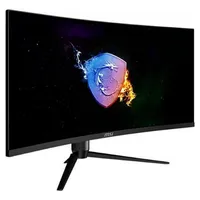
If you can afford it, ultrawide purists swear by the format for just how much you can cram onto the screen. Luckily, it's cheaper than it's ever been to pick one up for yourself. Over at Best Buy right now, you can get an MSI Optix MAG342CQR for $174, which is a saving of over $40 on an already pretty value-oriented panel.
As well as being gently curved and ultrawide, this monitor is 3440 x 1440 in resolution. Given that it's 34 inches in size, you probably wouldn't want to drop down to 1080p, but it's still a lot of pixels for the money.
- Join us on WhatsApp for daily deals, direct to your phone.
Ultrawide is a beloved format for good reason. In the likes of RTS games, it simply gives you access to more of the screen's information at once. This is an advantage in play, even though it may take a little while to get used to all that info.
In first-person shooters, ultrawide monitors amp up the immersion because of everything you can see on screen. Immersion is helped by the 1500R curve, too. The 1 ms response time isn't too bad either.
Though ultrawide gaming has gotten better over time, the likes of Elden Ring and Final Fantasy 7 Rebirth don't have official support. Luckily, tools like Flawless Widescreen can force support on non-support games.
Naturally, for that price, you are making some compromises and that comes in the form of the VA panel and a narrow variable refresh rate range (between 60 and 144 Hz). VA panels are well-liked for deep contrasts but offer worse color accuracy and viewing angles than the likes of IPS or OLED. They are traditionally seen as cheaper panels, and they tend to look it.
The 144 Hz refresh rate isn't awful, but it's not great. It's also missing official Nvidia G-sync support, though you may be able to force it to work via Nvidia's own software. If you have an AMD Radeon card, you can use FreeSync, but there's no HDMI VRR, so there's limited support for combating screen-tearing.
There are definitely some downsides to a monitor as budget-friendly as this one, but you are undeniably getting a great package here, and a sweet way of getting into ultrawide gaming.
1. Best overall / 4K:
MSI MPG 321URX
2. Best budget 4K:
Asus ROG Strix XG27UCG
3. Best 1440p:
MSI MPG 271QRX
4. Best budget 1440p:
KTC H27T22C-3
5. Best 1080p:
AOC Gaming C27G4ZXE
6. Best Ultrawide:
Gigabyte MO34WQC2
7. Best budget ultrawide:
Xiaomi G34WQi
8. Best 32:9:
Samsung Odyssey OLED G9
9. Best dual-mode:
Alienware AW2725QF