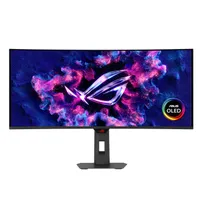
Even if you can afford to upgrade your PC gaming setup to sport the most powerful or latest hardware, that doesn't mean you should. That's because many components and peripherals are vastly overpriced in the current climate (looking at you, DRAM and SSDs), but there's one sector that's bucking that trend: OLED monitors.
And for $649 at Amazon, you can bag yourself a really epic and super-immersive ultrawide OLED display, safe in the knowledge that you're absolutely not paying over the odds.
The Asus ROG Strix XG34WCDG is essentially a lower-priced version of the ROG Switch PG34WCDM monitor we reviewed back in January 2024. It uses a different panel (Samsung QD-OLED vs LG WOLED) that isn't quite as highly specified, with the XG34WCDG sporting a maximum refresh rate of 175 Hz and a peak HDR brightness of 1,000 nits (240 Hz and 1,300 nits for the PG34).
The relatively high resolution of 3440 x 1440 is a boon for pixel density, but it will mean you'll need a beefy GPU for gaming at native settings, though with upscaling being as good as it is these days, you're not going to need anything too extreme.
What you lose in terms of outright performance, you gain significantly in bang-for-buck, as well as general comfort. The ROG Swift display has a very tight 800R curvature, whereas the ROG Strix is much easier to live with at 1800R (the bigger the number, the more gentle the curve).

Since it's a newer model, the XG34 also boasts Asus' OLED Care Pro tech, including a configurable proximity sensor which the monitor uses to determine if anyone is sitting in front of it. When there's nobody there, it switches everything to black to keep OLED burn-in at bay.
For truly immersive gaming, there's little that beats a hulking ultrawide, and while they're not necessarily perfect for general work scenarios, having all that real estate does make it easier to manage lots of Windows.
At $649, this Asus ROG Strix XG34WCDG is the cheapest it's ever been on Amazon and a full $350 under its launch MSRP. The RAMpocalypse might be doing its best to ruin the cost of upgrading your PC, but you can still treat yourself for less with this monitor.
👉Check out all of Amazon's gaming monitor deals here👈
1. Best overall / 4K:
MSI MPG 321URX
2. Best budget 4K:
Asus ROG Strix XG27UCG
3. Best 1440p:
MSI MPG 271QRX
4. Best budget 1440p:
KTC H27T22C-3
5. Best 1080p:
AOC Gaming C27G4ZXE
6. Best Ultrawide:
Gigabyte MO34WQC2
7. Best budget ultrawide:
Xiaomi G34WQi
8. Best 32:9:
Samsung Odyssey OLED G9
9. Best dual-mode:
Alienware AW2725QF