





The best mouse pad for gaming is more essential than you'd think. Take one look at that video above and you'll see a man who knows what it is to need a good mouse pad. Without a smooth surface to glide your mouse on, your precision in some games might wobble. A good mouse pad isn't as key as the best gaming mouse, but it's worth considering if you're well equipped with everything else.
The very best mouse pad on the market today is the SteelSeries QcK Performance. With a range of surface choices, superb build quality and excellent design, it offers a range of fabric mouse pad experiences that should suit most gamers down to the ground, and comes in either large or full desk pad sizes, which we've learned PC Gamer readers prefer.
Should you not wish to spend $40/$40 on a mouse pad, our pick for the best budget mouse pad won't cost you much more than a couple of coffees. It's the Corsair MM100. A fabric pad with little flair, we've used this mouse pad plenty, and we know it's dependable, easy to clean, and plenty smooth for gaming. You can't go wrong with that. Though if you want to go big, you go glass, and right now QPAD's Obsidian Glass is our favourite, though Razer's new Atlas Pro might have something to say about that.
Quick list

Expect to pay: $40 (large) $50 (extra large) / £36 (large) £45 (extra large)

Expect to pay: $100 / £100

Expect to pay: $10 / £8

Expect to pay: $20 / £17

Expect to pay: $30

Expect to pay: $100 / £100

Usually, I'd use this opportunity to talk about my expertise with this product category, how long I've been testing it, or some such. However, we're talking about mouse pads. There's only so much testing I can claim to have done. What I can say is I have used every single mouse pad in this guide, and I continue to use a few of them day-to-day. They're the mouse pads that I and other members of the team use daily. We like them, hopefully you will too.
Updated May 15, 2026: I've included the QPAD Obsidian Glass as our favourite glass pad, and removed the old Logitech desk pad, as SteelSeries QcK pads come in full desk pad size, and they're just plain great surfaces for gaming at any size. I've also included Jacob Fox's excellent video introduction about how to choose the right mouse mat for you.
Updated June 3, 2025: I'm ensuring our picks are all still the best mouse pads on the market right now, and they are. The SteelSeries QcK Performance series still takes the lead, because while they're expensive for cloth pads, you're getting truly top-tier quality. The Corsair is still the best budget pick because it's incredibly cheap for a decent, if a little plain, mouse pad. And the Razer Firefly V2 Pro is there for all those who don't mind splashing a little cash on a hard pad with equal parts performance and aesthetics in mind.
Updated April 25, 2025: I've checked through all our recommendations and give everything a bit of a Spring clean. There are no changes to any category, but we regularly check out new mouse pads, so you can be sure that, one day, there will be a new best mouse pad for gaming!
The best mouse pad for gaming


✅ You want the best mouse pad for competitive gaming: The Control version of this mouse pad offers excellent, err, control, and provides a supremely accurate surface to help ensure those twitchy headshots don't go amiss.
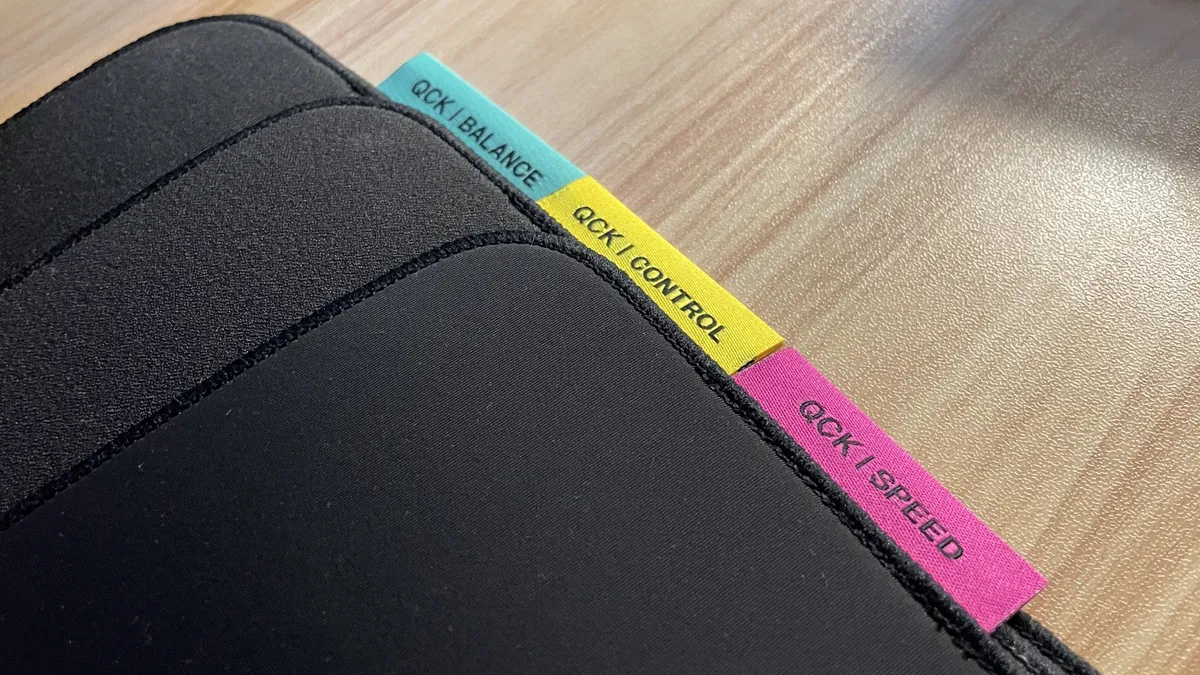
✅ You'd like a choice of surfaces: With Smooth, Control, and Balance options to choose from, you're spoilt for choice when it comes to exactly what sort of fabric surface you require.
❌ You're simply looking for something cheap: While the granularity of choice on offer here makes the SteelSeries QCK Performance mats the very best, if all you need is something cheap but excellent, the Corsair MM100 has you covered.
Choices, choices. Mouse pad feel is a very subjective thing, so choosing the right one for you can be more of a headache than it first appears. Luckily, the SteelSeries QcK Performance mouse pad comes in a variety of flavours, offering Smooth, Balance, and Speed options along with Large and XL sizes. Choice is important, and combined with the excellent build quality on offer, means the SteelSeries QcK Performance is the best mouse pad you can buy right now.
For those who prefer a slippery, smooth-as-glass-without-actually-being-glass feel, the nylon Smooth option is made for you. Our Jacob Fox, however, fell for the Control option, which uses a textured polyester surface to grip the underside of your mouse with supreme accuracy.
That's not to say your mouse won't glide on the Control model, though. It simply adds a little resistance into the equation, which means popping headshots in your favourite multiplayer shooter becomes an easier task. It's resistant to overshooting movements, meaning you can make rapid moves without speeding your mouse off-target in a late-night panic.
Whichever option you pick, the backing will be made of neoprene foam—unlike most fabric pads, which usually use a rubber and cloth combo. That makes these particular pads squidgey and stretchy—beyond being fun to play with, it also means you get a little extra stability and cushioning over a standard model.
The edges are held together with low-profile stitching, a marked improvement over the original model that means not only should the edges hold together well over time, but they also don't have an uncomfortable raised edge. It's the little things that make a good mouse pad, and the attention to detail here is excellent.
However, whichever you pick, you'll have to pay for it. At $40/£40 per pad, the SteelSeries QcK Performance range is fairly pricey, but given the options on offer and the build quality overall, it still feels worth it. It might be pricier than your standard mouse pad, but if you want the very best you can buy when it comes to a fabric surface, this is it right here.

Read our full SteelSeries QCK Performance mouse pad review.
The best hard-top mouse pad for gaming


✅ You want the slickest mouse movements: I've used a lot of mouse pads over the years, and I've stuck with this one longer than most, because of how silky-smooth my mouse feels on it.
✅ You're messy: I get thermal paste all over my fabric mouse pads, and they're a pain to clean. The Firefly V2 Pro is a doddle, just wipe it with a damp cloth.
❌ You are sensible with money: Don't look at the price tag if you're squeamish. We have an amazing budget hard-top mouse pad option for you below instead.
Do you need an RGB mouse pad? No, but you might want to check out a hard-top mouse pad. There's none finer than the Razer Firefly V2 Pro, our pick as the best hard-top mouse pad for gaming right now.
A slick surface makes for easy mouse movement—truly, a decent mouse with proper PTFE feet will glide over the Firefly V2 Pro like it's gliding atop a cloud. Your mouse turned peak '60s British engineering: a hovercraft. Ahem—it's pretty good, anyways.
I've been using the Firefly V2 Pro on my desk for a good few months now. The thing I've come to appreciate most about it over that time is not actually how light and smooth my mouse moves across it, but instead how easy it is to clean.
You might notice from a few of the images of the fabric mouse pads in this guide that there's a distinct grey smudging to all of them. That's thermal paste—I use a lot of it in this line of work, and I get it everywhere, even though I swear I'm very careful. It's also very tough to get out of a fabric mouse pad.
The Firefly V2 Pro, however, I can simply wipe down with a damp cloth, and it's sparkling clean again. That's worth a lot to me.
Is it worth the price of admission for the Razer Firefly V2 Pro? With an MSRP of $100, you'd be clever to wait around for a decent discount before picking one up. Nevertheless, it is the best mouse pad I've used, and I've used a lot, hence why it's the no.1 hard-top in this here guide.
The best budget mouse pad for gaming

✅ You want a simple, cheap mouse pad: With so many affordable fabric mouse pads to choose from, we've settled on the standard Corsair MM100 as the best of the bunch. Half the PC Gamer team has had one at some point, with no complaints.
❌ You want any flourishes whatsoever: The Corsair is a black rectangle. There's not even stitching around the sides, which does mean it can get a little frayed over time.
There's not much to say about the Corsair MM100. But it's that sort of simplicity, and its extremely low price tag, that we like. If you want a non-descript black rectangle with minimal branding that your mouse will glide across like ice, this is your pad.
It really is a back-to-basics design. If you can really call it much of a design at all. It's smooth on the top, rubberised on the bottom to stick to your desk, and, uh, that's it. There's no stitching around the edges, which means repeated scuffs can cause some frays, but it's really pretty robust as far as textile mats go.
The MM100 is your regular, modern mouse pad style for gaming. It's not too small, not too big. Just right for generally big mouse movements. If you really want to crank down your DPI and go for full elbow-length swings of your mouse, you'll probably want something bigger than this that takes up the entire desk.
Otherwise, for most gamers, this is a great pick if you only want to spend a little on a mouse pad—which is totally understandable, by the way.
The best budget hard-top mouse pad for gaming


✅ You want a hard-top for less: You can spend a lot, too much maybe, on a mouse pad if you're not careful. The Logitech G440 is much more affordable than some.
❌ You prefer more space: You're probably better off grabbing a fabric mouse pad if you want space for big mouse movements or even your keyboard.
Nothing compares to a solid, hard surface mouse pad when it comes to pure speed and low tactile resistance, except maybe Razer's hybrid. Though not everyone can afford Razer's proper hard-top Firefly V2 Pro, there are much cheaper options with plenty to offer. We reckon that the best hard-top is our office favorite, the Logitech G440.
PC gamers requiring subtle but rapid mouse movements often prefer these slick, low-friction surfaces that allow them to glide their mouse with ease. The G440 happily provides for much less money than some.
Unlike their cloth counterparts that all use very similar textiles, hard mouse pads are made from a wide variety of components and blends, including aluminum, plastic, and rubber.
They vary dramatically in friction, weight, and design, so there is sure to be a hard mouse pad out there that is perfect for you. For us, the simplicity and ultra-smooth surface of the Logitech G440 make it our top choice when considering speed.
At a glance, the surface of the G440 might appear to be completely smooth, but it is a polyethylene surface featuring microtextures that offer the perfect amount of resistance. That's pretty similar to the Firefly V2 Pro, in fact. The mouse pad provides just the right amount of feedback without any excess noise generated from our rapid mouse movements.
Logitech seems to have found the perfect middle ground between abrasive and smooth, as we were able to seamlessly move and stop our mouse with ease during intense battles. So, if you're hoping for a cheaper option to Razer but still want that ease of cleaning and the smooth surface on which to game, the Logitech G440 is your best bet.
The best looking mouse pad for gaming


✅ Aesthetics matter to you: If you demand good looks, first and foremost, look no further than Novelkeys. They're solid mouse pads, too, by the way.
❌ You are prone to spilling things: It depends on which design you pick, but any of the white ones are a no-go for clumsy gamers.
Sometimes we just want to think about the aesthetic, and for those times, Novelkeys' lineup of fantastically themed mouse pads comes in handy. That makes them our pick for the best-looking mouse pad for gaming, for sure.
Novelkeys is well-known for its custom group buys, covering everything a PC enthusiast could desire from key switches to mousepads. It specializes in colossal desk-sized pads in a range of often limited edition styles. You'll want to check out its website every so often to see the latest flavor, as it will often swap out old designs for new ones.
The Camping mouse pad (now sadly discontinued) featured a sprawling mountain range and used to live on my desk at home until I covered it in thermal paste and decided aesthetic desk pads aren't my thing anymore. That exact design is no longer available, but there are always many more to pick up throughout the year.
Most of the mouse pads come in at an accommodating 900 x 400 x 4 mm size with a rubber bottom, cloth top, and outer edge stitching to match. They're smooth, feel good to use, and last a long time, too.
While it used to be the case that most of Novelkeys' designs were limited-run group buys, it appears you can now just pick them up right away, so long as there's stock. We love the awesome space-themed desk pad, especially the black one, so hopefully it's in stock when you're reading this.
The best glass pad for gaming


✅ You feel cloth pads working against you: If you feel sluggish when using a cloth pad, this glass pad will be a humongous breath of fresh air.
❌ You aren't prepared to sleeve up: Without a gaming sleeve—or just a regular sleeve if you don't mind something a little less consistent—your arm might sometimes stick to the glass.
This is not a mouse pad for everyone, not even for every gamer, but the QPAD Obsidian Glass is the best glass pad for a certain type of competitive PC player. And if that's you, there aren't currently any better glass mouse pads out there you can buy. Razer is looking to change that with its imminent, supremely thin, Atlas Pro, but until we've slid our rodents across its surface, this is the pad we recommend.
It's pricey, but good hard-top gaming mouse pads already are. It's also a bit of a lifestyle choice in a way standard cloth pads aren't, because you might actually have to think about what you wear when you're gaming. Why? Because sticky arm.
This is a legit concern for glass pad users, where either you get too hot or the environment gets a little humid, and your forearm starts resisting movements as it rests on the glass surface, hindering your motion. You can wear a hoodie, but it's not the same as a dry arm. So, you may then have to become a gamer sleeve kinda person.
And you might want to do that because a glass pad, like this excellent QPAD, feels so much better and more consistent than any other surface you might otherwise use. Because there is almost no resistance to your mouse movements (especially if you're rocking some good skates on the bottom of it) it makes fine microadjustments super easy to make.
We're glass converts now, but in reality you really do have to want the competitive edge that a good surface can deliver to really want to pay that money. But you probably won't go back if you do.

Read our full QPAD Obsidian Glass review.
Also tested
How we test mouse pads
It's not easy assigning value to a piece of cloth, but someone's got to do it. When we receive a new mouse pad to test, we do what we do best: Play lots and lots of PC games.
Once we've got a feel for how a particular mouse pad feels underhand, we play a couple more games to get a feel for things. After that, if we like how it looks and is built to last rigorous gaming, it gets a thumbs up. If not, it's a thumbs down, and it's tossed on the great mouse pad fire raging since '85.
That being said, it's nearly impossible to mess up a mouse pad, even an old book makes a solid substitute, so there's rarely a bad word to be had or a pad to be ritualistically burnt. Massive price tags and needless functionality will see a few occasionally sent to the naughty corner, however.


