For a long time, setting up any fresh Windows device would incur the time sink of installing all of the latest updates. Windows 11 has garnered a number of these over the last few years, so there's no choice but to go find something else to do for about 30 minutes (or more, depending on your internet connection), right? Well, a new feature now lets you delay that limbo.
Now when you boot up a Windows machine fresh out of the box, you'll be asked if you want to carry out all of those updates later (as first spotted by AriaUpdated on X). I've since checked this out myself, booting up a freshly factory reset Gigabyte Aero X16 gaming laptop to see if I'd have the option.
As you can see from my pictures, the option to 'update later' was available on this 2025 machine. Clicking this option takes you to a confirmation screen that requires you to either click 'update later' again, or 'Complete Updates Now.'
If you have the time to spare, it's always best to update a new desktop or laptop with the latest security and stability updates for Windows 11. If you skip these during setup, then obviously your Windows 11 machine won't enjoy up to date protection. Sitting through these updates is still time-consuming, but at least the installer offers games to pass the time, including Microsoft Edge's Surf. Still, it's a bit of a shame that it's not quite as easy to speedrun a Windows 11 install without 'skips' like it was for Windows 10.
Anyway, the option to skip this and do it at a time that suits you puts a bit more control back into the hands of users. It's the latest step in what Executive Vice President of Windows + Devices Pavan Davuluri described last month as part of a strategy to reduce "disruption from Windows Updates."


At the start of the year, Davuluri had also said, "You will see us focus on addressing pain points we hear consistently from customers: improving system performance, reliability, and the overall experience of Windows [throughout 2026]."
Skipping updates streamlines the first-time setup process significantly, bringing Windows 11 more in line with its speedier rivals such as ChromeOS and macOS. I'm sure the Linux crowd will tell me their distro of choice still leaves it in the dust, though. With custom lock screens like this possible in Linux, I could definitely be tempted to make the switch. But for now, I think I can spare the time to hang around and see if Windows is serious about rebuilding user goodwill.
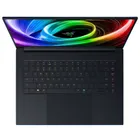
1. Best gaming laptop: Razer Blade 16
2. Best gaming PC: HP Omen 35L
3. Best handheld gaming PC: Lenovo Legion Go S SteamOS ed.
4. Best mini PC: Minisforum AtomMan G7 PT
5. Best VR headset: Meta Quest 3