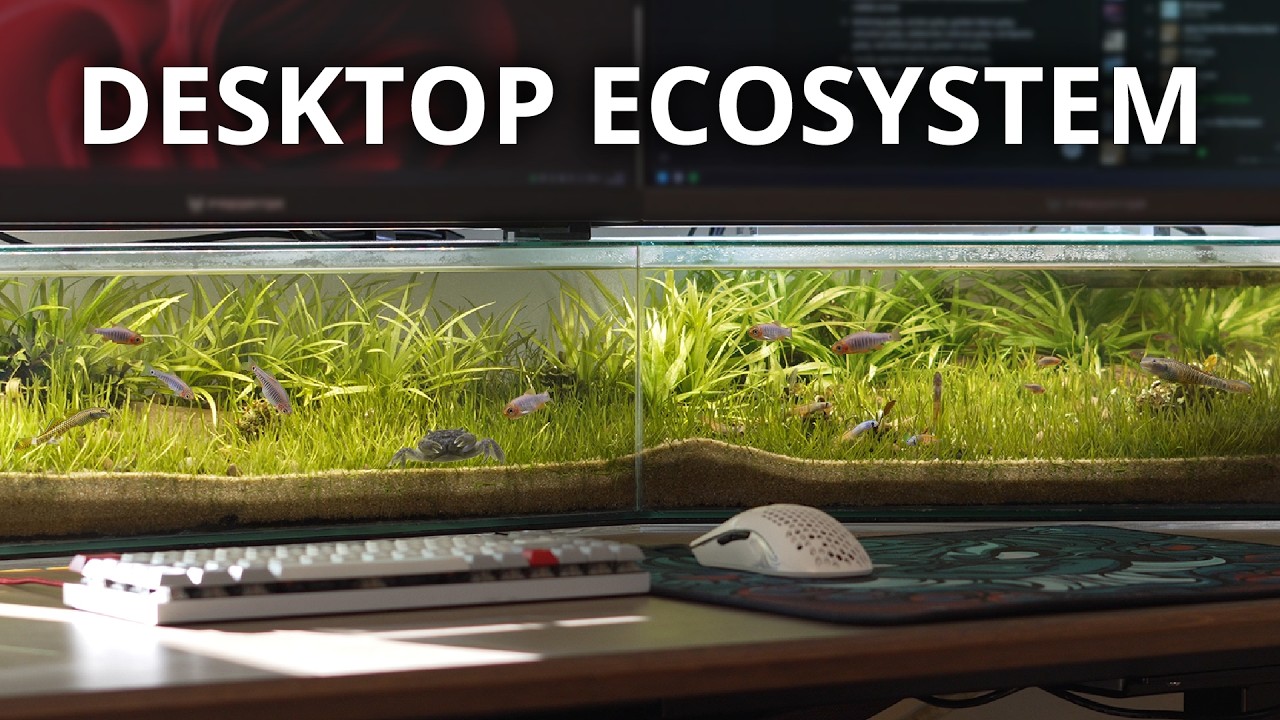
Suspending a pricey pair of Acer Predator monitors above several litres of water may not sound like the brightest idea. However, this YouTuber's under-monitor aquarium makes a strong case for handcrafting your own desk-side ecosystem.
The channel Tanks for Nothin is all about weird and wonderful aquarium builds, though this is their first time setting up such watery shop around PC hardware. Called The Desktop Riverbed, I definitely see the appeal of having lots of little fishies to keep you company throughout the workday.
The tank itself is a custom construction bonded together with a water-tight silicone sealant. Once dry, the whole thing is placed on risers to allow the wire for the creator's keyboard to run underneath the aquarium. Frosted film on the back of the tank obscures any messy cable management. There's already some elegance to the design, but my anxious self has several questions about electrical safety.
Thankfully, in between introducing the flora and fauna of this underwater, under-monitor ecosystem, the YouTuber is quick to address these concerns. Two powerful strip lights placed above the tank encourage algae to grow with wild abandon. To clean this up, the YouTuber introduces snails, clams, guppies, and a dedicated water pump system.
"If I'm going to have water pipes hanging around my computer, I don't want them knocked and stretched when this motorised desk moves up and down," the creator explains. "So, I took the computer holder that came with the desk and used it to suspend a heated filter instead. I'm using zip ties so I can move it easily if I mismeasure anything, and now everything moves up and down with the desk."
The YouTuber continues to nurture the ecosystem, specifically introducing primarily bottom-dwelling species "that stay low so they're visible from above." However, this introduces an unexpected design flaw: though the selected species tend to burrow and hide among the tank's foliage, the creator says that they've inadvertently created the "ultimate 'get nothing done' tank."
"In a scene where things are still most of the time, I've found that sudden movements grab my attention the most," They reflect, "So, in the end, I've decided to add some midwater fish, [a number of tiny emerald rasboras specifically], to reduce distraction by providing some constant background movement."
While I prefer to keep my desk space cluttered with Miku Hatsune figurines, the thought of a desktop aquarium is pretty enchanting. I also hate to admit it, but the idea of submerging Miku and watching her become a cosmic horror canvas for algae is also pretty compelling.
1. Best overall / 4K:
MSI MPG 321URX
2. Best budget 4K:
Asus ROG Strix XG27UCG
3. Best 1440p:
MSI MPG 271QRX
4. Best budget 1440p:
KTC H27T22C-3
5. Best 1080p:
AOC Gaming C27G4ZXE
6. Best Ultrawide:
Gigabyte MO34WQC2
7. Best budget ultrawide:
Xiaomi G34WQi
8. Best 32:9:
Samsung Odyssey OLED G9
9. Best dual-mode:
Alienware AW2725QF