While it's not on sale in any way, it's still a great price for an entry-level gaming PC that sports a decent-sized SSD. You can get faster rigs for more cash, of course, but you'll want to keep some money aside for a nice monitor, mouse, and keyboard.
With Amazon's Spring Sale now up and running, I've been nosing through all the deals to see whether it's possible to put together a complete gaming PC setup (i.e. computer and all the necessary peripherals) for under $1,200. There's a huge amount of satisfaction to be had from building your own PC, but thanks to the global memory crisis, the prices of DRAM and SSDs are ludicrous.
The build I originally put together came to a total of $1,001 but it had one crucial part missing: Windows. I know I could go down the Linux route and not have to worry about spending any money on an operating system, but for anyone new to PCs, that's really not an ideal entry point.
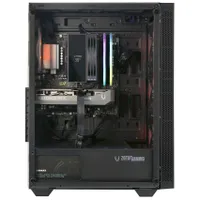
Eventually, I settled on a Zotac Gaming prebuilt for $900 at Newegg (which obviously does come with Windows), and then went off to find a nice monitor, keyboard, mouse, and headset to go with it.
The Ryzen 5 5500 is our current pick for the best budget gaming CPU on the market right now. Yes, it's a relatively old processor, with an architecture dating from 2020, and the lack of L3 cache (just 16 MB) does it no favours in gaming. However, I can attest to its plucky spirit, having built a few systems with the chip, and its ultra-low price helps to offset the enormous cost of memory and storage.
For graphics duties, the Zotac Gaming Mek sports a GeForce RTX 5050, and just like the little Ryzen, it's our top recommendation for the best budget graphics card. It's nothing amazing, but for 1080p gameplay, it's pretty decent. Enable DLSS upscaling, and it'll handle competitive shooters just fine.
1 / 5
1080p gaming performance
Avg FPS
1% Low FPS
RTX 5050
50
38
Arc B570
37
28
RTX 5060
64
48
020406080
Black Myth Wukong (1080p High) Data
Product
Value
RTX 5050
50 Avg FPS, 38 1% Low FPS
Arc B570
37 Avg FPS, 28 1% Low FPS
RTX 5060
64 Avg FPS, 48 1% Low FPS
Avg FPS
1% Low FPS
RTX 5050
32
23
Arc B570
33
28
RTX 5060
46
30
015304560
Cyberpunk 2077 (1080p RT Ultra) Data
Product
Value
RTX 5050
32 Avg FPS, 23 1% Low FPS
Arc B570
33 Avg FPS, 28 1% Low FPS
RTX 5060
46 Avg FPS, 30 1% Low FPS
Avg FPS
1% Low FPS
RTX 5050
54
24
Arc B570
54
32
RTX 5060
73
39
020406080
F1 24 (1080p Ultra high) Data
Product
Value
RTX 5050
54 Avg FPS, 24 1% Low FPS
Arc B570
54 Avg FPS, 32 1% Low FPS
RTX 5060
73 Avg FPS, 39 1% Low FPS
Avg FPS
1% Low FPS
RTX 5050
96
58
Arc B570
64
39
RTX 5060
109
53
037.575112.5150
Homeworld 3 (1080p Epic) Data
Product
Value
RTX 5050
96 Avg FPS, 58 1% Low FPS
Arc B570
64 Avg FPS, 39 1% Low FPS
RTX 5060
109 Avg FPS, 53 1% Low FPS
Avg FPS
1% Low FPS
RTX 5050
65
43
Arc B570
73
46
RTX 5060
87
47
0255075100
Metro Exodus Enhanced Edition (1080p Ultra) Data
Product
Value
RTX 5050
65 Avg FPS, 43 1% Low FPS
Arc B570
73 Avg FPS, 46 1% Low FPS
RTX 5060
87 Avg FPS, 47 1% Low FPS
Avg FPS
1% Low FPS
RTX 5050
46
28
Arc B570
40
19
RTX 5060
52
34
015304560
The Talos Principle 2 (1080p Ultra) Data
Product
Value
RTX 5050
46 Avg FPS, 28 1% Low FPS
Arc B570
40 Avg FPS, 19 1% Low FPS
RTX 5060
52 Avg FPS, 34 1% Low FPS
Avg FPS
1% Low FPS
RTX 5050
54
40
Arc B570
55
39
RTX 5060
78
57
020406080
Total War: Warhammer 3 (1080p Ultra) Data
Product
Value
RTX 5050
54 Avg FPS, 40 1% Low FPS
Arc B570
55 Avg FPS, 39 1% Low FPS
RTX 5060
78 Avg FPS, 57 1% Low FPS
1440p gaming performance
Avg FPS
1% Low FPS
RTX 5050
33
28
Arc B570
26
21
RTX 5060
44
37
015304560
Black Myth Wukong (1440p High) Data
Product
Value
RTX 5050
33 Avg FPS, 28 1% Low FPS
Arc B570
26 Avg FPS, 21 1% Low FPS
RTX 5060
44 Avg FPS, 37 1% Low FPS
Avg FPS
1% Low FPS
RTX 5050
17
10
Arc B570
17
9
RTX 5060
23
12
07.51522.530
Cyberpunk 2077 (1440p RT Ultra) Data
Product
Value
RTX 5050
17 Avg FPS, 10 1% Low FPS
Arc B570
17 Avg FPS, 9 1% Low FPS
RTX 5060
23 Avg FPS, 12 1% Low FPS
Avg FPS
1% Low FPS
RTX 5050
34
22
Arc B570
36
22
RTX 5060
45
13
015304560
F1 24 (1440p Ultra High) Data
Product
Value
RTX 5050
34 Avg FPS, 22 1% Low FPS
Arc B570
36 Avg FPS, 22 1% Low FPS
RTX 5060
45 Avg FPS, 13 1% Low FPS
Avg FPS
1% Low FPS
RTX 5050
68
35
Arc B570
49
27
RTX 5060
89
52
0255075100
Homeworld 3 (1440p Epic) Data
Product
Value
RTX 5050
68 Avg FPS, 35 1% Low FPS
Arc B570
49 Avg FPS, 27 1% Low FPS
RTX 5060
89 Avg FPS, 52 1% Low FPS
Avg FPS
1% Low FPS
RTX 5050
46
33
Arc B570
55
39
RTX 5060
63
45
020406080
Metro Exodus Enhanced Edition (1440p Ultra) Data
Product
Value
RTX 5050
46 Avg FPS, 33 1% Low FPS
Arc B570
55 Avg FPS, 39 1% Low FPS
RTX 5060
63 Avg FPS, 45 1% Low FPS
Avg FPS
1% Low FPS
RTX 5050
29
21
Arc B570
27
15
RTX 5060
41
21
015304560
The Talos Principle 2 (1440p Ultra) Data
Product
Value
RTX 5050
29 Avg FPS, 21 1% Low FPS
Arc B570
27 Avg FPS, 15 1% Low FPS
RTX 5060
41 Avg FPS, 21 1% Low FPS
Avg FPS
1% Low FPS
RTX 5050
37
27
Arc B570
39
27
RTX 5060
55
40
015304560
Total War: Warhammer 3 (1440p Ultra) Data
Product
Value
RTX 5050
37 Avg FPS, 27 1% Low FPS
Arc B570
39 Avg FPS, 27 1% Low FPS
RTX 5060
55 Avg FPS, 40 1% Low FPS
Upscaling performance
1% Low FPS
RTX 5050
57
49
Arc B570
45
32
RTX 5060
73
62
020406080
Black Myth Wukong (1440p High + Upscaling quality) Data
Product
Value
RTX 5050
57 Avg FPS, 49 1% Low FPS
Arc B570
45 Avg FPS, 32 1% Low FPS
RTX 5060
73 Avg FPS, 62 1% Low FPS
Avg FPS
1% Low FPS
RTX 5050
61
40
Arc B570
77
65
RTX 5060
81
54
0255075100
Cyberpunk 2077 (1440p RT Ultra + upscaling quality) Data
Product
Value
RTX 5050
61 Avg FPS, 40 1% Low FPS
Arc B570
77 Avg FPS, 65 1% Low FPS
RTX 5060
81 Avg FPS, 54 1% Low FPS
Avg FPS
1% Low FPS
RTX 5050
82
55
Arc B570
112
44
RTX 5060
101
11
037.575112.5150
F1 24 (1440p Ultra high +upscsaling quality, 2x FG) Data
Product
Value
RTX 5050
82 Avg FPS, 55 1% Low FPS
Arc B570
112 Avg FPS, 44 1% Low FPS
RTX 5060
101 Avg FPS, 11 1% Low FPS
Avg FPS
1% Low FPS
RTX 5050
94
56
Arc B570
63
38
RTX 5060
113
61
037.575112.5150
Homeworld 3 (1440p Epic + upscaling quality) Data
Product
Value
RTX 5050
94 Avg FPS, 56 1% Low FPS
Arc B570
63 Avg FPS, 38 1% Low FPS
RTX 5060
113 Avg FPS, 61 1% Low FPS
1% Low FPS
RTX 5050
68
24
Arc B570
63
36
RTX 5060
84
41
0255075100
The Talos Principle 2 (1440p Ultra +upscaling quality, 2x FG) Data
Product
Value
RTX 5050
68 Avg FPS, 24 1% Low FPS
Arc B570
63 Avg FPS, 36 1% Low FPS
RTX 5060
84 Avg FPS, 41 1% Low FPS
Synthetic performance
RTX 5050
6184
Arc B570
6742
RTX 5060
8618
02,5005,0007,50010,000
Overall index score
3DMark Port Royal Data
Product
Value
RTX 5050
6184
Arc B570
6742
RTX 5060
8618
GPU index score
Overall index score
RTX 5050
4614
4900
Arc B570
6001
6176
RTX 5060
6379
6526
02,0004,0006,0008,000
3DMark Time Spy Extreme Data
Product
Value
RTX 5050
4614 GPU index score, 4900 Overall index score
Arc B570
6001 GPU index score, 6176 Overall index score
RTX 5060
6379 GPU index score, 6526 Overall index score
RTX 5050
753.42
Arc B570
354.68
RTX 5060
939.86
02505007501,000
Samples per min
Blender 4.3.0 (Junkyard) Data
Product
Value
RTX 5050
753.42
Arc B570
354.68
RTX 5060
939.86
Index score
Duration (sec)
RTX 5050
1268
78.851
Arc B570
1185
84.358
RTX 5060
1683
59.399
05001,0001,5002,000
Procyon generative image creation Data
Product
Value
RTX 5050
1268 Index score, 78.851 Duration (sec)
Arc B570
1185 Index score, 84.358 Duration (sec)
RTX 5060
1683 Index score, 59.399 Duration (sec)
System performance
RTX 5050
2682
Arc B570
2693
RTX 5060
2659
07501,5002,2503,000
Average clock speed (MHz)
GPU frequency Data
Product
Value
RTX 5050
2682
Arc B570
2693
RTX 5060
2659
4K frames per J
1080p frame per J
RTX 5050
0.22
0.53
Arc B570
0.21
0.51
RTX 5060
0.24
0.61
00.20.40.60.8
Performance per watt Data
Product
Value
RTX 5050
0.22 4K frames per J, 0.53 1080p frame per J
Arc B570
0.21 4K frames per J, 0.51 1080p frame per J
RTX 5060
0.24 4K frames per J, 0.61 1080p frame per J
Peak power (watts)
Average power (watts)
RTX 5050
150
128
Arc B570
183
162
RTX 5060
170
154
050100150200
Power Data
Product
Value
RTX 5050
150 Peak power (watts), 128 Average power (watts)
Arc B570
183 Peak power (watts), 162 Average power (watts)
RTX 5060
170 Peak power (watts), 154 Average power (watts)
Peak temperature (°C)
Average temperature (°C)
RTX 5050
68
67
Arc B570
63
61
RTX 5060
64
62
020406080
Thermals Data
Product
Value
RTX 5050
68 Peak temperature (°C), 67 Average temperature (°C)
Arc B570
63 Peak temperature (°C), 61 Average temperature (°C)
RTX 5060
64 Peak temperature (°C), 62 Average temperature (°C)
You only get 16 GB of DDR4-3200 memory, but as I've shown in the past, that's more than enough for most games, as long as you avoid having too many apps open while gaming. And while it would be nice to have more storage than just 1 TB, SSD prices are so high these days that it's actually quite a shock to see this amount for an entry-level build.
Overall, it's a simple gaming PC, but one that should keep anyone new to PC gaming happy. Now, you just need a monitor, keyboard, mouse, and headset to go with it. Easy peasy.
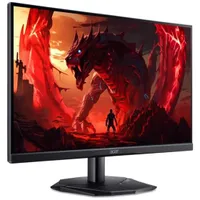
Why do monitor model names need to be so confusing? It's an eternal mystery. But if you can decode this Acer, you'll find it's a cracking deal. A 165 Hz gaming monitor for under $100. It uses a VA panel, so it won't have the best colors, but that's to be expected at this price point.
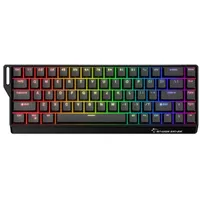
It might have the most ludicrous name you've ever seen for a keyboard, but this is actually the best budget gaming keeb you can buy right now. It might look and feel a bit cheap, but it packs all the latest gaming tech inside.
The best budget wireless gaming mouse is nearly always on sale, because it's quite an old model. However, there's nothing wrong with the classic that is the G305 Lightspeed: simple, solid, and very reliable.
Key specs: 12,000 DPI | 99 g | 250h battery life (AA cells)
Just like the Logitech mouse, Corsair's classic headset is frequently on sale and has been around for a long time. For good reason, though: it's the best budget headset you can buy. At this price, there's nothing to beat Corsair's cans.
It's easy to get carried away when picking up a monitor and peripheral set to go with your new gaming PC, but if you're on a tight budget, it can be hard to sift through the masses of 'deals' on offer. Well, don't worry, because I've done it for you (or rather, the whole team has) because we've personally tested all of the above peripherals and rate them very highly.
The only thing we haven't tested is the Acer monitor. It won't have the rich colors of an IPS panel or the blistering speed of an OLED monitor, but what it does have is a fast VA display and excellent value for money.
Put everything here together, and you've got a whole new gaming PC setup for just under $1,112. That's a whole $88 less than my original budget of $1,200 for a complete system. The RAMpocalypse might be trying its best to ruin PC gaming, but if you don't mind using older parts and tech, you can still get into one of the best hobbies around without utterly destroying your bank account.
Nick, gaming, and computers all first met in the early 1980s. After leaving university, he became a physics and IT teacher and started writing about tech in the late 1990s. That resulted in him working with MadOnion to write the help files for 3DMark and PCMark. After a short stint working at Beyond3D.com, Nick joined Futuremark (MadOnion rebranded) full-time, as editor-in-chief for its PC gaming section, YouGamers. After the site shutdown, he became an engineering and computing lecturer for many years, but missed the writing bug. Cue four years at TechSpot.com covering everything and anything to do with tech and PCs. He freely admits to being far too obsessed with GPUs and open-world grindy RPGs, but who isn't these days?
You must confirm your public display name before commenting
Please logout and then login again, you will then be prompted to enter your display name.