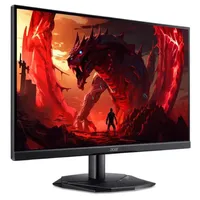
Despite the protest of some of my colleagues, dual monitors are just the best setup for a gaming rig. The distance between the two gives me clearly defined borders for a game to run on the better screen for pretty games, and on the worst screen for competitive ones. That's before mentioning a second screen gives room for extra information, a notepad app, or just a podcast when I'm bored.
If you agree dual monitors are the best and you're in need of a second screen, I'd recommend the Acer Nitro KG241Y P3bip now that it's a mere $90 at Newegg. A saving of $40 makes it a super solid choice, and what I'd be picking if I needed a new one.
- Join us on WhatsApp for daily deals, direct to your phone.
With this monitor, the price is mostly what sells it to me. 1080p resolution is a tad low, naturally, but 4K monitors will demand a few hundred dollars more. However, just because its resolution is the bare minimum you'd want for gaming doesn't mean its other stats lack too.
You are getting a 180 Hz refresh rate, which is solid, and a response time of 0.5 ms. This makes the Acer a solid competitive gaming pick.
1080p is far less tough for a GPU to deal with than 4K or 1440p, so this works as a decent main monitor for the likes of Counter-Strike 2 or Valorant, where frame rate really matters. I have the same setup myself: one lush OLED 1440p panel for single-player, pretty games, and one more budget-oriented 1080p monitor for competitive play.
It is a VA panel, which is typically better than IPS for its contrast, but worse for viewing angles and color accuracy. It's an older tech, too, though solid nonetheless.
This Acer screen isn't the absolute cheapest gaming monitor I'd recommend right now. MSI's G242L E14 is $5 cheaper, and it uses an IPS panel, but it has a higher response time and lower refresh rate. The Acer is a better competitive choice, while the MSI will handle color better.
Still, if you find yourself not quite satisfied with the amount of information you can cram into just a single screen, a second monitor will really make your gaming rig pop, and getting one for $90 makes it even pretty solid on a budget. I'd know, I've done the same myself.
1. Best overall / 4K:
MSI MPG 321URX
2. Best budget 4K:
Asus ROG Strix XG27UCG
3. Best 1440p:
MSI MPG 271QRX
4. Best budget 1440p:
KTC H27T22C-3
5. Best 1080p:
AOC Gaming C27G4ZXE
6. Best Ultrawide:
Gigabyte MO34WQC2
7. Best budget ultrawide:
Xiaomi G34WQi
8. Best 32:9:
Samsung Odyssey OLED G9
9. Best dual-mode:
Alienware AW2725QF