


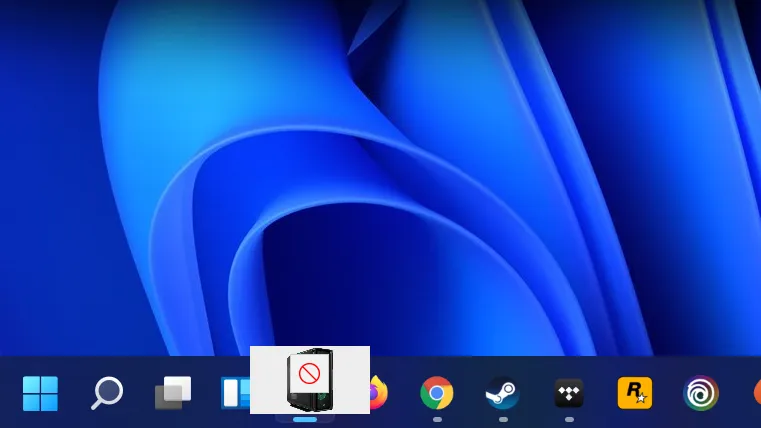
If you got used to dragging and dropping files into your taskbar on Windows 10, in order to open an associated app, you might have been a little bit peeved when that functionality was altogether missing from Windows 11. It definitely took some time for me to unpick my brain from this habit in its absence, but at least now I can relearn it all over again. Microsoft has reintegrated drag and drop to taskbar into Windows 11 with its latest Insider build.
The ability to drag and drop onto the taskbar might not seem altogether that important, but once you're doing it, it's tough to adjust back to not doing it. It meant you could drag a .PSD onto Photoshop and open the file, or a video into VLC player, from anywhere.
Sure, you could just double-click with your file associations setup to open that program, but that's not the point.
Though drag and drop also meant you could have multiple windows of File Explorer open, but not necessarily visible, and drag a folder between them with ease. You just grabbed the file, hover over File Explorer, pick the other window, and drop. Simple.
Windows 11 review: what we think of the new OS
How to install Windows 11: safe and secure install
What you need to know before upgrading: things to note before downloading the latest OS
The return of drag and drop on the taskbar was a highly requested feature after its notable omission. It actually gained a fair bit of popularity in the Feedback Hub, and Microsoft had responded saying it "appreciated all the feedback, and we'll continue to use it to help guide the future of features like this."
And clearly it did do just that, and fairly timely too. The feature is only available in the new Insider Dev Channel build, 22557, but it shouldn't be long before it returns to the stable version of Windows 11.
Windows 11's latest build actually brings in a lot of new features that could be quite good for Windows users all-round and gamers specifically. There are Task Manager changes, including a new Efficiency Mode, and windowed gaming should no longer come with extra performance baggage.

