





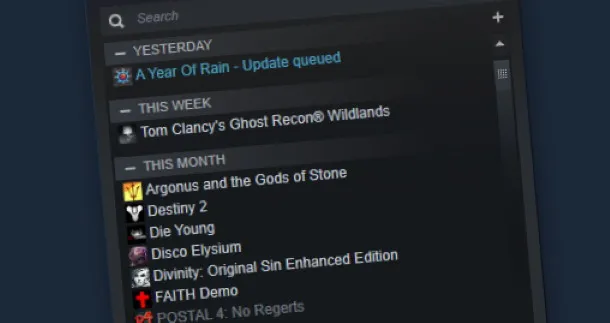
The new Steam Library has been out for a couple months now, and while it adds some very nice new features, not everyone is happy with its presentation. Small mode was something Chris Livingston said he missed back when we asked how everyone was getting on with the new format, and he'll be pleased to learn that it's back, at least in Steam's beta branch.
If you haven't opted into that, you can do so by opening Settings, and clicking the "Change…" dialog button in the Account section next to Beta Participation. From there, choose Steam Beta Update in the dropdown menu.
Once you've opted in and updated your client, hit the "View" dropdown and assuming all is in place, you'll be able to select the "Small Mode" option, which will turn Steam into a wee little box at the bottom of your screen. If you don't like it, go back to the same dropdown and you'll notice a "Large Mode" option that will take you back to way things were.
The update makes a number of other fixes and changes that you can read all about in the patch notes.
Library:
- Brought back Small Mode library view and updated to work with Steam Collections and the new Steam Library
- Added a library setting to hide game icons in the Steam Library’s left column game list
- Fixed download progress bar and status wrapping to a second line on game pages on smaller windows
- Compressed game page links bar to one line on smaller Steam windows
- Post-game summary, game review reminder and other dynamic content on game pages will now fill only one column on wider Steam windows
- Fixed occasional crashes caused when uninstalling games
- Fixed Steam client crash after exiting some AutoCloud-enabled games
- Fixed a case where game icons would sometimes not properly be downloaded and used for the game's desktop shortcut when installing a game. For for previously installed games affected by the problem, validating game contents and recreating the shortcuts should fix the issue.
- Removed auto-creation of Documents/Downloads directory.
Linux:
- Updated vaapi decoding to libva2 compatibility
- Fixes to free disk space checks to address issues with some NFS mounts
- Fixed Steam Input F12 binding
