This month I have been replacing the back of my Steam Deck: If there's one mod I can't resist it's throwback transparent shells for modern hardware, akin to the Game Boy Advance back in the day. So you know I was all over that JSAUX transparent purple back. It's gorgeous.
This month I have been testing Intel's NUC 13 Extreme: A compact PC with a whole RTX 3080 Ti in it. It runs surprisingly cool, too. Well, the GPU does. Not so much the CPU. You can read up all about it in my Intel NUC 13 Extreme review.
The Epic Games Launcher isn't great at dealing with large game libraries. Images take a while to pop in, the library only loads when you scroll past a certain point, and it's difficult to spot which games are already installed and ready to play. It's even sluggish to respond to mouse movements sometimes. But it doesn't have to be this way, as the Heroic Games Launcher proves.
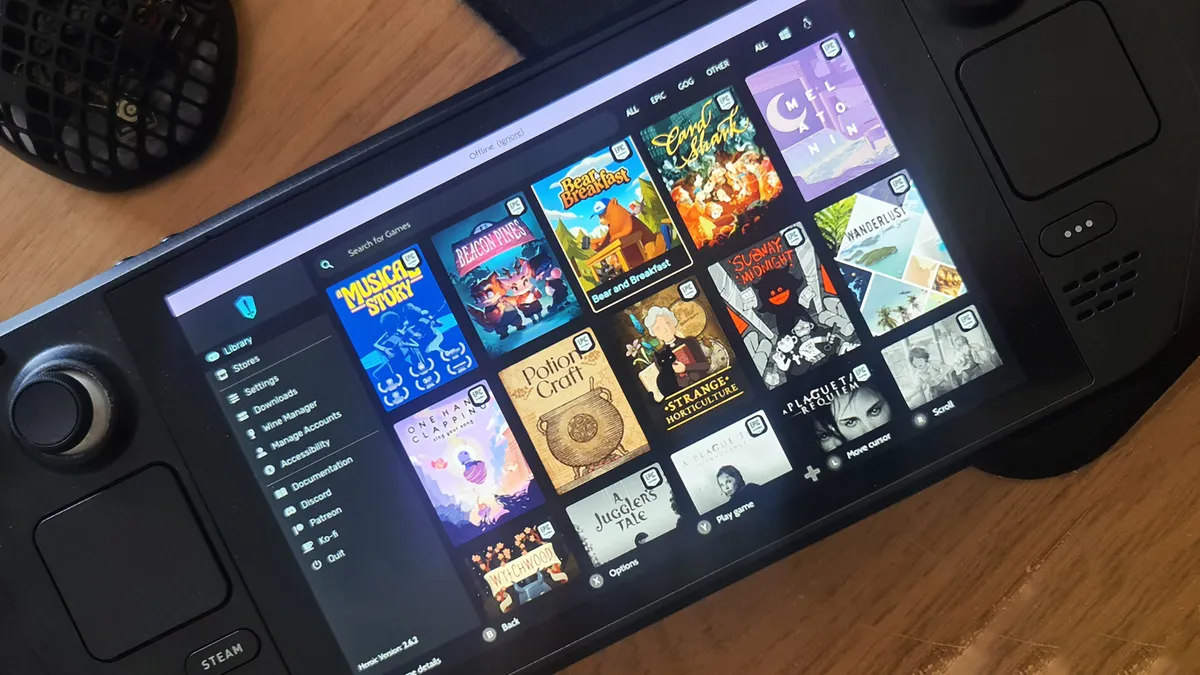
The Heroic Games Launcher is an open source app for Windows, Linux, and MacOS that combines your Epic Games and GOG libraries into one launcher. In a way it's competing with GOG's Galaxy application for easy access to all your games, but I simply use it as a stand-in for the Epic Games Launcher on my Steam Deck. On which it has proven to be an extremely easy way to access my Epic games on the PC handheld—the Epic Games app isn't much fun to use on Steam Deck, but Heroic works a treat and automatically adds installed games to the Steam Deck's native UI.
On Heroic, I can scroll through my games with no pop-in, images don't take forever to load, and when I click on them I can see all the info I need. On Steam Deck, that also includes important information as to the compatibility layer being used to translate the mostly built for Windows games to run on Linux. There's a lot more to it than that, too. You can import the game, check Wine versions prior to installing, limit FPS, enable V-Sync, and more.
The UI is also much improved. The search bar sticks at the top even if you scroll all the way down to the bottom of your library, your most recently played games are the first you see, and your installed games are easy to discern from uninstalled games by their colourful portraits (which was something Epic used to do but got rid of in an 'update').
I used to think Epic was slow because of its beautiful big game images, but Steam manages to make its library very scrollable with similarly big pictures, and in the video I captured below you can see Heroic make easy work of it, too.
Epic Games Launcher versus Heroic Games Launcher"
And you're watching cold boots for both apps there. I'd previously logged into Epic and Heroic, but neither was running in the system tray or in the background at the time I opened the apps from the task bar. The difference in responsiveness is night and day.
There's even an in-depth accessibility options menu right there in the main menu, with zoom functions, font families, and themes.
I have been hit with a few bugs worth mentioning when using Heroic. It doesn't always load up game details even when I'm on Wi-Fi but most annoyingly it had a moment where none of my installed games would boot anymore, and I had to reinstall a bunch of them. Frustrating to say the least, and lucky my Steam Deck is mostly used as an indie game machine so all the installs are pretty small. That issue seems to be fixed for good now, as I've not run into it again since.
That's still nothing compared to the day-to-day frustration of navigating the Epic Games Launcher.
This open source, mostly crowdfunded, free-to-use launcher is so good on the Steam Deck— a tiny, fairly weak-hearted PC platform—that I'm left wondering why my desktop PC can't keep up with the official Epic Games Launcher software installed.
The answer is quite simple: install Heroic on your PC. That's plenty possible, there's a Windows version, and that's exactly what I've done. Moreover, I don't know why I need a third-party app to do what Epic's own should be doing already. What I really want is Epic to improve its launcher on PC. However much I appreciate Heroic launcher, and I do a lot, something's already gone wrong if I feel the need to use it.