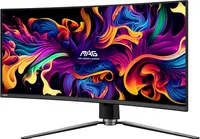
32-inch 4K or 34-inch ultrawide? If the answer is the latter, your OLED weapon of choice could well be the MSI MAG 341CQP, yours for $680 from Amazon and the cheapest we've seen this class of display.
We've just had the in-office debate over the merits of 32-inch 4K versus 34-inch 1440p ultrawide. The 4K option scores with image detail, pixel density and superior non-gaming capabilities. The 34-inch ultrawide hits back with that wrap-around sense of gaming immersion.
Then there's cost and how performance intersects with cost. The argument goes something like this. We recently spotted another MSI OLED panel, the 32-inch 4K MSI MAG 321UP on Newegg for $800. That makes it the cheapest 4K gaming OLED yet. Nice.
Now, if that was the only consideration, 4K for $800 versus 34-inch ultrawide for $680, well, you could make a strong argument for 4K. The problem is that 4K is so very demanding in terms of GPU load. So, if you're going 4K, you're going to need $900, maybe $1,000's worth of GPU to make the most of it.
With a 34-inch ultrawide and its 3,440 by 1,440 pixel grid, you're looking at just under five million pixels to the over eight million pixels of 4K. So, a $600 graphics card like an Nvidia RTX 4070 Super should suffice.
If that's the broad proposition, what's good about this particular 34-inch OLED? Well, it's a Samsung-based QD-OLED panel, so that means loads of HDR pop combined with decent full-screen brightness.
Downsides? Well, like all OLED monitors, burn-in is always a bit of a worry. Long term testing by various third party outlets tends to show only very mild burn in occurring with these modern OLEDs. Moreover, you've got three years of burn-in cover from new.
Beyond that, it's a little harder to know how these screens will fare. Will they be badly burned after five years? That's tricky to say. How long do you usually use a monitor? If you're happy buying something new after, say, four years once the warranty expires, well, that's fine. It's a subjective call in the end.