I keep an eye out for features, feel, and value for money when searching for the best gaming keyboards. Each of the gaming keyboards in this guide delivers on these three points, though I've focused on various price points to cater to any sort of budget.
The best gaming keyboard right now is the Wooting 80HE. It has powerful Hall effect switches and excellent software to make the most of them. But if you want to go for something cheaper, we've been blown away by the Gamakay X NaughShark NS68, which is the new best budget gaming keyboard.
One vital aspect of any gaming keyboard purchase is what type of switch to buy. We're seeing more and more specialised switches, such as Hall effect, optical, induction and TMR, which are becoming great picks for competitive gamers. Though a mechanical switch can still be plenty powerful.
August 6, 2026: We've updated our page for easier reading and checked over our recommendations. March 25, 2026: We've selected a new best gaming keyboard, the Wooting 80HE.
March 9, 2026: Added the newly updated table to allow you to see all our recommendations right at the top of the page.

There are few keyboard enthusiasts as enthusiastic as our Jacob. He's been professionally testing them for many years now, and has been collecting mechanical key switches like Smaug hoarded gold for even longer. Whether it's Hall effect or straight mechanical, he's poked and prodded more keyboards and switches than any one man should, and is our expert on all things keeb.
The best gaming keyboard
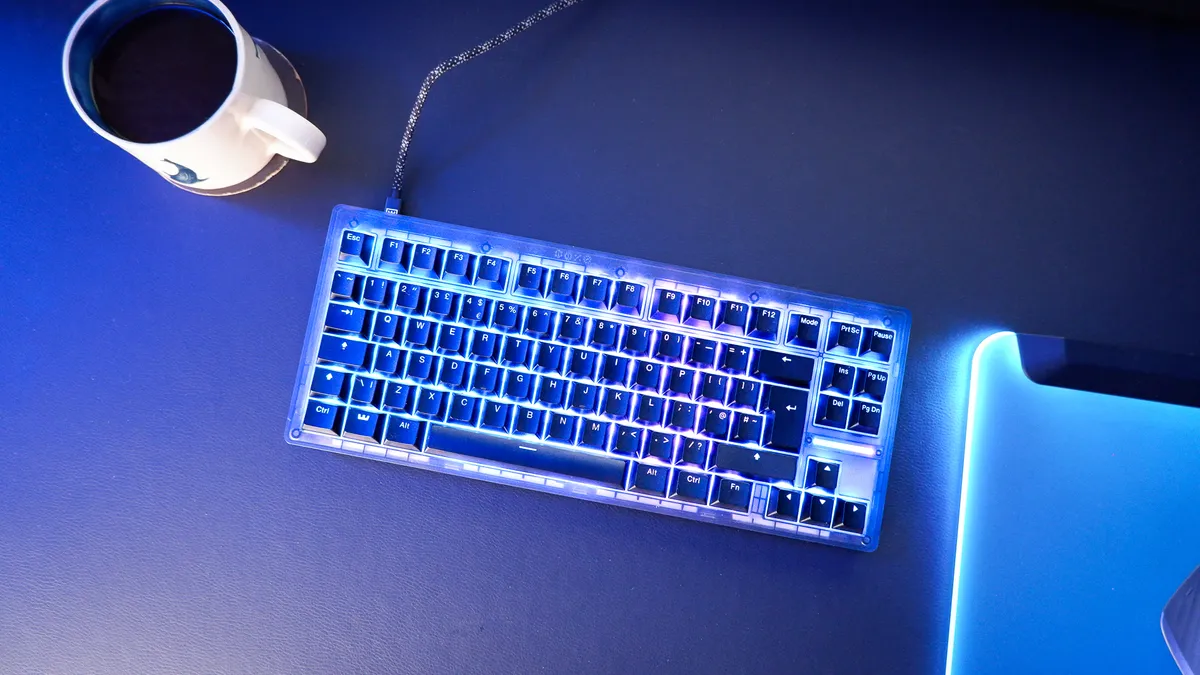


✅ You want the best software: Wooting's Wootility is easily the best in the game, and it makes things easy for new and experienced gamers alike.
✅ You want flexibility: The Wooting 80HE has made profile switching a breeze, with a dedicated mode key and straightforward set-up.
❌ You want the sleekest typing experience: There are better keyboards for pure typing experience, though most are without the benefits of Hall effect.
Hall effect is no longer a new technology with great promise; it's delivered on it. The Wooting 80HE is the best example of Hall effect delivering genuine upgrades for gamers, through not only its magnetic switches but the software to unlock their full potential.
The Wooting 80HE offers a compact design; more or less a tenkeyless design but squished a little closer together. It comes with Lekker L60 v2 switches, with less wobble than previous versions. That's a great upgrade, though with the recent release of the Wooting 60HE v2, Wooting introduced the Lekker Tikken switch, which is hands-down the best of the bunch. I prefer the size of the larger 80HE, but, luckily, you can kit it out with Tikken switches—only catch is you have to build it yourself.
Hall effect switches offer a range of benefits, including rapid trigger, adjustable actuation, multiple actions per key, and more. On the Wooting 80HE, these can be accessed through the Wootility software. It brandishes easy to set-up profiles, selected at a tap of the dedicated Mode button on the keyboard, and allows for a high level of customisation without a fuss.
There's a small light bar above the arrow keys that can also be set to various functions in the Wootility, such as showing how far you've depressed a key (analog, remember?), which mode is selected, or a bar that gradually fills up the faster you type. Yeah, that's become a bit of an obsession.
The Wooting 80HE offers a plastic surround as standard. A metal one is available for an extra fee. It may not be to everyone's taste, as it has a bit of flex and the feet are not adjustable. Though any tech that offers a translucent option is a win with me. The 80HE offers three standard plastic case finishes: black, ghost (grey translucent) and frost (white translucent).
For competitive gamers, this is an easy pick. Even if you're not that sweaty, there's so much flexibility here, it's hard to argue with. You could spend your money on a keyboard that is nicer to type on, but it might not have the features that the Wooting 80HE offers. You may even find a Hall effect or even TMR keyboard that's technically faster, but it won't have the software. That's why, after testing a lot of keyboards this year and last, the Wooting 80HE is the one I've settled on to use myself.

Read our full Wooting 80HE review.
The best budget gaming keyboard


✅ You want a great gaming experience: The Gamakay offers 8K polling, Hall effect switches and all the benefits of those, including rapid trigger. All for an absurdly low price.
✅ You have a small desk: You can save room by trimming down your gaming keyboard. More room to flick your mouse around or just fill with figurines.
❌ You're stuck in your ways: It might seem silly, but this is both a small keeb and one fitted with some new tech like rapid trigger. Both require a little patience to fully take advantage of, so this may feel a little different to use than your average keyboard.
It's easy to see why the Gamakay x NaughShark NS68 is the best on a budget. Just look at the specs, and then the price. Did you do a double take?
The Gamakay isn't just a small and wallet-friendly board; it's also packed full of new features like Hall effect switches. It's frankly astounding to think you can get such advanced extras, such as rapid trigger, at such a low price nowadays.
The NS68 is, as you may be able to guess from that name, a 68% keyboard, and this makes it great for any small desk as it only takes up a little room. Though not so little that it loses out on genuinely useful keys, like the arrow keys, which are missing on 60% keyboards.
However, smaller keyboards like the Gamakay x NaughShark NS68 aren't always as convenient as full-size boards. Just ask the tiny right-side Shift key.
Though it is undoubtedly a cheap-feeling keyboard compared to most on this list, it's not as flimsy as you'd think and it comes with PBT keycaps; those are the standard for quality keys. At just over 750 grams, it's pretty light. The version we tested is wired only, too, though you can pay only a small amount for tri-mode connectivity over 2.4 GHz and Bluetooth.
One of the areas the Gamakay lacks is its software. Perhaps one of the single biggest flaws in most great keyboards. It works fine, but it isn't the cleanest-looking software, and the UI could benefit from a great deal more polish. This software matters more for a Hall effect keyboard such as this; however, if you can get over that, it's hard not to admire the robust set of features this Gamakay offers for such a reasonable price.

Read our full Gamakay X NaughShark NS68 review.
The best 60% gaming keyboard


✅ You want a compact keyboard with lots of customisation: The Wooting 60HE v2 is very flexible and can be programmed to your liking in the Wootility.
✅ You value typing feel: Even though it's primarily a gaming keyboard, the Wooting 60HE v2 is a Hall effect keyboard than can go toe-to-toe with top mechanical boards for typing feel.
❌ You need more keys: It may seem obvious, but a 60% layout has far fewer keys than a full-size keyboard, which requires learning shortcuts to get around.
A tiny keyboard with huge potential. The Wooting 60HE v2 may have fewer keys than most but it doesn't feel any less capable for it.
With Wooting's latest Lekker Tikken switches under the hood, the 60HE v2 no longer feels like a second-rate typing experience compared to the best mechanical keyboards. The switch sounds superb and feels more consistent and stable as you game or type.
All the benefits of a Hall effect keyboard are present: rapid trigger, adjustable actuation, multiple actions per key and a host more. You can enable these in the no-nonsense Wootility app. These can also be enabled or disable depending on a profile, selected in the app or via a keyboard shortcut. There's no dedicated mode key on the 60HE v2, as there is on the Wooting 80HE, but you can access another layer of shortcuts with a function key to quickly switch between profiles.
It's an optional extra, but the eagle-eyed among you may have noticed the split spacebar in the pictures above. This is a great feature, and one that I'm sure we will be seeing more of in gaming keyboards soon. It affords this compact keyboard a few extra keys that can be programmed as you see fit.
For example, setting one half of the spacebar as the delete key while in typing mode. Or another example, setting one half to parry or melee in a game. There's also an extra key between the two spacebar halves that can be set to whatever you like, such as push-to-talk or a capture button.
With an all-aluminium construction, the Wooting 60HE v2 looks and sounds great. Though this does ramp up the cost. While there is a plastic body available, the 60HE v2 is definitely a more premium offering from the company for the number of keys it provides.
As far as compact gaming keyboards go, it doesn't get much better than this.

Read our full Wooting 60HE v2 review.
The best 75% gaming keyboard


✅ You're a competitive gamer: Rapid trigger is a type of tech that is best suited for a serious gamer looking to cut mere milliseconds of their reaction time, and you pay extra for it.
❌ You want switch options: Although it's hot-swappable, there are few switches actually compatible with this keyboard.
Keychron has often pushed the envelope for combining new tech with traditional keyboard quality, and nothing proves this more than the Keychron K2 HE, the best wireless rapid trigger gaming keyboard.
The 'HE' of this keyboard's name stands for 'Hall effect', which as this guide proves, is a big deal for gaming keyboards in 2026. These keys can cut out precious milliseconds, which is an eternity for professional or semi-professional Counter-Strike 2 or Valorant players. Hey, it's a helping hand even if you're not a pro.
Apart from delivering a flawless rapid trigger experience, the K2 HE is more affordable than many. That's a pretty big win in my books. It still feels incredibly high-quality in terms of sound, feel, and aesthetics, with the special edition version our Reece tested has Rosewood side-panelling, which adds a very unique and classy flair to the clacker.
And clack it does, thanks to its tall double-shot PBT keycaps, lubed Gateron double rail switches, and heavy, well-crafted casing. Yes, it's a plastic casing, apart from the wood panels, but there's no flex to be felt with this 966 g, 75% layout keyboard.
Oh, did I mention it's wireless? That's a bonus here I wasn't expecting for the money, coming with both 2.4 GHz and Bluetooth connectivity. You're also getting a whopping 240 hours of battery life without RGB enabled, and 74 hours with it enabled. Considering everything else this keeb has to offer, this is icing on a very fine cake. The only real downside to it is that you shouldn't expect to have a cornucopia of switch choices because, while they are hot swappable, there are few compatible replacements out there right now.

Read our full Keychron K2 HE review.
The best mechanical gaming keyboard
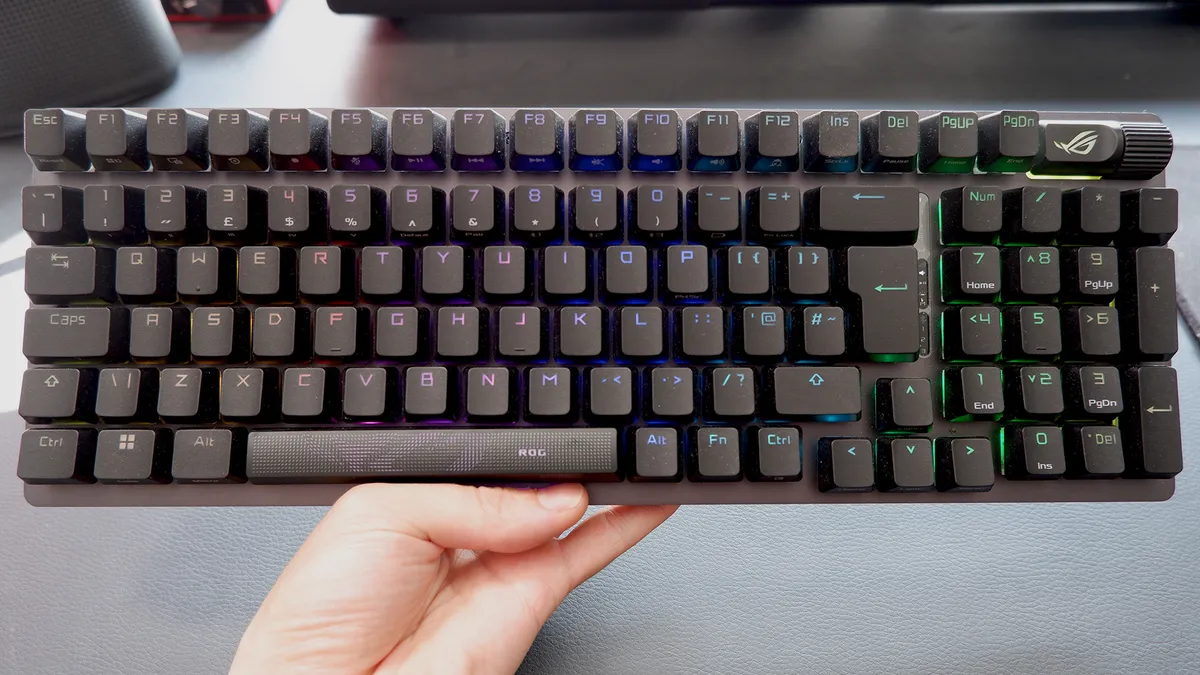


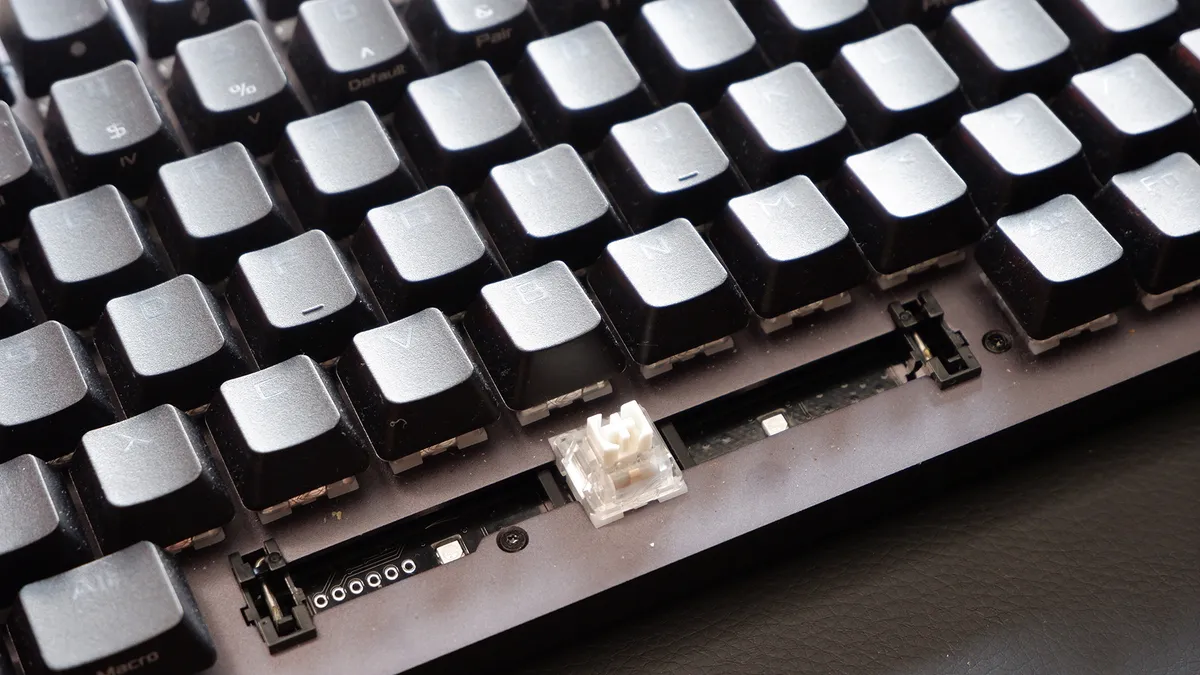


✅ You want the smoothest typing experience: With lubed switches out of the box, you don't need to waste any energy with a pot of lube and a paintbrush in order to get an immaculate typing experience.
✅ You want a great generalist gaming keyboard: You can find faster keyboards, and definitely flashier ones, but the ROG Strix Scope II 96 excels at a lot and makes few sacrifices.
❌ You want speed or Hall effect features: Yu can find faster keyboards than this using smarter switch technologies, like Hall effect, induction or TMR.
It's rare that a keyboard is such an all-around joy to use as this is. The Strix Scope II 96 Wireless brings together many of the features we're looking for in a modern gaming keyboard.
It's got some of the smoothest mechanical switches in the biz. You can pick between ROG-branded NX Snow or NX Storm switches in this board. I've been using the Snow switches, which are your regular linear dealio with an actuation force of 45 g, though the Storm switches are a moderately heavier tactile option.
A drop of lube on every mechanical key switch makes a surprising amount of difference to the typing experience. Each keypress is smooth, consistent, and every thwack produces a glorious clack. This lube is already pre-applied to each switch, which saves you the hassle of opening each one and applying it yourself. We've done that before and it can get messy.
Both of the available switches actuate at 1.8 mm, which is pretty snappy, though miles off a Hall effect or similar. It may not be the fastest on paper, but the Scope II 96 feels extremely responsive nonetheless. Before Hall effect came around, mechanical switches like these would've been hard to beat.
The Scope II 96 is nearly a full-size board—it importantly retains a full numpad—though it's been squished down into a more compact chassis. As a result, the delete key is further away from your pinky than normal. It takes some getting used to, but I've been tapping away on it for a long time now and I feel I've got typing on the Scope II 96 down to a fine art.
Still, it's been a long time since I've been blown away by a gaming keyboard. So many appear carbon copies of what Corsair did well over 10 years ago—but the Scope II 96 managed to impress me during review. It nails the fundamentals. It's also great for gaming and doesn't cost anywhere near as much as the ROG Azoth Extreme. The Scope II 96 is often discounted nowadays.
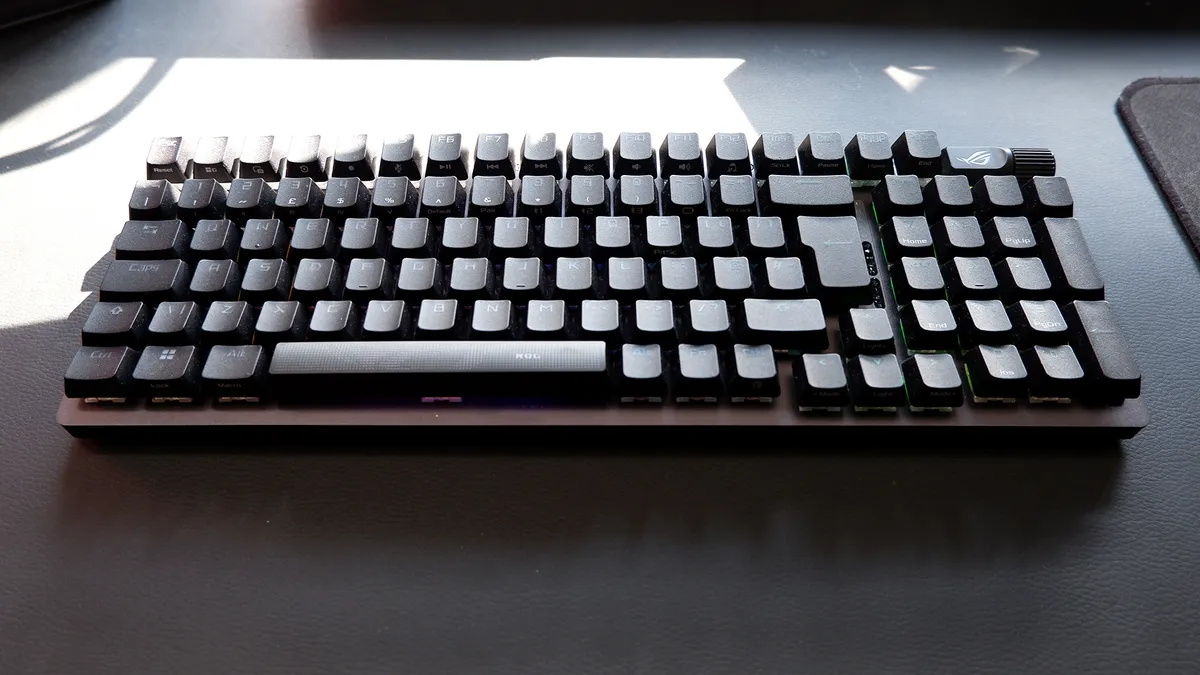
Read our full Asus ROG Strix Scope II 96 Wireless review.
The best silent gaming keyboard


✅ Sound is a concern: These key switches are so quiet that they surprised the PC Gamer office. With a company name like Be Quiet!, there's a lot to live up to, but the Light Mount does so admirably.
❌ You want to be very competitive: The Light Mount doesn't have some modern competitive gaming staples like rapid trigger or customizable actuation, and you can get both of those in other keyboards for the same price.
Mechanical keyboards are infamously clacky little beasts, yet the Light Mount says "no more!", being easily the best silent gaming keyboard out there right now. Three layers of sound-dampening foam and silicone cushioning produce that wonderfully muted sound.
Its custom mechanical switches do emit a light noise but monumentally less than others we've tested, with the space bar being the loudest of the lot. They give the Topre Realforce R2 a real run for their money, and these mechanical switches are much better for a game than Topre's capacitive touch switches.
The typing feel is great, with its soft silicone-dampened keypresses feeling surprisingly unsquishy.
The whole keyboard looks great with per-key RGB customization and software that allows you to fine-tune those flashy lights. The software is quite good as far as gaming keyboard software goes, and intuitive too. However, you will soon be able to customize the keyboard from a web-based version of the app, should the idea of any extra software be a little much for you.
All of this is given in a reasonably priced package that, whilst not exactly budget, doesn't cause undue sticker shock. It also come with a two-year warranty and some nifty little features like NKRO rollover and a smooth media knob. That media knob is a tad basic but a great inclusion and just tucked away enough in the top left corner to fit its purpose.
The only major place this may lose out to similarly priced competition is the lack of competitive features like rapid trigger. No Hall effect, no savvy switches, just pure ol' mechanical reliability. And, hey, that did us just fine for decades. It still does.
The main draw here is the quiet keys, but what made us love the Light Mount is everything it manages to cram in at the same time.

Read our full Be Quiet! Light Mount gaming keyboard review.
The best ergonomic gaming keyboard


✅ You want the best ergonomic gaming experience: You'll find more ergonomic keyboards, and more gaming ones too, but you'll not find a keyboard that blends the two worlds quite as well as this one.
❌ You're on a tight budget: Ergo boards aren't known for being cheap, and this gaming-specific one requires the extra $30 lift kit to unlock its full potential.
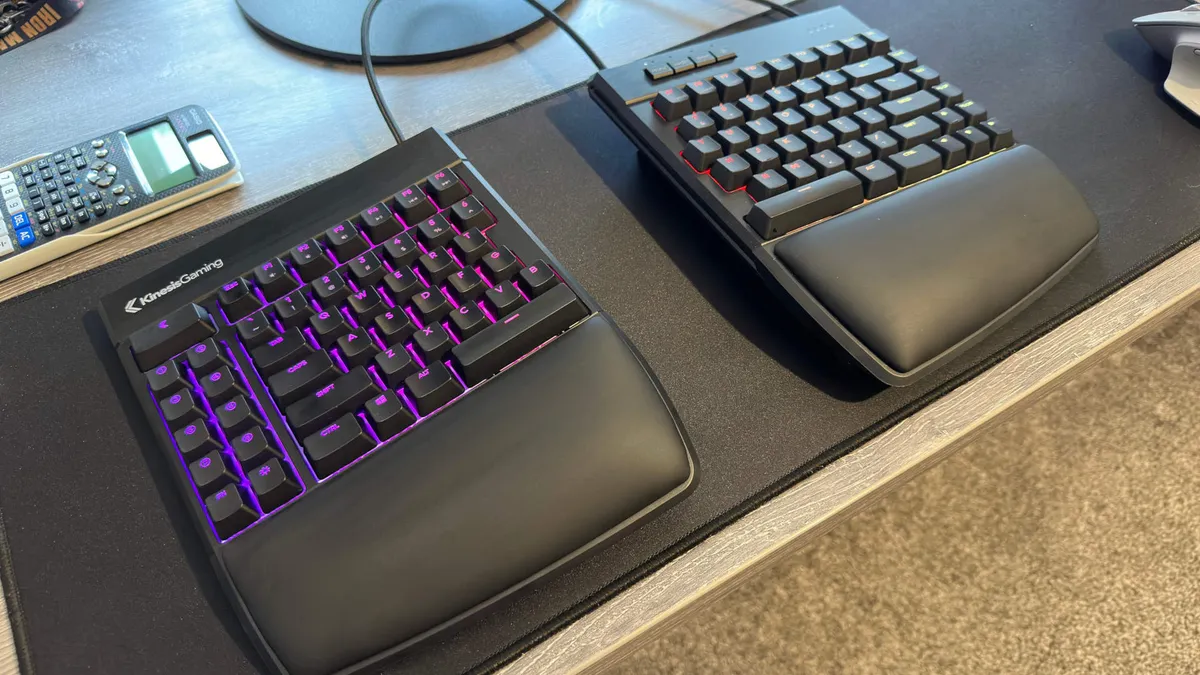
The Kinesis Freestyle Edge RGB has been specifically designed to blend the best of ergonomic and gaming keyboards, which is why it ranks in this very guide.
The most striking feature of the Kinesis has to be its split design. A single cable connects the two halves, and this offers you the freedom to shift it into a position that's more comfortable long-term. The best practice is to loosely keep both halves in front of your hands without having to turn in at all at the elbows. Not only is this good for your wrists, but it's good for your arms and shoulders, too.
The split design does mean you need to be pretty comfortable typing with both hands across both halves. No problem for touch typists or anyone who glues their index fingers to F and J, but if you tend to stab from the centre, it can take a bit of adjustment. Compared to some ergo boards, this layout isn't too taxing, at least.
The wrist rests are built into each half of the Freestyle Edge RGB, and they're plenty plush for long-term gaming or typing. Though if they're not to your liking, you can detach them and replace them with something more your speed. What's a bit of a surprise is that the Kinesis doesn't come with a lift kit included in the box; it's sold separately. That means you're a bit more limited in adjustments you can make to the Kinesis compared to some ergo boards. Still, it does make up for it with some excellent gaming-specific features.
Cherry MX mechanical switches mean this ergo keyboard isn't a slouch for gaming, and of course, there's fully adjustable RGB lighting on a per-key basis.
All in all, the Kinesis Freestyle Edge RGB is a seriously good ergonomic gaming keyboard and one that shouldn't be glossed over, even if you were originally thinking of a more standard layout. Ergo keyboards are legion at this point, but the Kinesis Freestyle Edge RGB is the best we've tested to date.

Read our full Kinesis Freestyle Edge RGB review.
The best membrane gaming keyboard


✅ You want water resistance: With IP57 protection here, you can be sure that spilling an can of Monster or mug of tea won't ruin your day.
❌ You want fast or responsive keys: Membrane keys just aren't in the same league as mechanical, and certainly not Hall effect.
There really are some people that prefer a rubber dome to a mechanical switch. They are much like you or I, spending their weekends at their gaming PCs. Only they prefer the squish of a membrane key. I actually know someone who fits into this category. It's absolutely not me, but for that guy, here's our recommendation: the Glorious GMBK 75%.
Membrane keyboards offer a softer sound and feel than mechanical keyboards, which membrane enthusiasts will swear is definitely not "mushy". Er, if you say so.
They also tend to offer water and dust resistance. This is a benefit rarely if ever shared by mechanical or magnetic keyboards. Much like the GMBK 75% here, which has an IP57 rating. That's at least a bit of peace and mind if you're prone to throwing your keyboard in the dishwasher, down a well, or into a lake. I guess if you have profusely wet hands it might be handy too.
You're not getting per-key RGB lighting on the GMBK 75%, like most others on this list. However, you are getting 10-zone RGB lighting to play around with in the Glorious software. That's more zones than our previous pick, the Roccat Magma, has.
Though there is one further benefit to membrane. No, it's not better for gaming in any sense whatsoever, but it is often pretty affordable. Though while it's true that the Glorious is fairly cheap, it's no cheaper than a lot of mechanical keyboards these days, and good ones at that. So I'm really only keeping this pick in the guide for the membrane heads out there. You crazy kids.

Read our full Glorious GMBK 75% review.
How we test gaming keyboards

We've years of experience testing gaming keyboards on team. Each and every keyboard included in this guide has been reviewed by a professional reviewer. To do that, we use the keyboard extensively during the test period, inspect the switches, utilize the software, and use any special features the keyboard may have.
A big part of a keyboard's quality is how it feels to type on, and that comes down to the key switches. Are they sticky? Are they smooth? Do they feel like they're filled with sand? Have they been lubed? There are a lot of variables for just the key switches alone. We know what is best for gaming and typing, and what definitely isn't.
As for the keyboard, the layout can be a sticking point for some, as well as where the media keys are placed. Even the typeface is a key point of contention for these boards, and we do judge them on every aspect to make sure we've picked the best for your money. Nowadays, that's a lot more about assessing the software as it is the hardware itself, thanks to analog keyboards.
Gaming keyboard FAQ
What is the big deal with Hall effect switches?
Hall effect is actually just one type of analog switch, which also includes optical and TMR switches. They all offer something similar: the ability to measure exactly how far a key is pressed. That makes them so much more flexible than a standard mechanical or membrane switch. Those are simple on or off; a Hall effect switch is tracking its full range of actuation.
Some analog switches, or rather keyboards, do more with this ability than others. These keyboards rely on their software a lot more than a standard mechanical keyboard, so it's important to consider software when you decide which one to get. Most Hall effect and similar gaming keyboards offer features like rapid trigger, adjustable actuation, and dual-function keys. However, only some offer full analog functionality—essentially turning your keyboard into a controller.
Do I need a compact gaming keyboard?
Compact keyboards (60%, TKL, etc.) are simply useful for saving space. Whether that's important to you is subjective, but if you have a tiny desk or you like to set a very low mouse DPI and make huge sweeping movements across your mouse pad, a compact keyboard comes in handy.
It also means that your hands resting on the WSAD keys and the mouse are closer together, which in turn improves the ergonomic posture, either when gaming or simply using your computer. And, hey, sometimes the numpad is just surplus to requirement. Though I generally like 'em.
What is the most important thing to look for in a mechanical gaming keyboard?
The switch type is arguably the most important choice to make when picking your new gaming keyboard. Cherry mechanical switches are the most common and most recognizable, but there are a host of alternatives on offer, as well as a bunch of upmarket, specialist switches to choose from. We generally prefer a lubed switch these days. They are smoother, more consistent, and just feel nicer to type and game on.
Jargon buster
Actuation point
The height to which a key needs to be pressed before it actuates and sends an input signal to a device.
Adjustable actuation
You can often define the actuation point—the point at which the key registers a key press—to be at a point of your choosing on Hall effect and similar keyboards
Clicky
A switch that delivers an audible click every time it's pressed, generally right around the point of actuation.
Debounce
A technique to ensure that only one input registers every time a key is pressed.
Dynamic keystroke
This feature often found on Hall effect and similar keyboards allows you to set multiple key actions per key, depending on how far you depress the key.
Hall effect switch
This switch uses magnets to register how far a key has been pressed, offering lots of extra features compared to mechanical.
Housing
The shell that surrounds the internal components of a switch.
Hysteresis
The result of the actuation point and reset point in a switch being misaligned. This generally means a key needs to be lifted off further than normal before it can be actuated again.
Induction switch
This switch uses a ferrous metal and registers how far a key has been pressed using sensors mounted on the PCB. The benefit of this is that ferrous metals are easier to produce in a consistent fashion compared to magnets, and in theory can reduce power consumption, but they're not that popular.
Linear
A switch that moves directly up and down, generally delivering smooth keystrokes without noise or tactile feedback.
Mechanical keyboard
A keyboard built around individual switches for each key rather than a membrane sheath mounted on a PCB.
Membrane keyboard
A keyboard on which all the keycaps are mounted on a membrane sheath; when a key is pressed, a rubber dome depresses and pushes against the sheath and PCB beneath, actuating the key.
Optical switch
These switches use light to register how far a key has been pressed. The first wave of analog keyboards used optical switches, but many moved to Hall effect thereafter. Razer still evangelizes optical as the best pick for pro gamers, however, claiming it's the most consistent and precise.
Rapid trigger
A feature often available on analog keyboards. Rather than resetting the key at a set point in the movement, rapid trigger adjusts the reset point to wherever the key is in the travel when you release it and depress it again. Essentially, it cuts out the lag between pressing and releasing a key.
SOCD
A feature that allows for two keys to be pressed at the same time but only one key's input to be registered by a system. It's extremely useful for counter strafing in games like CS2—so much so, in fact, that the public outcry over its use led to Valve banning players using it.
Stem
The component of a switch on which the keycaps are mounted on a mechanical keyboard.
Switch
The physical component of a mechanical keyboard beneath the keycaps on a mechanical keyboard. The switch determines how a key is actuated, whether or not it provides audible or tactile feedback with each press, and more.
Tactile
A switch that provides a 'bump' of feedback every time it's pushed.
Tenkeyless (TKL)
A keyboard that lacks the right-hand number pad.
TMR switch
This switch uses an emerging technology that operates similarly to Hall effect but claims more consistent and precise operation. It's mostly used in controllers, and only a handful right now, but there are some keyboards using it today.