


Alienware has long been synonymous with high-performance gaming, but its latest laptop opens the door for a whole new wave of players. The Alienware 15 is designed to deliver the brand's signature performance and build quality in a streamlined 15-inch form factor, making it the most accessible way to experience what Alienware has to offer.
Whether your goal is unwinding with the latest RPG after class or knocking out assignments between gaming sessions, this machine is built to handle it all. It gets you a quality Alienware experience in a laptop that fits into everyday life, just as easily as it fits into a backpack.
TL;DR
- The Alienware 15 brings trusted Alienware performance and design DNA to a streamlined, affordable gaming laptop.
- You can choose from a wide range of Nvidia graphics cards and Intel and AMD processors, so you get full control over your laptop's capabilities.
- Advanced Alienware Cryo-TechTM cooling keeps your gaming experience consistent and steady, no matter how long your sessions last.
- A compact, durable build with versatile connectivity makes it an ideal daily driver for students and on-the-go gamers alike.
The Alienware 15 serves up true Alienware DNA in a streamlined package
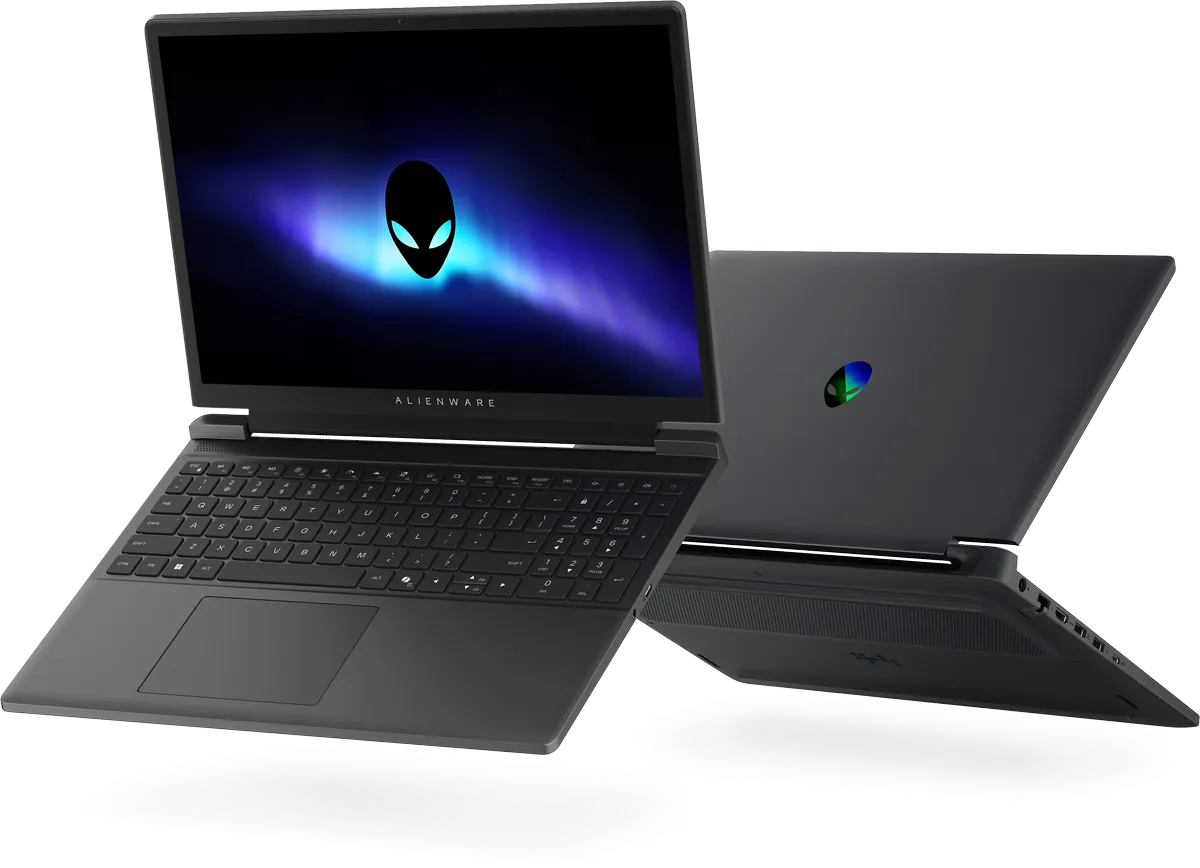
The Alienware 15 is not a stripped-down compromise. It shares the same AW30 industrial design language found in Alienware's flagship Area-51 and versatile Aurora laptops, which means the look and feel are unmistakably Alienware. The sleek Nova Black coating paired with durable polycarbonate resin gives the laptop a premium metallic sheen that looks sharp in a lecture hall or a living room. It may be a mainstream laptop rather than top-of-the-line, but you wouldn't know from looking at it.
What makes the Alienware 15 stand out from other entry-level gaming laptops?
Alienware puts the Alienware 15 through the same rigorous testing as its higher-tier machines. That means it is designed to keep running after drops and spills, and the keyboard is tested to support up to 40,000 keystrokes, so it's built to keep up with heavy daily use over time.
This level of build quality is perfect if you're someone who needs a laptop that can handle the bumps and spills of real life. Put it in a backpack, commute with it every day, and set it up on a crowded desk. The Alienware 15 is built to take it in stride, all the while delivering a top-notch gaming experience.
Gaming-first design that can handle anything you throw at it

Under the hood, the Alienware 15 is equipped to deliver smooth, immersive gameplay across popular titles. It offers a choice of Intel Core (Series 2) or AMD Ryzen 200 Series processors paired with a range of Nvidia GeForce RTX laptop GPU options, including the RTX 3050, RTX 4050, RTX 5050, and RTX 5060 (offers vary by market). This lineup gives you the flexibility to choose the configuration that fits your needs, with enough power to run demanding games on high settings.
How does the Alienware 15 handle performance under load?
On the RTX 5050 and RTX 5060 configurations, the Alienware 15 can push up to 110 W of Total Performance Power and up to 85 W of Total Graphics Power in Performance Mode with Dynamic Boost. Nvidia's Dynamic Boost intelligently balances power between the CPU and GPU in real time, so the system adapts to whatever is happening on screen without any manual tweaking.
The result is reliable, optimized performance for relaxed gaming sessions, letting you explore open worlds, race through circuits, or dive into story-driven adventures without fiddling with settings. The Alienware 15 handles the heavy lifting, while you focus on the gaming.
And because needs change over time, Alienware made the Alienware 15 user-upgradeable. It supports up to 32 GB of DDR5 memory and up to 1TB of PCIe Gen4 SSD storage, so there is room to grow without replacing the whole machine.
Alienware's advanced cooling keeps things consistent without adding bulk
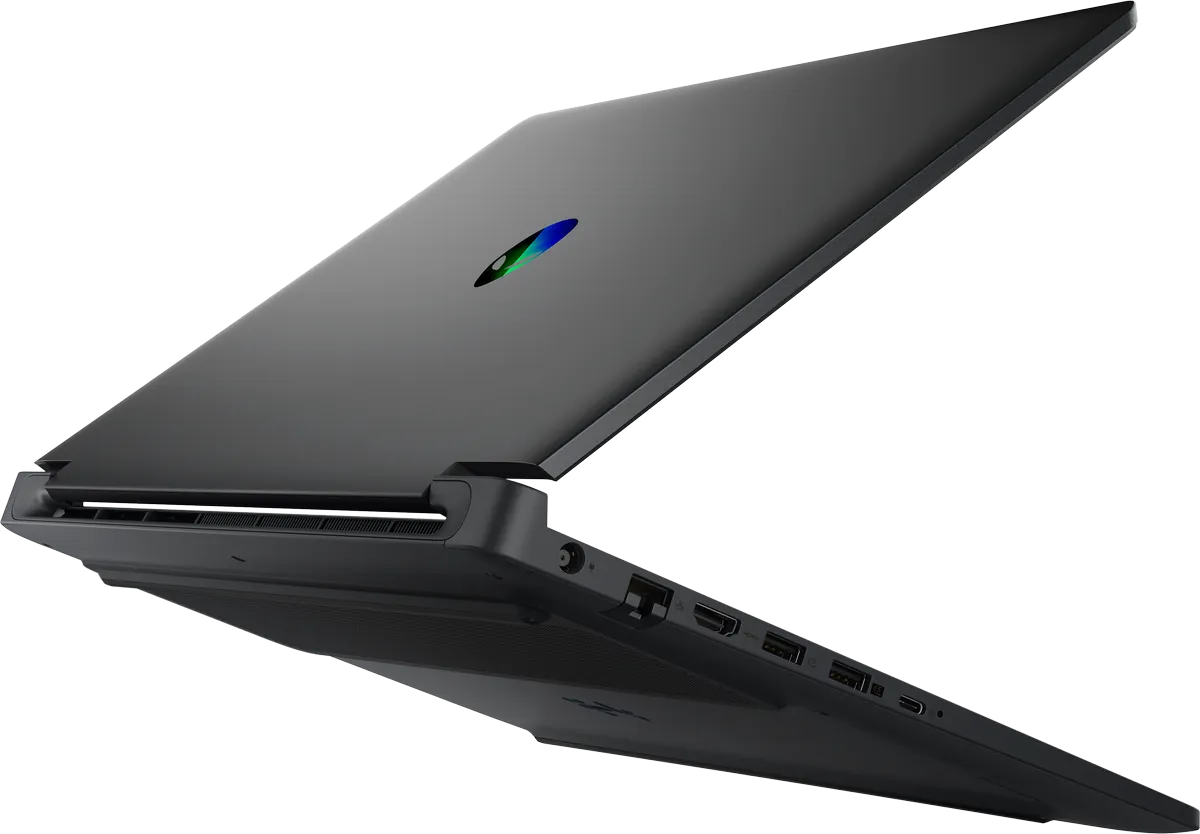
Long gaming or streaming sessions can push any laptop, but the Alienware 15 is engineered to stay cool and composed thanks to advanced Alienware Cryo-tech cooling technology. This is the same thermal architecture trusted across Alienware's lineup, adapted here for a more compact form factor.
How does the Alienware Cryo-Tech cooling system work?
The system uses dual fans with a total of 146 blades that pull cool air through 2,163 perforations across the top and bottom panels, directing airflow precisely where it matters most. Three copper heat pipes carry heat away from the CPU and GPU, and a single rear exhaust channels hot air out the back of your laptop.
On configurations with RTX 5050 or RTX 5060, a dedicated proprietary Cryo-Chamber structure is designed to increase air intake and boost overall airflow. The clever tower hinge design further optimizes rear exhaust, and the absence of a rear thermal shelf means the Alienware 15 maintains a smaller footprint compared to larger gaming laptops while still delivering excellent thermals.
A display and input experience built for immersion

The Alienware 15 features a 15.3-inch, 165Hz display with a 1920 x 1200 resolution and a 16:10 aspect ratio. The higher refresh rate means gameplay looks smoother and more fluid, and at 300 nits of brightness, the display holds up well in a variety of lighting conditions.
That extra screen real estate is one of those things that is easy to overlook on a spec sheet, but genuinely nice to have day to day. Whether it is keeping an eye on a game guide while playing or fitting more of a document on screen without scrolling, the 16:10 ratio just makes everything a little more comfortable.
What about the keyboard and touchpad?

The white backlit keyboard with numpad is designed for both resilience and precision, making it comfortable for extended gaming and typing sessions alike. The large touchpad (4.53 x 3.15 inches) offers smooth, soft tactility with a fingerprint-resistant surface, so it stays clean and responsive through daily use. A 720p HD webcam with dual array microphones rounds out the package, delivering clear visuals and audio for video calls without needing external accessories.
Versatile connectivity and portability for life on the move

The Alienware 15 is packed with the ports and features that make it a genuine all-rounder. The full connectivity suite includes RJ-45 Ethernet, HDMI 2.1, two USB Type-A 3.2 Gen 1 ports, a USB Type-C 3.2 Gen 1 port, and a USB Type-C port with USB 3.2 Gen 2, Power Delivery, and DisplayPort 1.4a. That last port is USB-C charging enabled, up to 100 W, which is a great option for lighter tasks when you need critical power on the move.
Is the Alienware 15 easy to carry around?

Absolutely. The compact design, with no thermal shelf adding to the footprint, means the Alienware 15 slides easily into a backpack or messenger bag. The combined weight of the laptop (up to 4.96 lb, or 2.25 kg) and its power adapter (up to 1.25 lb, or 0.58 kg) is manageable for daily commutes, and the option to charge via USB-C during lighter workloads means it is possible to leave the larger adapter at home on days that do not call for heavy gaming.
There is also a thoughtful feature called Stealth Mode, activated with a single keypress, that switches the laptop into a quieter, more discreet operating mode. It’s especially useful for those in-between moments when a gaming session needs to wind down quickly.
Picture squeezing in a few rounds at a coffee shop, the library, or even an empty lecture hall before class begins. Then, the professor walks in, your study group arrives, or friends pull up a chair to join you. With one tap, you can shift out of Performance Mode (and the higher fan noise that comes with pushing the hardware) and into a calm, low-key state that won't draw attention.
It's a seamless bridge between gaming and everything else, and a small touch that underscores how the Alienware 15 is designed to fit into every part of daily life, not just gaming sessions.
If you're thinking of buying an Alienware 15, find out more on the Alienware website.
