Our Verdict
Insanely compact and thoroughly well built, the G1 Pro captures an impressive amount of performance for a remarkably reasonable price. It's not flawless, it can run hot, and you'll need a USB hub to really take advantage of it, but if you're after a solid machine that can game, handle productivity tasks well, and even act as a console replacement, this'll do nicely.
For
- Insanely compact form factor
- Decent value
- Solid gaming performance at 1440p
- Quiet enough
- Remarkably portable
Against
- CPU performance could be better
- Cooling is mixed
- You're going to need a USB hub
PC Gamer's got your back Our experienced team dedicates many hours to every review, to really get to the heart of what matters most to you. Find out more about how we evaluate games and hardware.
The Minisforum Atomman G1 Pro has sat on my desk now for about two weeks. Happily bimbling away, running benchmarks, stress tests, and going through all manner of arduous rigamarole that we require these mini gaming PCs to endure in our pursuit of testing excellence, (write that down, it'll be in the company call later).
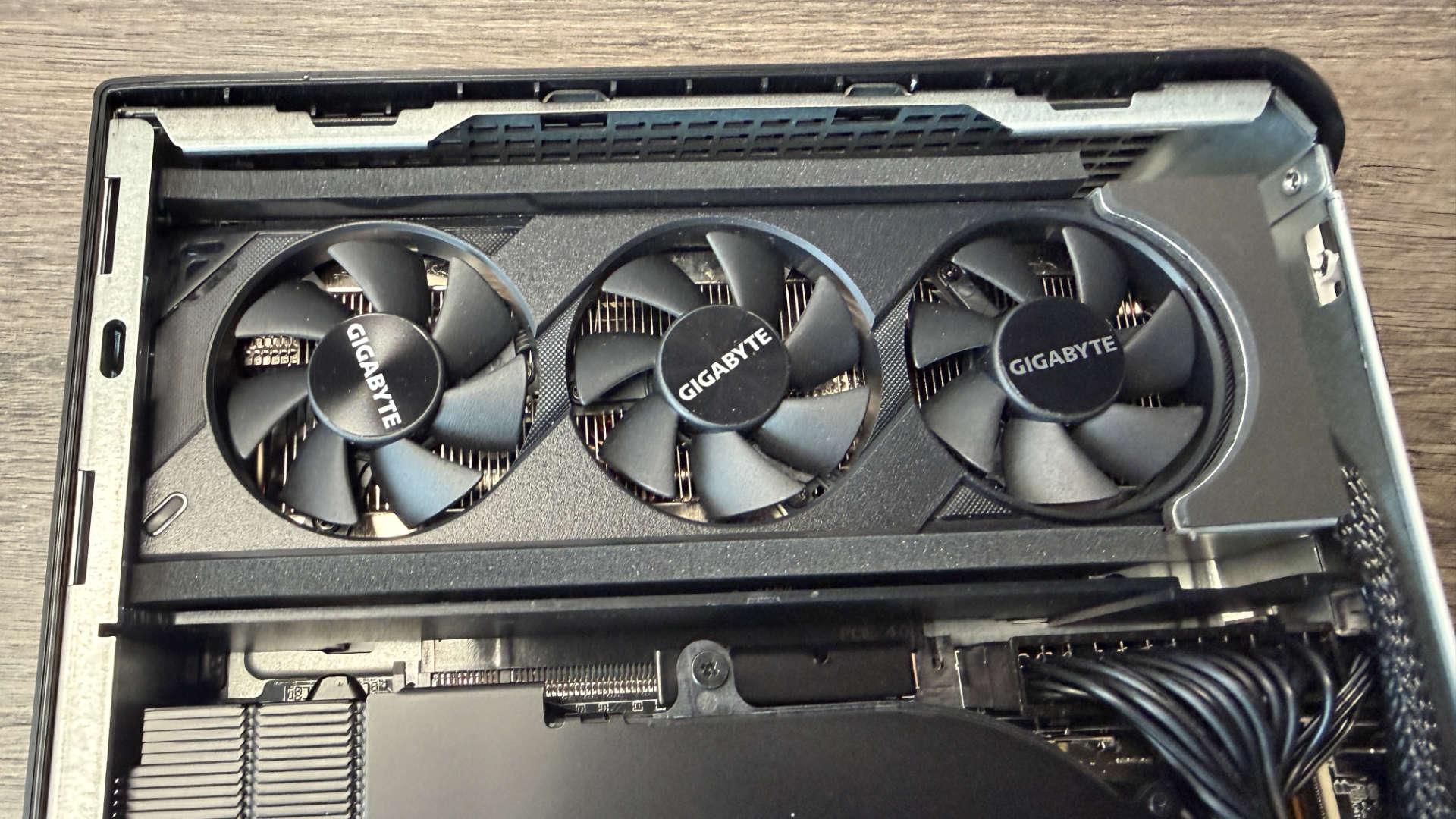
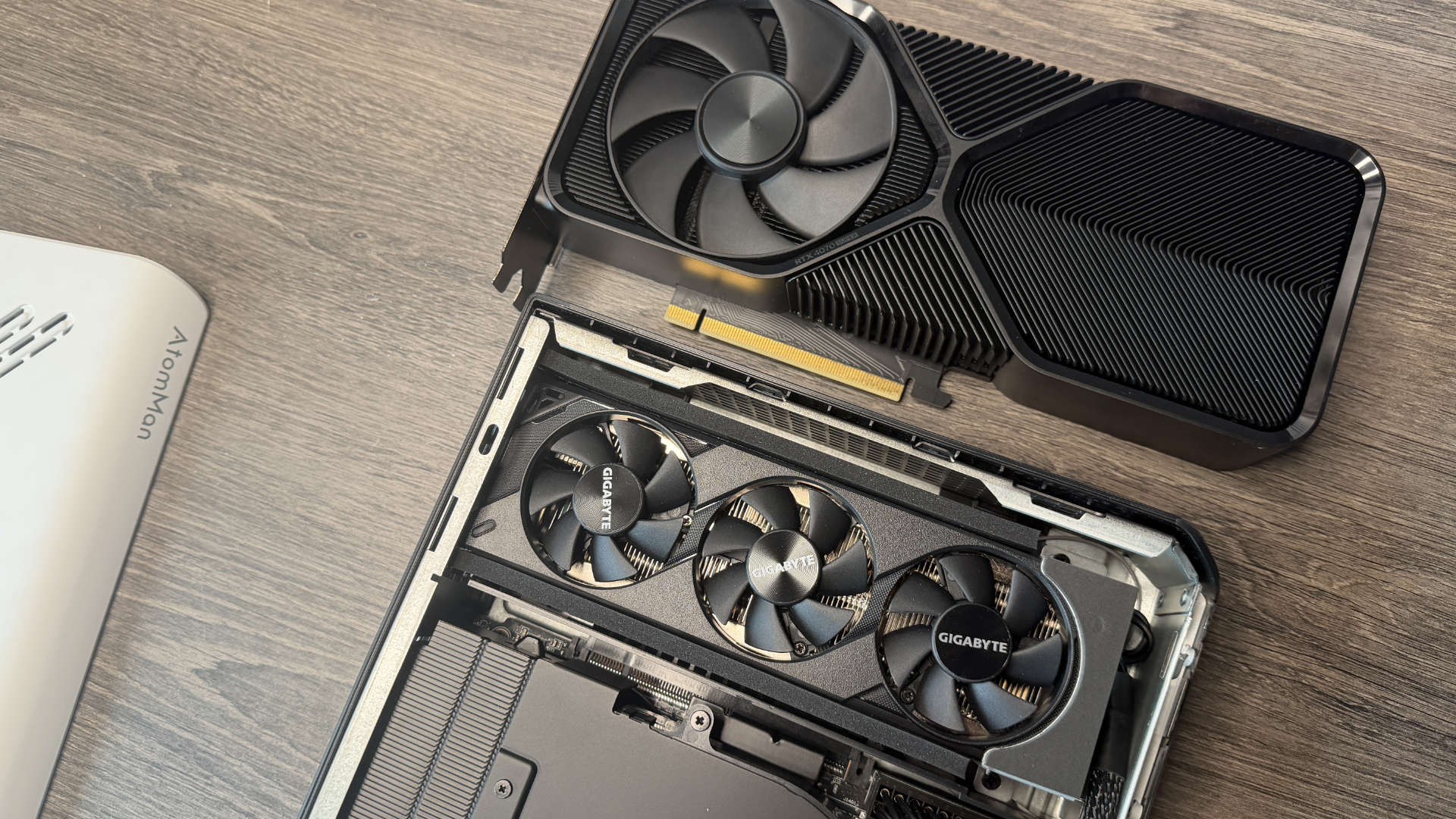
In essence, it's quite unique. Effectively a weird hybrid of sorts. Fluidly blurring the lines between a mid-range gaming laptop and an entry-level ITX rig. The case is outlandishly compact, with only 3.8 L of internal capacity, and yet somehow, Minisforum has slammed a 350 W PSU in there, a motherboard with 32 GB of dual-channel DDR5, an RTX 5060 low-profile GPU, and no less than two M.2 slots as well. It's so slim. So sheepishly svelte, it's hard to believe that this plucky little case actually manages to hold all that in there without buckling at the seams. Looking more akin to a PS5 than a dedicated gaming desktop.
CPU | AMD Ryzen 9 8945HX |
Cores | Threads | 16 | 32 |
Clock speed | Up to 5.4 GHz |
GPU | Gigabyte RTX 5060 OC Low Profile 8G |
RAM | 32 GB DDR5-5200 |
Storage | 1 TB Kingston PCIe 4.0 M.2 (2x PCIe 4.0 M.2 slots available) |
Rear I/O | 1x USB 3.2 Type-C, 2x USB 3.2 Type-A, 1x RJ45 5GB, 2x HDMI 2.1, 2x DisplayPort 1.4 |
Front I/O | 1x USB 3.2 Type-C, 1x USB 3.2 Type-A, 3.5mm combo jack |
Power | 350 W |
Dimensions | 215 x 57 x 315 mm |
Price | £1,350 | $1,449 (as configured) |
✅ You value compact portability: Smaller than a PS5 and arguably twice as versatile the G1 Pro is remarkably well designed, producing impressive performance given the size constraints
❌ You can build your own and don't care about space that much: You could probably build one of these with slightly better performance for the same cost, with off-the-shelf parts, but it won't be anywhere near as small.
It's effectively a low-powered Zen 4, 16-core unit, running off the back of TSMC's 5nm FinFET design. Primarily, it's aimed at the high-end laptop market, but it's got some serious chops in terms of overall processing power too, particularly when you provide it with enough juice. And it's that one unique element Minisforum is trying to take advantage of here.
The G1 Pro comes with its own desktop app, and as you probably have already guessed, it allows you to swap between three different profiles that effectively alter the power delivery to the CPU directly. There's "Office Mode", where the 8945HX is locked at 60 W TDP, "Gaming Mode" where it stumbles along at an absolutely placid 80 W, and "Beast Mode" (phwoaaar…) that ramps that wattage all the way up to 100 W, (although officially AMD's 8945HX is only rated to run between 55 and 75 W). It's very similar in many ways to Lenovo's Legion 9i laptop line. As you can imagine with that, though, you get more performance, higher frequencies for longer, but also a lot more heat.
The GPU itself, a low-profile RTX 5060—complete with 8 GB of VRAM and packaged up nicely by Gigabyte in a spectacularly slim Low Profile OC design—will quite happily trundle away at 145 W no matter what profile you set. Really, you're only impacting CPU performance with this, and even with it set to Ultra Instinct Mega Beast mode, at max, you're still leaving that PSU with a good 105W of headroom. No drama on power supplies going pop here.
That CPU, though, is not a cool chip. Not in this design anyway. And not even in dull-as-dishwater office mode either. It's silicon that's been built very specifically with low power delivery in mind, because it's meant to be used in laptops, and products where cooling is limited compared to, you know, those desktop machines where you'll just slap a full-fat 360 mm wham-bam-thank-you-mam AIO into it and call it a day.
In the G1 Pro, because it's got such a compact form factor, it naturally runs hot. In that default mode, max CPU temps throughout our computational tests landed at 93 °C. In-game, that top temp hit a staggering 91 °C in consecutive runs of Metro Exodus, with an average of 89 °C overall.
Now, yes, technically the 8945HX does have a TJmax temp of 100 °C, but outside of bragging rights, and that one-off benchmark run you do when your office is 7 degrees, because you've left the window open all night, those profiles arguably aren't really worth it. Particularly as it doesn't affect the GPU. That's a bit weird, too, by the way, because that RTX 5060 is surprisingly efficient given its size (good work, Gigabyte).
In computational tests (Blender in particular), it maxed out at 67 °C overall. In-game, though, the figure was markedly higher at 77 °C overall. Clearly, there's headroom there still, specifically for that graphics card to be pushed a little harder, which is surprising that Minisforum didn't bake something in for that specifically.
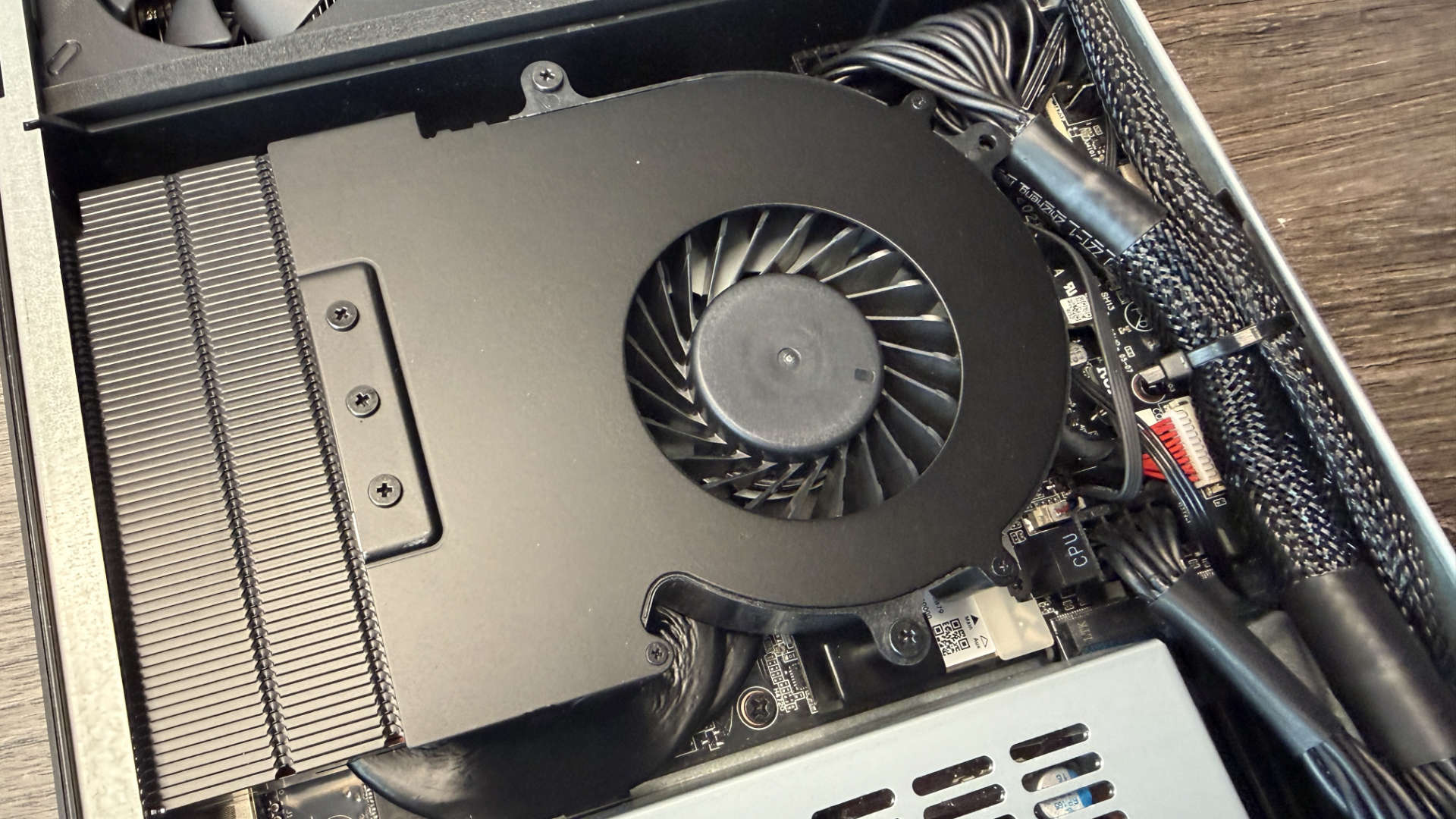
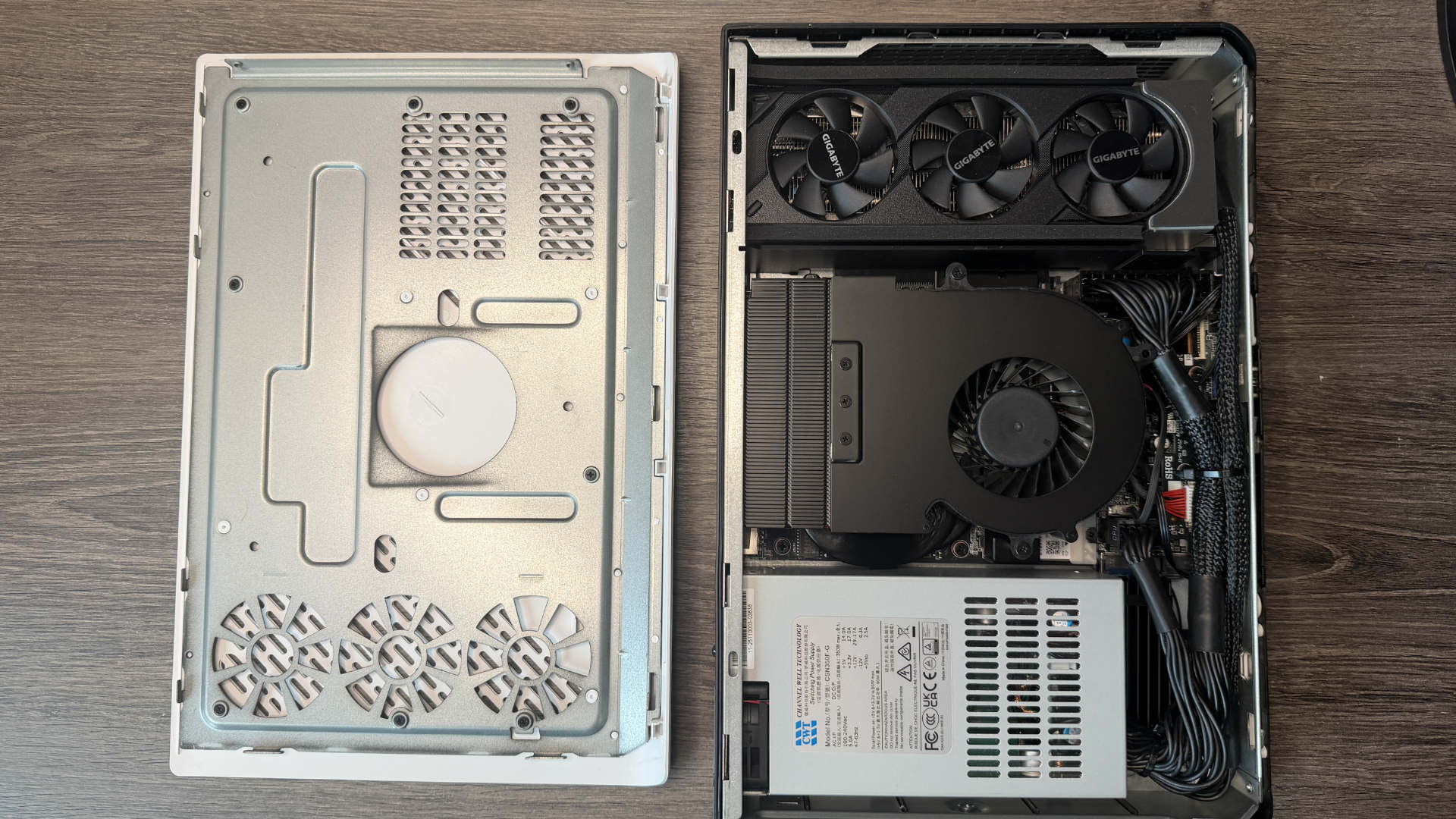
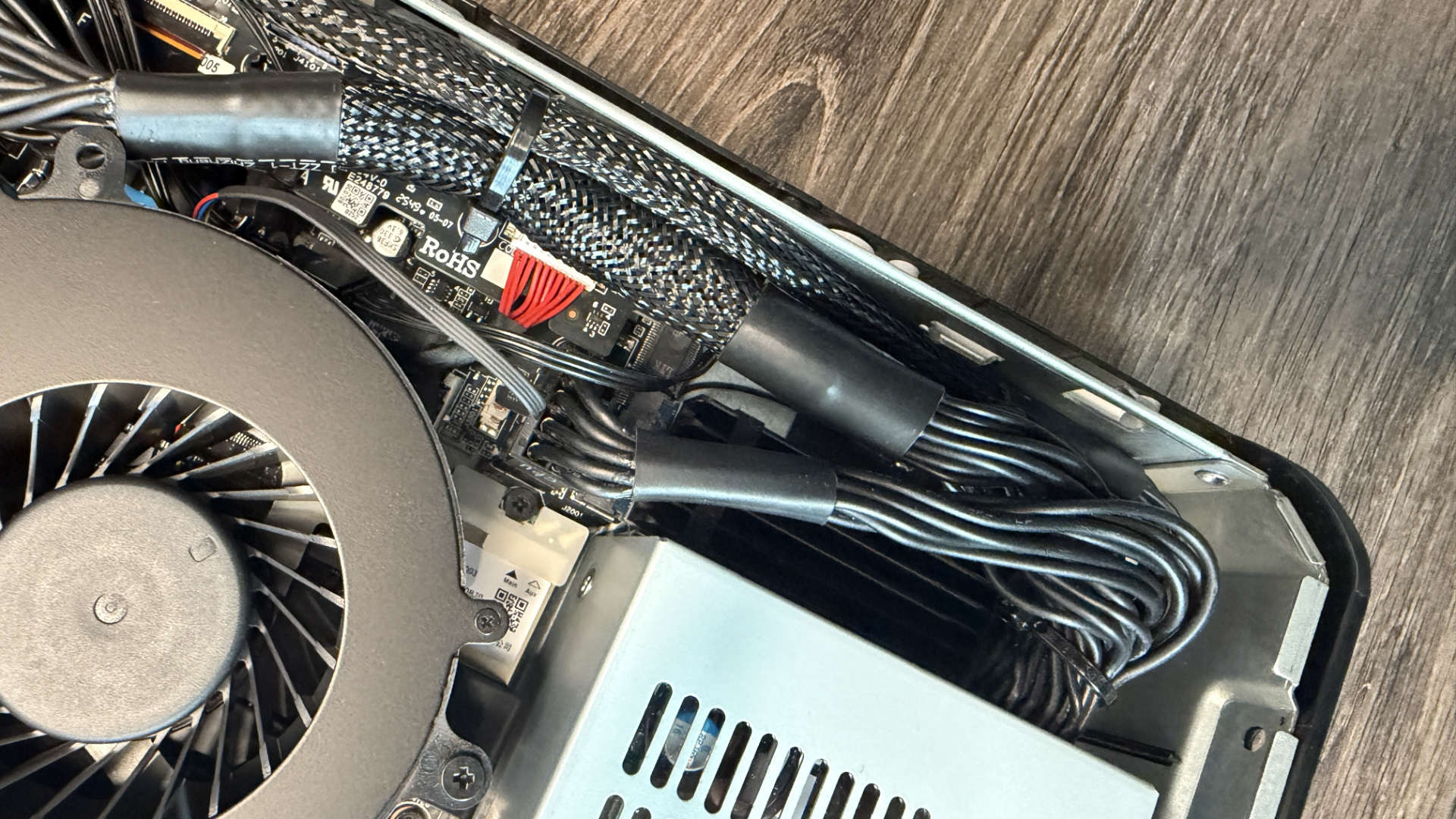
A tiny peak inside quickly reveals just what's going on here, and it's purely a matter of form factor over function, and I don't know if I should be impressed or not. It's cramped, cables are tidy, well secured, out the way as best they can be. Cooling is optimized, and hardware positioning is intuitive. There are two M.2 slots here, one housing a 1 TB PCIe 4.0 SSD (Kingston's OM8TAP41024K1-A00, complete with Kioxia's 162-layer BiCS6 QLC NAND), and Minisforum has included an additional M.2 heatsink as well if you want to add an additional drive (a genuinely nice touch). But boy, they di not have much space to work with. Still, if you do want to upgrade it later on, say if OpenAI awkwardly can't buy up 40% of the world's memory supply, and DRAM prices plummet suddenly as a result (oh no, what a shame), you can… with a bit of effort.
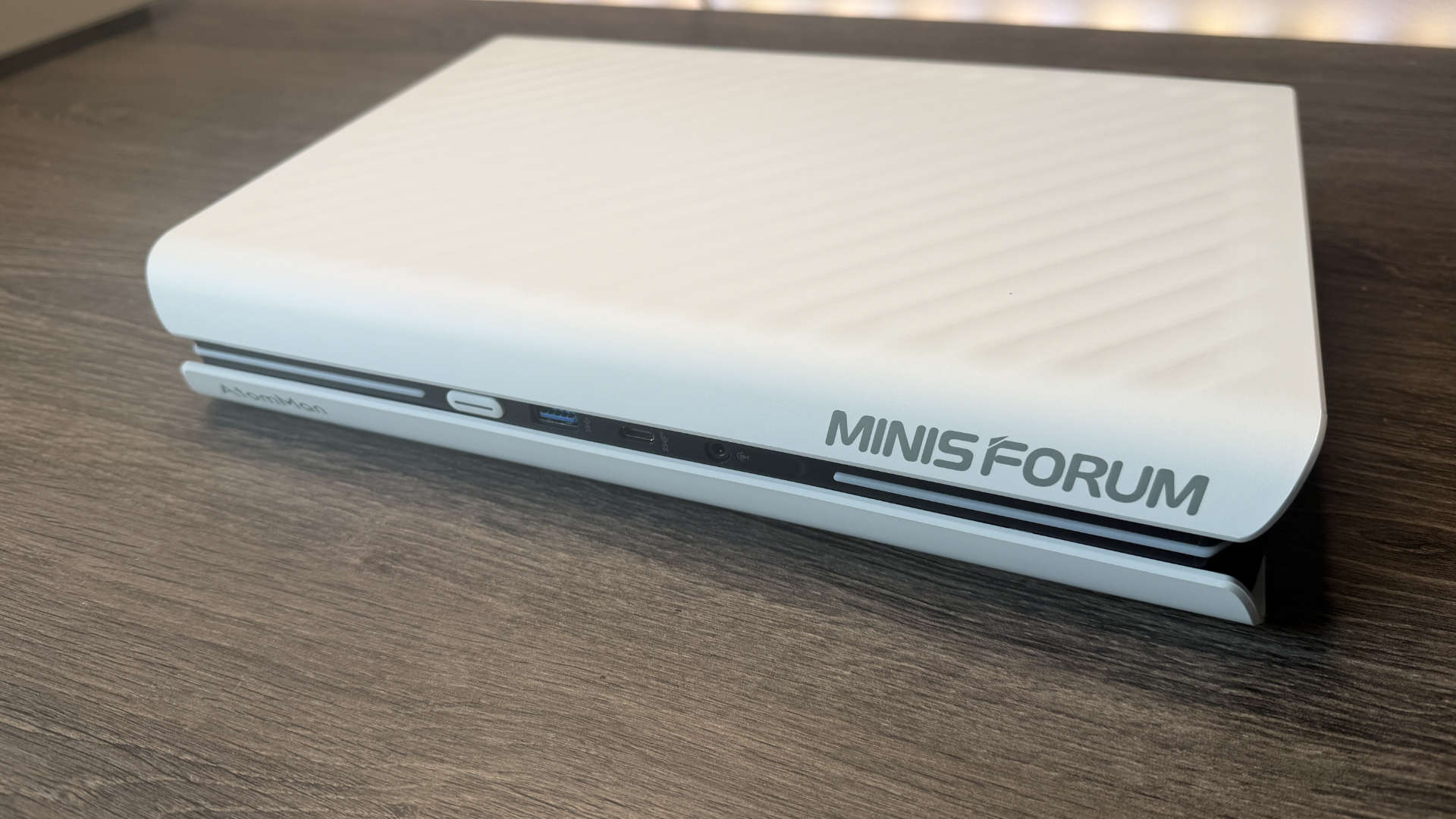
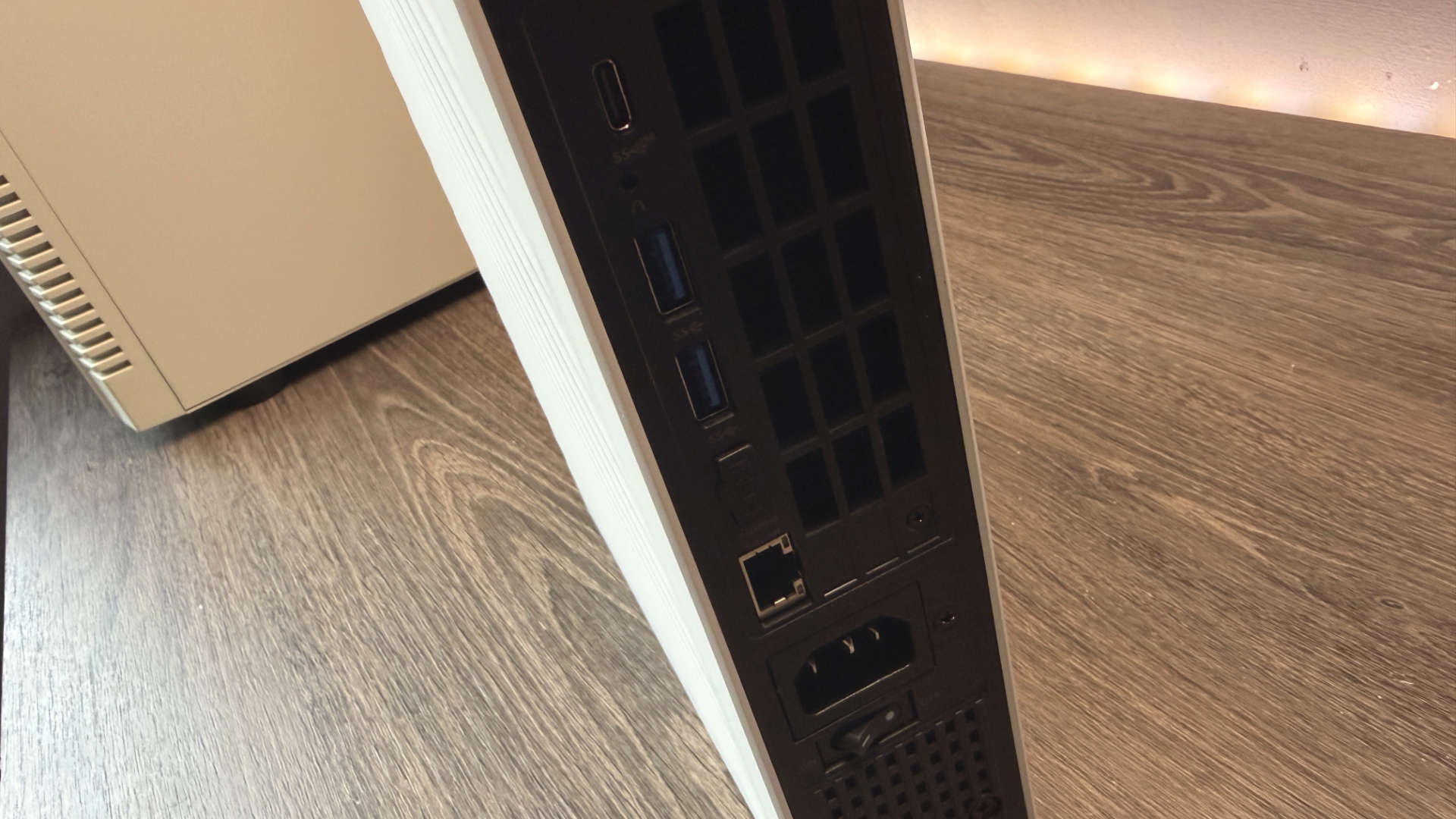
One thing I will highlight as a potential issue, though, is the whole I/O situation. Just full stop, period. It's incredibly limited. You've got a total of two USB Type-C ports (one on the front, one on the back), three USB Type-A (again one on the front, two on the back), a 5G Ethernet, one audio out (in front), and well that's it (aside from the obvious display outputs, WiFi 7 and Bluetooth). It ain't a lot, so if you're serious about your setup, you're going to want to invest in a solid USB hub of some description.
Generally, though, build quality, very good. Aesthetics, top-tier. Expandable, internals excellent. Cooling, a bit of a swing and a miss in some cases. I/O, eugh. But the performance, now that is the interesting bit. And let's face it, it kind of needs to be for the price (£1,350 in the UK, $1,439 in the US with a hefty discount at time of writing).
Thermal performance
| Product | Value |
|---|---|
| AtomMan G1 Pro | RTX 5060 | 8945HX | 89 Avg CPU Temp (°C), 91 Max CPU Temp (°C), 77 Avg GPU Temp (°C), 67 Max GPU Temp (°C) |
| Framework Desktop | 8060S | Max+ 395 | 76 Avg CPU Temp (°C), 79 Max CPU Temp (°C) |

In the G1 Pro, because it's got such a compact form factor, it naturally runs hot. In that default mode, max CPU temps throughout our computational tests landed at 93 °C. In-game, that top temp hit a staggering 91 °C in consecutive runs of Metro Exodus, with an average of 89 °C overall.
Now, yes, technically the 8945HX does have a TJmax temp of 100 °C, but outside of bragging rights, and that one-off benchmark run you do when your office is 7 degrees, because you've left the window open all night, those profiles arguably aren't really worth it. Particularly as it doesn't affect the GPU. That's a bit weird, too, by the way, because that RTX 5060 is surprisingly efficient given its size (good work, Gigabyte).
In computational tests (Blender in particular), it maxed out at 67 °C overall. In-game, though, the figure was markedly higher at 77 °C overall. Clearly, there's headroom there still, specifically for that graphics card to be pushed a little harder, which is surprising that Minisforum didn't bake something in for that specifically.
Gaming performance
| Product | Value |
|---|---|
| AtomMan G1 Pro | RTX 5060 | 8945HX | 44 Avg FPS, 38 1% Low FPS |
| Framework Desktop | 8060S | Max+ 395 | 36 Avg FPS, 26 1% Low FPS |
Temps aside, gaming performance overall is fairly robust. At 1440p, Cyberpunk manages 32 fps on the Ray Tracing Medium preset. Stick DLSS on at Quality and slap frame gen up to x2 with the CNN model, and that figure shoots up to 86 fps, making the thing more than an enjoyable experience. Similarly, Metro Exodus on Ultra equally manages 52 fps, and Black Myth comes in at 37 fps (albeit with the help of some DLSS goodness). I also tested this in Total War: Warhammer 3 at 1440p Ultra, and both the battle benchmark and campaign benchie came in at 72 and 65 fps, respectively, for the plucky little RTX 5060. That's not quite as good as its full-fat desktop cousin, at least not from our own results, but given there's a laptop CPU powering the lot, masquerading as a desktop big boy, you've maybe got to expect some losses there.
CPU performance, though, well, again, it does depend on how hard you want to run it. In Office mode, Cinebench 2024 saw scores of 1,323 on the multi-core and 111 on single core, that's about 41 points per thread on the multi-thread test, which is okay for efficiency, not bad by any means, but about 50% less efficient than what you'd find on something like the 9950X3D.
Creator performance
| Product | Value |
|---|---|
| AtomMan G1 Pro | RTX 5060 | 8945HX | 111 Single core index, 1323 Multi thread index |
| Framework Desktop | 8060S | Max+ 395 | 114 Single core index, 1908 Multi thread index |
Still, it's doing all that in a tiny 3.8L case, with a 350 W PSU, and a remarkably compact cooling solution to boot. Credit where credit's due, there are literal physical limits to what can be achieved at these kinds of form factors, and if you want a machine that's smaller than a PS5 that sits on your desktop comfortably and quite happily games at 1080p and 1440p, you'd be hard-pressed to find something just as potent for less. It certainly beats out the much older G7 PT.
I've had a quick peruse online too, and to match the G1 Pro, spec for spec, with the cheapest available components I could find, the price you're looking at is about $1,440, or £1,342 or so (eerily close, guessing the humies at MinisForum have done their research). That's with a Ryzen 5 9600X, A620I motherboard, RTX 5060, 1 TB SSD, and 32 GB of DDR5, sat inside of a Cooler Master MasterBox NR200P V2 (although you could switch for the slightly larger Phanteks XT V3 and shave off about $60).
But here's the thing. You have to build that. You still have to buy Windows, and it's still going to be considerably larger than the AtomMan G1 Pro, for maybe only slightly better performance, and in CPU terms not really. To circle back to what I was saying earlier, the G1 is very much this hybridisation design. It's built very specifically to challenge traditional gaming consoles, laptops, and ITX PCs while encapsulating what they do best, but with far greater versatility. You can fit this thing in a rucksack, carry it to the office, a LAN event (people still do those right?), or claw back some much-needed desk space so you can show off more of your Warhammer 40K collection. Is it perfect? No. Is it as powerful as a full desktop equivalent? No. But it shouldn't need to be.
1. Best overall:
Minisforum AtomMan G7 PT
2. Best budget:
Minisforum Venus UM790 Pro
3. Best pure gaming:
Asus ROG NUC 970
4. Best compact:
Geekom AX8 Pro
5. Best looking:
Ayaneo Retro Mini AM02
6. Best iGPU for gaming:
Beelink SER9
7. Best for AI:
Framework Desktop
Insanely compact and thoroughly well built, the G1 Pro captures an impressive amount of performance for a remarkably reasonable price. It's not flawless, it can run hot, and you'll need a USB hub to really take advantage of it, but if you're after a solid machine that can game, handle productivity tasks well, and even act as a console replacement, this'll do nicely.

You must confirm your public display name before commenting
Please logout and then login again, you will then be prompted to enter your display name.