

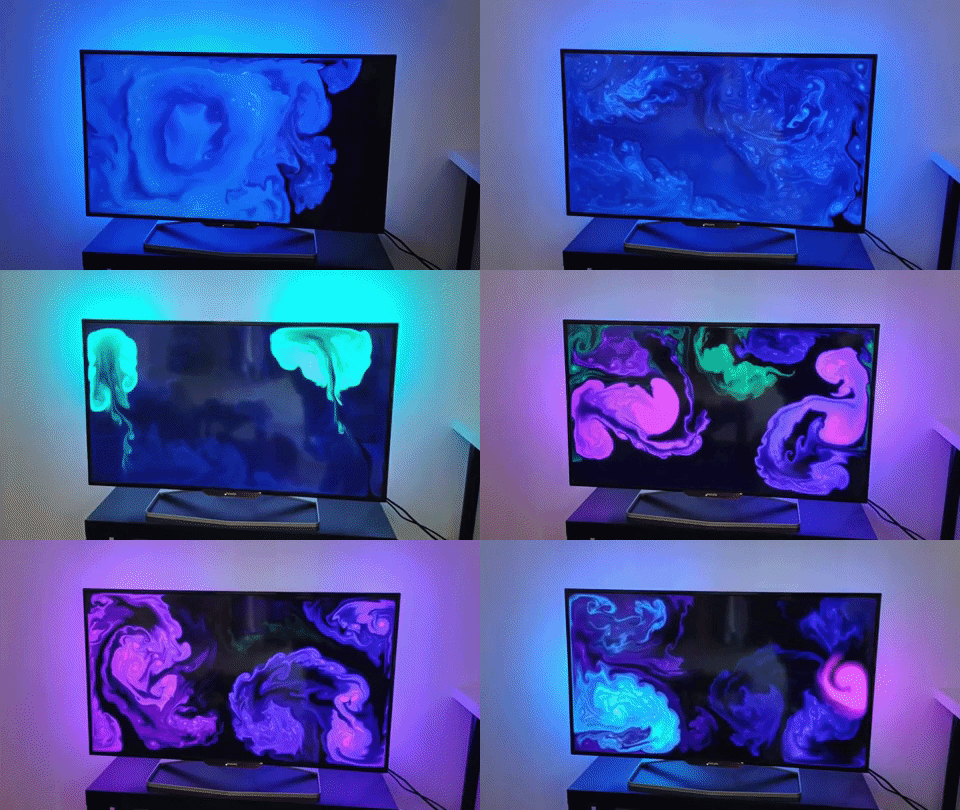
I just can't stop staring at this hypnotic DIY Ambilight project
If you want to turn your gaming monitor into a carnival lightshow then this is the homebrew project for you.

Keep up to date with the most important stories and the best deals, as picked by the PC Gamer team.
You are now subscribed
Your newsletter sign-up was successful
Want to add more newsletters?
Every Friday
GamesRadar+
Your weekly update on everything you could ever want to know about the games you already love, games we know you're going to love in the near future, and tales from the communities that surround them.
Every Thursday
GTA 6 O'clock
Our special GTA 6 newsletter, with breaking news, insider info, and rumor analysis from the award-winning GTA 6 O'clock experts.
Every Friday
Knowledge
From the creators of Edge: A weekly videogame industry newsletter with analysis from expert writers, guidance from professionals, and insight into what's on the horizon.
Every Thursday
The Setup
Hardware nerds unite, sign up to our free tech newsletter for a weekly digest of the hottest new tech, the latest gadgets on the test bench, and much more.
Every Wednesday
Switch 2 Spotlight
Sign up to our new Switch 2 newsletter, where we bring you the latest talking points on Nintendo's new console each week, bring you up to date on the news, and recommend what games to play.
Every Saturday
The Watchlist
Subscribe for a weekly digest of the movie and TV news that matters, direct to your inbox. From first-look trailers, interviews, reviews and explainers, we've got you covered.
Once a month
SFX
Get sneak previews, exclusive competitions and details of special events each month!
Colour me excited. This homebrew lighting project lets you imbue your boring, lifeless gaming monitor with the magic of your very own makeshift Philips Ambilight feature. And while it may not have all the titillating features of the Philips Momentum on our best 4K monitors guide, it'll tide you over while you save up.
It may be devoid of the Momentum's 120Hz refresh rate and 4ms response time, but this project (via Sweclockers) will provide a remarkably gaudy, somewhat spectral experience as you wander through the vast expanses of your favourite game worlds.
Built around an Arduino Uno, and connected to a flexible Yunbo RGB LED strip that skirts the screen back, the project is not standalone. The connected PC utilises Prismatic software to read the colours shown on screen, which it sends through the Ardunio before each corresponding LED is assigned a colour.
Sounds easy enough right?
Best gaming monitor: pixel-perfect panels for your PC
Best high refresh rate monitor: screaming quick screens
Best 4K monitor for gaming: when only high-res will do
Best 4K TV for gaming: big-screen 4K PC gaming
Of course, it's a little more complicated than that. Accurate voltage calculations are necessary to ensure you don't blow anything up, and I expect there's a fair amount of soldering involved. Even attaching the lightstrip to the back of the TV with double sided tape looks fiddly as heck, but if you're feeling handy and want to get totally immersed in your game worlds, this will be the project for you.
There are other solutions if you want to turn your monitor into a lightshow, but this is the brightest one we've come across recently, and from the video above looks more responsive than NZXT's lighting kit.
In fact, this thing is so darn bright I'm convinced it could turn even the gloomy vistas of Metro Exodus into a freaking carnival.
Keep up to date with the most important stories and the best deals, as picked by the PC Gamer team.

Having been obsessed with game mechanics, computers and graphics for three decades, Katie took Game Art and Design up to Masters level at uni and has been writing about digital games, tabletop games and gaming technology for over five years since. She can be found facilitating board game design workshops and optimising everything in her path.

