

AMD adds automated video creation to its Gaming Evolved client
Keep up to date with the most important stories and the best deals, as picked by the PC Gamer team.
You are now subscribed
Your newsletter sign-up was successful
Want to add more newsletters?
Every Friday
GamesRadar+
Your weekly update on everything you could ever want to know about the games you already love, games we know you're going to love in the near future, and tales from the communities that surround them.
Every Thursday
GTA 6 O'clock
Our special GTA 6 newsletter, with breaking news, insider info, and rumor analysis from the award-winning GTA 6 O'clock experts.
Every Friday
Knowledge
From the creators of Edge: A weekly videogame industry newsletter with analysis from expert writers, guidance from professionals, and insight into what's on the horizon.
Every Thursday
The Setup
Hardware nerds unite, sign up to our free tech newsletter for a weekly digest of the hottest new tech, the latest gadgets on the test bench, and much more.
Every Wednesday
Switch 2 Spotlight
Sign up to our new Switch 2 newsletter, where we bring you the latest talking points on Nintendo's new console each week, bring you up to date on the news, and recommend what games to play.
Every Saturday
The Watchlist
Subscribe for a weekly digest of the movie and TV news that matters, direct to your inbox. From first-look trailers, interviews, reviews and explainers, we've got you covered.
Once a month
SFX
Get sneak previews, exclusive competitions and details of special events each month!
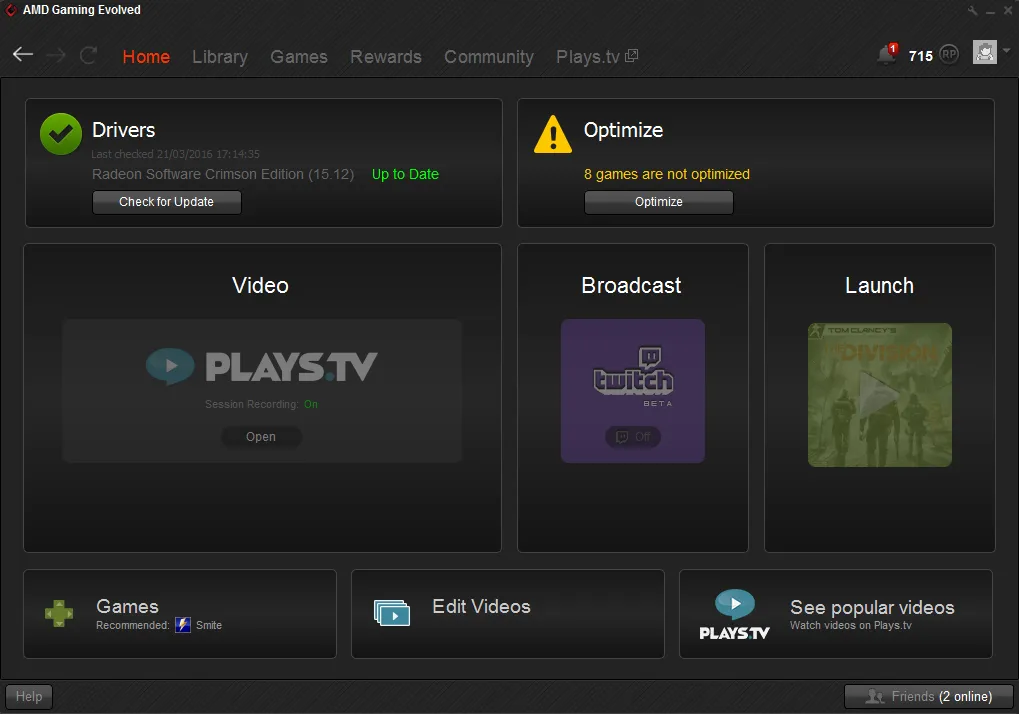
AMD has updated the Gaming Evolved client, its software for game optimization along with video capture and sharing.
One notable new recording feature adds automatic creation of highlight videos that are already edited and ready to share. This is only available with League of Legends and Counter Strike: Global Offensive for now, but AMD says more games will be added over time. It works by syncing live match data in order to work out key moments and create pre-edited highlight videos.
The other new feature of Gaming Evolved is that recording begins automatically when your game begins, and it captures the entire session, while deleting older videos to save storage space. You can disable automatic recording if you'd rather enable it manually. I tested out a quick five minute video capture of The Division and it worked well.
While you're playing, you can hit a hotkey to create a bookmark, which will record a clip (you can set the length from 5 seconds to 10 minutes). Then you're able to use the new video editor, and create quick highlight reels by just selecting multiple bookmarks at once. The video editor is pretty basic right now, with only simple clipping and volume controls, but it works fine for making these snappy videos. If you're looking to create something more advanced, you'll still have to use some other software.
Another limitation is that the software currently only lets you upload videos to Plays.tv.
Keep up to date with the most important stories and the best deals, as picked by the PC Gamer team.

