Join The Club





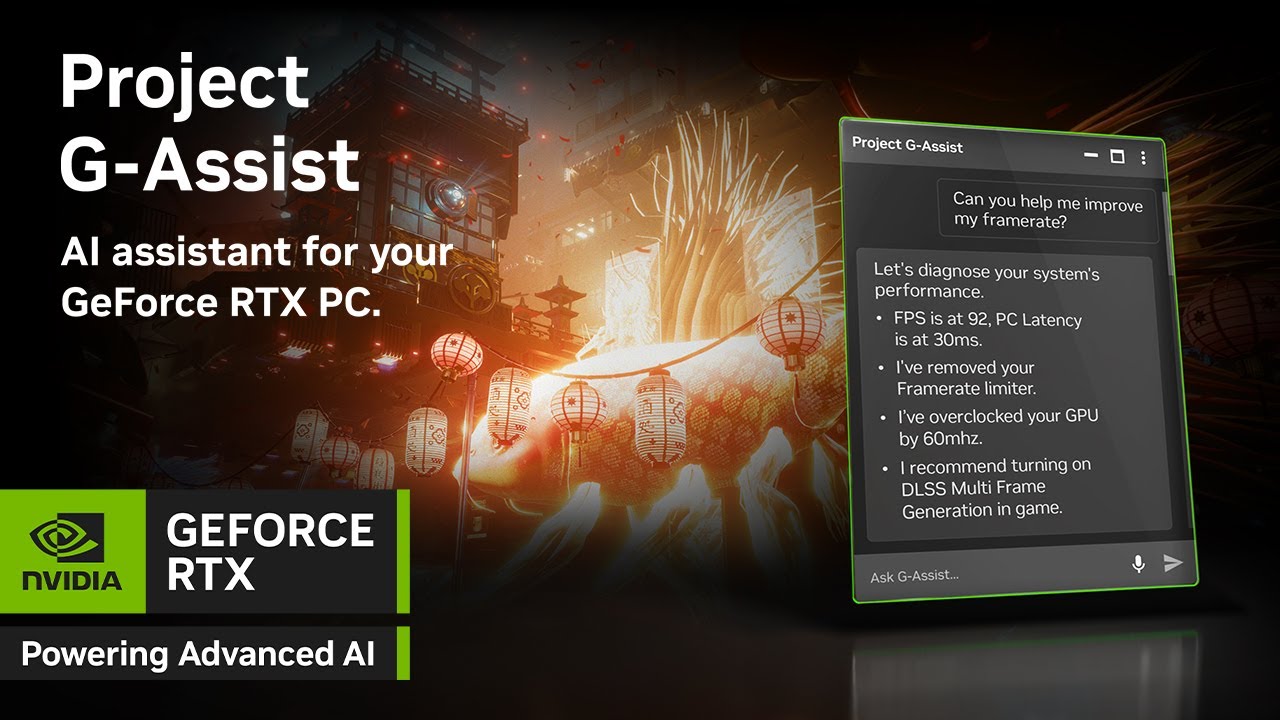
A new version of the Nvidia App has been rolled out with a couple of pretty trick features. The big news items with Nvidia App version 11.0.3.218 are custom DLSS upscaling resolutions and a new AI assistant called Project G-Assist that runs locally on your PC.
The "base resolution" means the resolution that the GPU's 3D pipeline renders at before upscaling adds pixels to generate a high-resolution final image. For instance for a final upscaled resolution of 4K or 3,840 by 2,160 pixels, the base resolution for Performance mode upscaling might be 1,920 by 1,080 or 1080p, while Quality mode will typically be 1440p base resolution or 2,560 by 1,440.
Article continues belowBase resolutions of anywhere between 33% and 100% of the final upscaled resolution can be selected. If 100% sounds like it doesn't make any sense—wouldn't 100% base resolution mean no upscaling at all?—it effectively applies DLAA or Deep Learning anti-aliasing, which is a more effective and faster anti-aliasing routine that traditional methods like MSAA or multi-sampling AA.

That's a pretty handy feature for hand tuning your own DLSS modes. But it's Project G-Assist that could more transformative for a greater number of gamers. It's an AI assistant based on a small language model that runs locally on your PC.
For now, it's only compatible with RTX 30-series and up desktop GPUs. Nvidia says laptop GPU support will be added later.
Anyway, Nvidia says G-Assist can help users, "control a broad range of PC settings, from optimizing game and system settings, charting frame rates and other key performance statistics, to controlling select peripherals settings such as lighting — all via basic voice or text commands."
It's not totally clear how flexible the natural language interface will be. In an ideal world, you'd be able to say something like, "hey, Half-Life 2 RTX is running badly, can you make it a bit smoother without impacting the image quality too much," and then after looking at the results say, "that's not bad but the textures look a bit fuzzy, can you make them sharper," or, "it looks smooth but feels laggy, can you fix that."
Project G-Assist is available as a separate download from the Home tab of the Nvidia App in the "Discover" section. Note, it will only be visible if you have a compatible GPU.
Nvidia says G-Assist uses a Llama-based model with eight billion parameters, which is relatively tiny compared to large language models like ChatGPT-4, which has around 1.8 trillion parameters. The smaller size of the model means it can run locally on a gaming GPU.
For now, we don't know how much VRAM G-Assist uses. Given that Nvidia's lower end GPUs tend to be a bit short of video memory as it is, that's a bit of a concern. But then maybe, just maybe, if features like this become more important, Nvidia will up VRAM allocations, just as Apple increased the base spec of its Macs from 8 GB to 16 GB to support AI features and Intel's Lunar Lake chip had to be minimum 16 GB to meet Microsoft's Copilot+ specification.
Well, I'm allowed to hope, right?!

You must confirm your public display name before commenting
Please logout and then login again, you will then be prompted to enter your display name.