Our Verdict
A very potent wireless HE gaming keyboard with lots to like that's marred by a horribly high price tag.
For
- Powerful HE switches
- Thoughtful layout
- Doubleshot keycaps
- Lightweight, but powerful, web-based software
Against
- How much is it again?
- That's right—it's a good portion of a rent payment
PC Gamer's got your back Our experienced team dedicates many hours to every review, to really get to the heart of what matters most to you. Find out more about how we evaluate games and hardware.
Asus first introduced the ROG Azoth range a couple of years ago to straddle the line between traditional gaming keyboards and the more enthusiast-grade options that had skyrocketed in popularity. The original ROG Azoth was a triumph that walked the tricky line wonderfully, packing in nice-to-haves such as lubricated switches, reliable wireless connectivity and hot-swappable powers into a smart, compact chassis.
This new ROG Azoth 96 HE takes some of what Asus has built up to this point and tears it up. For instance, it's not mechanical in the same sense as its predecessors (or siblings, I suppose), as Asus has opted to go for its ROG HFX V2 Hall effect switches for gaming precision and power, rather than the increased tactility of a traditional mechanical switch.

Switch type: Asus ROG HFX V2
Keycaps: PBT, doubleshot
Lighting: RGB, controllable in software
Onboard storage: 5 profiles
Extra ports: None
Connection type: Wired USB-C/2.4 GHz/Bluetooth 5.0
Cable: USB Type-C/USB Type-A, detachable
Weight: 1.395 kg/3.07 lbs
Price: €399
They're also smooth and slick with POM stems to make for a satisfying keypress in general use, and benefit from a new block stem design to reduce stem wobble. Plus, to benefit acoustics and overall typing feel, Asus has kitted this keyboard out with lots of dampening inside (and there's no case rattle or ping) and internal gaskets for a bouncier feel under finger.
As much as Asus is outwardly catering to hardcore gamers with the ROG Azoth 96 HE, there are still traces of enthusiast-grade running through it.
The same is also true with this keyboard being hotswappable, although Asus doesn't explicitly state which keyswitches will work in here apart from their own. It's very rare that you have the option to swap in more traditional three or five pin switches in an HE keyboard, and there are only a couple of choices that can take both HE and 'normal' mechanical switches—the Glorious GMMK 3 Pro HE and upcoming Cherry Xtrfy MX 8.2 Pro TMR Wireless.
All of this combines to make the ROG Azoth 96 HE a very powerful keyboard to use for games.

For fun for this review, I found someone who had modded the old Weapons Course time trial training course into Counter-Strike 2, which I hadn't played since dabbling with CS:GO at an exhibition a decade ago. I tried it with my Topre RealForce R2 PFU as a baseline and managed some time in the high-thirty-second range, and then moved over to this Asus keyboard. Maybe it's warming up, or the added speed of movement that this Asus keyboard brought, but I was able to beat the 'company time' of 35.2 seconds by a two-and-a-half-second margin with just a few attempts.
By anyone else's standards, those times are godawful, but for me, I was quite proud of the result with Asus' board in the hands of a ham-fisted idiot.
A lot of the speed on offer is down to the added precision and customisation of the HFX V2 switches. The benefits of these can be reaped with Asus' own web-based software—Gear Link. This opens up as a link from inside Asus' Armoury Crate, and works in a better way than the sluggish mess that Asus' old software has been in the past.

Being web-based means it's lighter and more responsive, but it isn't bereft of features. There are lots of things to do inside, such as changing actuation and reset points of individual switches and fiddling with the keyboard's rapid trigger powers, plus there are more advanced means, such as dynamic keystroke, for mapping multiple functions to one key.
There is also SOCD tech for unnaturally quick strafing, known here as Speed Tap, although this is more for marking bumf than for real-world use. Use it online, and you'll probably see the almighty ban hammer wielded. You can also fiddle with RGB lighting with ten different presets—not the most I've seen, but it's fine, I suppose.
Wireless connectivity is handled by either 2.4 GHz or Bluetooth, and it's easily switchable with a toggle switch on the rear of the keyboard. Flick to Bluetooth, and it'll instantly put the ROG Azoth 96 HE into pairing mode, and I got it hooked up to my MacBook in a matter of moments.

For 2.4 GHz powers, the USB-A receiver is contained in the back of the keyboard, and it's plug-and-play with my Windows gaming PC. Using the receiver yields wireless 8000 Hz polling powers, too, for more frequent reporting of inputs than other, more standard gaming keyboards. It might not be something that mere mortals can benefit from, but for the pros where every fraction of a second counts, it's a worthwhile addition (at the expense of battery life, of course).
Battery life is okay for the most part, with out-of-the-box settings netting me around 40 hours before this keyboard needed recharging. There are some useful power-saving modes provided to help yield longer endurance, too. One of these is known as the Zone mode, which turns down the polling rate of all unessential keys to just 250 Hz, but leaves WASD at the full 8000 Hz and disables RGB lighting.

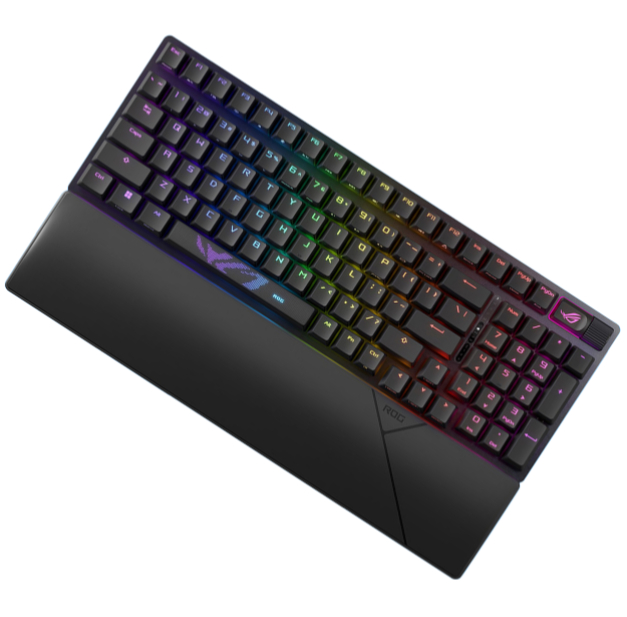
As much as Asus has overhauled the internals of the ROG Azoth 96 HE, it hasn't done much to the outside. Of course, with the '96' in its name, it's had a change of layout against the smaller 75% layout of the older Azoth models. This new one has grown to encompass a number pad and proper nav cluster, albeit in a slightly smaller format than a proper full-size keyboard. That's known as a 96%, or 1800 layout. It's a functional layout that's familiar and easy to use if all you've used in the past is a more normal keyboard.
Otherwise, the fit and finish of this Asus keyboard is excellent, with a metal top cover and plastic underside that gives it some weight and durability. Granted, it is possible to get fully machined aluminium cases at this price point, but this is a good mix of materials. In addition, this keyboard has doubleshot PBT keycaps for extra durability and a quality touch, and the function keys on the bottom row have both Windows and Mac functions on them.
✅ You want a powerful full-size keyboard: The ROG Azoth 96 HE is a potent keyboard with little compromises on size, speed, and physical features.
❌ You want a more affordable choice: I wince at the virtual €400 of this Asus keyboard, especially when similarly beefy choices are nowhere near as expensive.
Plus, there's the signature OLED screen and twiddly knob to its right for displaying things such as battery life, connectivity information, and even for adjusting actuation points on the fly without going into software that saves to the keyboard's on-board memory. Simply select the mode on the display, push the key down and then use the dial adjacent to the screen to set the actuation point. That's very handy.
Then we get to the important bit: the price tag. There has always been a bit of a bump up in price for Asus products, and the ROG Azoth 96 HE is no different. Asus is charging €399 for this keyboard (with no UK or US pricing at the moment), which is very expensive in any guise.
The fact is that you can get a premium HE gaming keyboard for much less than this, including other 96% choices such as the Keychron Q5 HE that has a fully machined aluminium case at the expense of lacking slightly more advanced switches.
If you want to match the ROG Azoth 96 HE in specs and power, you'll need to downsize a smidgen back towards its original 75 percent size with something such as the Keychron K2 HE. Nonetheless, that's some three times cheaper than Asus' choice, which arguably shows up the ROG Azoth 96 HE's eye-watering price tag even more. Don't get me wrong, this is a fantastic gaming keyboard, but it doesn't do anywhere near enough to justify such a high markup.
1. Best overall:
Asus ROG Strix Scope II 96 Wireless
2. Best budget:
Gamakay x Naughshark NS68
3. Best mid-range:
Ducky Zero 6108
4. Best rapid trigger:
Wooting 80HE
5. Best wireless rapid trigger:
Keychron K2 HE
6. Best silent:
Be Quiet! Light Mount
7. Best tenkeyless:
Keychron Q3 Max
8. Best low profile:
NuPhy Air60 HE
9. Best ergonomic:
Kinesis Freestyle Edge RGB
10. Best membrane:
Roccat Magma
A very potent wireless HE gaming keyboard with lots to like that's marred by a horribly high price tag.

You must confirm your public display name before commenting
Please logout and then login again, you will then be prompted to enter your display name.