You are now subscribed
Your newsletter sign-up was successful
Want to add more newsletters?

Every Friday
GamesRadar+
Your weekly update on everything you could ever want to know about the games you already love, games we know you're going to love in the near future, and tales from the communities that surround them.

Every Thursday
GTA 6 O'clock
Our special GTA 6 newsletter, with breaking news, insider info, and rumor analysis from the award-winning GTA 6 O'clock experts.

Every Friday
Knowledge
From the creators of Edge: A weekly videogame industry newsletter with analysis from expert writers, guidance from professionals, and insight into what's on the horizon.

Every Thursday
The Setup
Hardware nerds unite, sign up to our free tech newsletter for a weekly digest of the hottest new tech, the latest gadgets on the test bench, and much more.

Every Wednesday
Switch 2 Spotlight
Sign up to our new Switch 2 newsletter, where we bring you the latest talking points on Nintendo's new console each week, bring you up to date on the news, and recommend what games to play.

Every Saturday
The Watchlist
Subscribe for a weekly digest of the movie and TV news that matters, direct to your inbox. From first-look trailers, interviews, reviews and explainers, we've got you covered.

Once a month
SFX
Get sneak previews, exclusive competitions and details of special events each month!
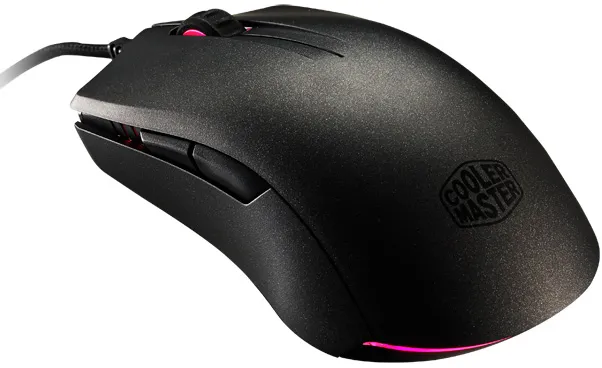
You might already be using one of the options in our top picks for gaming mice, but if you're left handed, maybe not. Left-handed gamers don't have as many options as righties when it comes to gaming mice, that's just the way it is. However, Cooler Master opted to cater to both groups with its new MasterMouse Pro L, an ambidextrous gaming mouse that was "made with customization in mind."
"This way, users can literally have a mouse all their own," Cooler Master says.
Sitting inside the MasterMouse Pro L is a 32-bit ARM processor with 512KB of onboard memory for creating and storing up to five custom profiles. Once configured, you can plug the rodent into any PC and not have to fiddle with the settings all over again or revert by to the default configuration.
Users can toggle the PixArt PMW3360 optical sensor between four levels of DPI ranging from 400 to 12,000. There's no interpolation and no acceleration.
"MasterMouse Pro L doesn't estimate your moves. It tracks them in real time," Cooler Master added.
Other specs include a lift-off distance of around 2mm, which is adjustable, along with a tracking speed of 200 ips (50g) and a 1,000Hz/1ms polling rate.

The mouse comes standard with eight programmable buttons using Omron switches. You can expand these up to 14+1 by enabling secondary functions.
Finally, there are programmable illumination zones for the scroll wheel, back beam, and both front sides. Users can customize the lighting scheme with 16.7 million color options and various effects.
The MasterMouse Pro L should be available today on Cooler Master's online store for $60.


