


The best controller for PC is a great way to play many kinds of game, and that's a fact. While we still love our mouse and keyboard setups for shooters, plenty of games are designed primarily with controllers in mind. For any of those, you want a proper PC gaming pad.
The GameSir G7 Pro is currently our choice for the best PC controller. It's the perfect blend of features, build quality, and price, and it manages to beat out the pretty superb Xbox Controller at a similar price. If you're looking to spend as little as possible, then the GameSir Nova Lite is the best budget controller, which offers Hall effect thumbsticks at an incredibly reasonable price. And if your budget's on the higher side, Razer's Wolverine V3 Pro 8K PC now sits in the best high-end spot.
You can bet that the best gaming mouse and the best gaming keyboard will prevail in almost every PC exclusive ever made, but adding one of these controllers to your inventory will cover the areas where they fall short.

Dave cut his industry teeth writing guides for PlayStation and Xbox magazines a million years ago, and is as well versed in the world of gamepads as he is in the obviously more accurate keyboard and mouse realm. He's also got a penchant for arcade football games, and two small children, and so knows a thing or two about the need for reliable pads that can take some punishment.
August 21, 2026: We've added in a review search box to allow you to see all our controller reviews from within this page. If a particular pad hasn't made it into the guide, you can search and see why it didn't make it.
August 7, 2026: The guide has been trimmed down and tidied up to make it easier for you to navigate and find the most important information about the best PC controllers.
May 6, 2026: We've added the Steam Controller as the best controller for couch gaming.
The best controller


✅ You want a great controller at a great price: The Gamesir G7 Pro stands up to more expensive controllers in many regards. Its comfort, ergonomics, and Bluetooth support mean it feels like a helluva steal for the cash.
❌ You want something flashy: This is a serious controller in a lot of ways, and it lacks any RGB—which means it won't glow in the dark, but it also won't drain its battery super quickly either.
The best PC controller is the GameSir G7 Pro. It's exceptionally high quality for the money, comfortable, colorful and manages to emulate the excellent feel of the Xbox controller, without any worries of potential stick drift.
It is a tad more expensive than the Xbox controller, but you can't say it doesn't earn that price bump. Its asymmetrical sticks are in the same place, so too are the ABXY buttons. It even has a share button and a big Xbox logo on the top. If it weren't for 'GameSir' being written on the bottom of the front plate, you could easily believe this was shipped straight from Microsoft.
However, this pad is much closer to a pro controller than a standard one. You can take the grips, front plate, and D-pad off for replacement with other units, should you want to mix and match, and it even comes with TMR (Tunnel Magnetoresistance) sticks, which means you can say goodbye to stick drift worries for good.
As well as having TMR sticks, the triggers are Hall effect, which means they won't die on you either. And in addition to the plethora of buttons, paddles, and switches, it's even bundled with a charging stand, so keeping that battery topped up between sessions should be no issue at all.
This is all helped by the fact that the G7 Pro is super sturdy, despite being a little lighter than the Xbox Wireless Controller. It took a lot to dethrone the Xbox unit as the best overall choice, but the G7 Pro has certainly earned its place at the top of this guide.

Click through to read our full GameSir G7 Pro review.
The best budget controller


✅ You're on a tight budget: The Nova Lite’s central selling point is its excellent price. There are better controllers for more money, but you’re unlikely to get a better value choice in the market.
✅ You want to play on multiple devices: This controller has built-in functions for quickly swapping from one device to another. It even outclasses much more expensive models in just how easy it is to connect to multiple devices in seconds.
❌ You want super strong battery life: At around 10 hours on a single charge, the Nova Lite won’t go dry too early—but it's a poor showing compared to some of our other recommendations.
❌ You're looking for pro features: This controller lacks back paddles, a capture button, and an aux jack, which is a bit of a shame. Still, money had to be saved somewhere, I guess.
The GameSir Nova Lite is the best budget controller for PC gaming, and that's not just because it's cheap. There are plenty of options to choose from in the sub-$30 price range, but few of them have as good a feature set as the Nova Lite.
To start with, you get proper Hall effect thumbsticks, so stick drift won't ever be an issue. Plus, it comes with a low-latency 2.4 GHz dongle, which is far more suitable for faster gaming than the standard Bluetooth connection (which it also supports).
Along with a Type-C USB port for wired use, the Nova Lite's firmware is configured for multiple platforms: PC, Steam Deck, Nintendo Switch, iOS, and Android devices. All of this would be an impressive list in a controller twice the price, so it's especially good to see in something so affordable.
Naturally, some corners have been cut to keep the cost down, so you won't find a 3.5 mm audio jack or any extra buttons, for example. The shoulder buttons are pretty small, and the D-pad is nowhere near as refined as that on the Xbox Wireless controller. It's also disappointing to note that the rechargeable battery will only last 10 hours or so, at most. That's roughly the same as the DualSense but far less than something like the Xbox Elite Series 2.
But these are minor quibbles when you consider the incredibly small price tag. It's all very usable, comfortable, and instantly familiar. There are better quality controllers on the market, and ones with more features, but you'll struggle to find anything as good value as the GameSir Nova Lite.

Click through to read our full GameSir Nova Lite Wireless review.
The best high end controller


✅ You're a seriously pro gamer: Should you need the very best wireless performance and button responsiveness, and can actually make use of the polling rate, the V3 Pro 8K PC is the pad for you.
✅ You want lots of customisation: With trigger locks, remappable buttons, and Razer Synapse 4, there are plenty of ways to customise the V3 Pro 8K PC
❌ You don't need 8,000 Hz polling: It might not have Hall effect sticks, but you can get the mighty Xbox Elite Series 2 for a lot less.
❌ You want to play on Xbox: The standard V3 Pro works on both Xbox and PC, but the V3 Pro 8K PC only works wirelessly on PC. In exchange, though, you get TMR sticks and a super high polling rate.
The best high-end PC controller is the Razer Wolverine V3 Pro 8K Pro. The V2 Pro is pretty good, but its high price point, awkward buttons, and lack of modern features such as TMR thumbsticks and Hall effect sensors meant it was never destined for a top spot. This was swiftly replaced by the V3 Pro, which has now been replaced by the V3 Pro 8K PC here.
Despite being lighter than the standard V3 Pro, it's still a super solid controller, and that carry case will help protect it from any bumps while you're on the move. Razer has clearly acted on the criticisms of the V2 Pro because now you're getting TMR thumbsticks (say goodbye to stick drift) and even Hall effect triggers, marketed as Pro HyperTriggers.
Everything about the triggers and bumper buttons feels positive, and that inspires a lot of confidence in those high-pressure gaming moments. The buttons on the front are all equally clicky, which is great if you want a positive response from your controller, but less so if you want a quiet night of gaming.
Razer's controller can be used wired or wirelessly, and in the case of the latter, the included HyperSpeed dongle allows for an 8,000 Hz polling rate. Unfortunately, there's no Bluetooth option (which the V2 Pro did have), but at least you get an extra-long USB cable for wired mode and a carry case.
At $200, the Wolverine V3 Pro 8K PC is invariably going to be compared to Microsoft's Elite Series 2. Razer's higher price is justified by the TMR sticks and Hall effect triggers, but it's still an awful lot of money to throw down on a peripheral. Still, it's also one of the best controllers we've used to date, so if you've got the cash, we can confirm it's a helluva gaming device.

Click through to read our full Razer Wolverine V3 Pro 8K review.
The best couch gaming controller


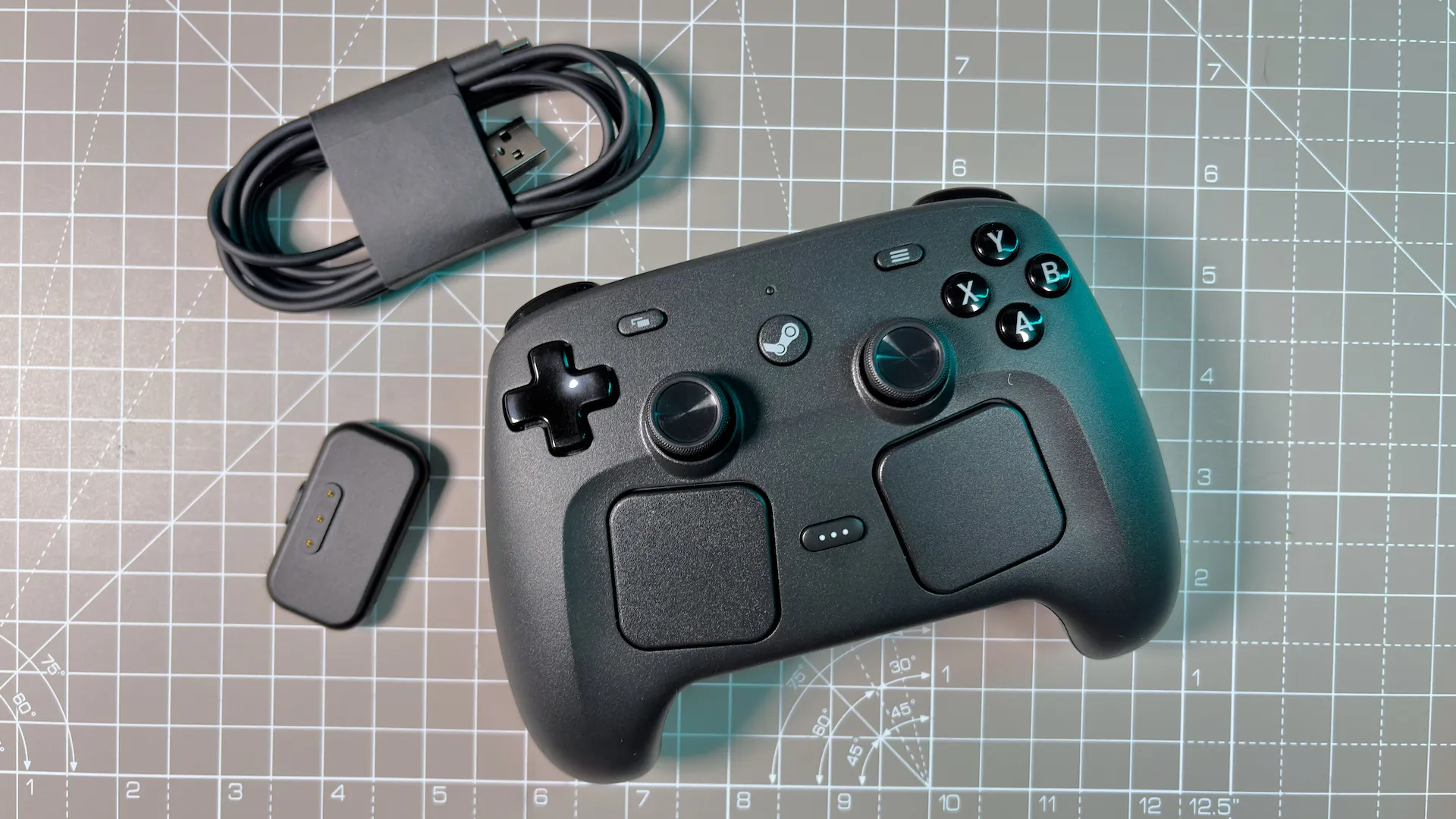

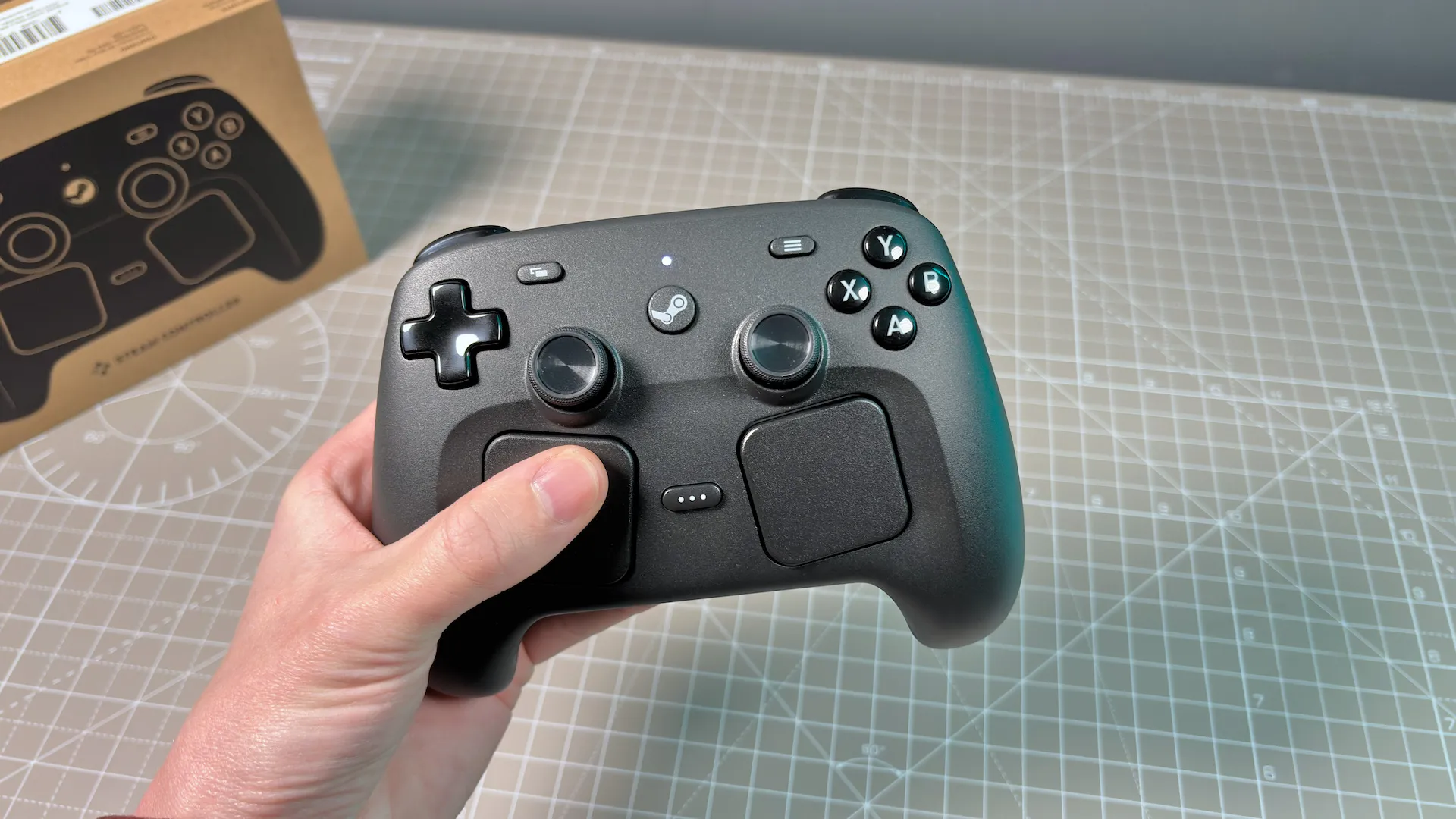

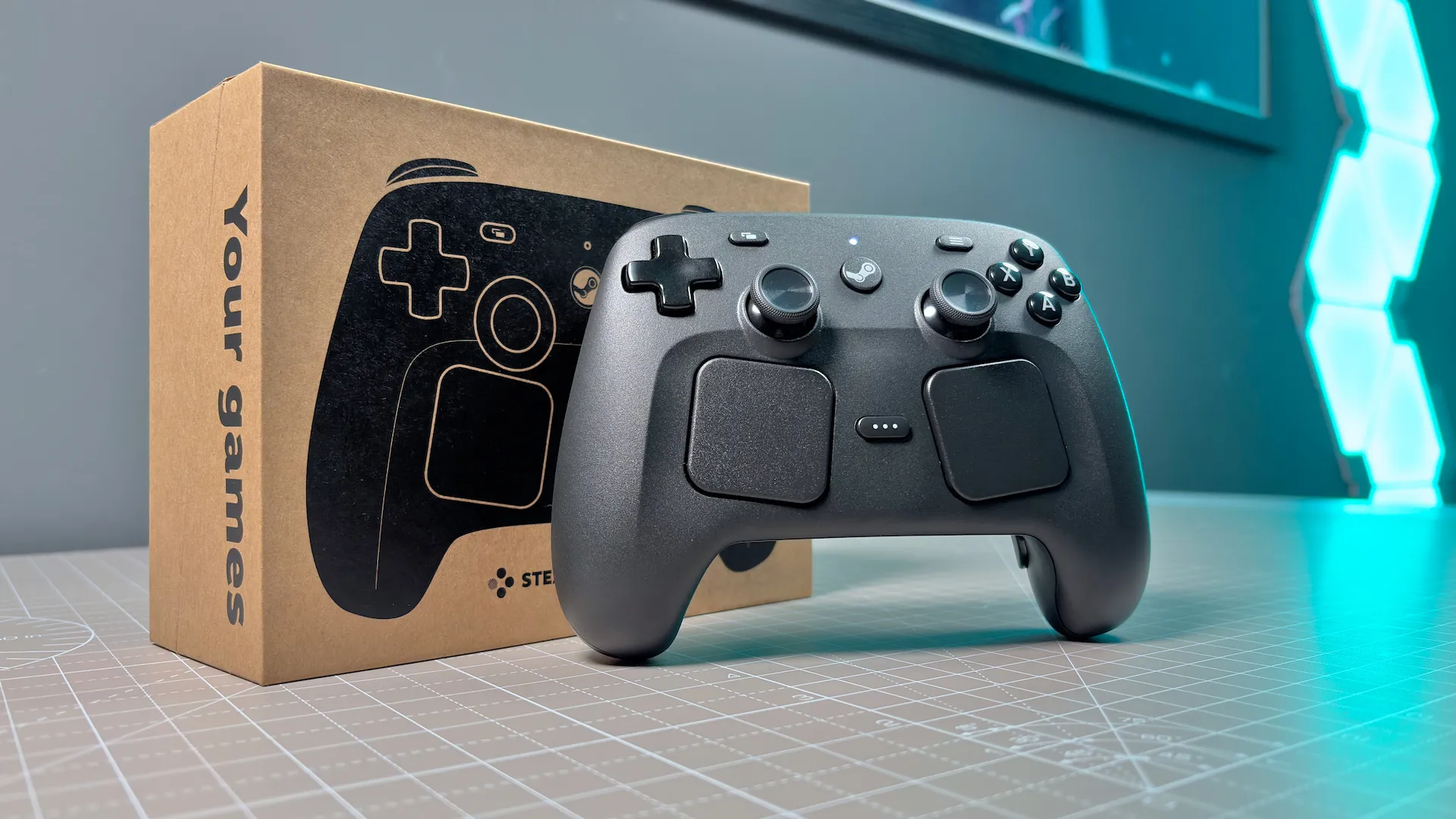


✅ You're building or buying a living room PC: The Steam Controller's trackpads and gyro make it easy to navigate access files, install apps, and play games intended for mouse controls even from the comfort of your sofa.
❌ You just need a standard pad for your desk: You could spend a lot less than this on a pad without trackpads and gyro and still get all the important features for most controller use cases.
There's nothing quite like the Steam Controller for couch gaming. Combining thumbsticks with trackpads and gyro controls, it's able to better mimic a mouse input than a standard pad. That means easier navigation across the desktop and the ability to play games that require a mouse without leaving the comfort of your couch.
The twin haptic trackpads are easy to use and sit comfortably under your thumbs. You can move your mouse pointer with the right side and scroll up and down with the left. The triggers, back buttons (of which there are four), face buttons, and trackpads are all available to use for mouse clicks or context menu shortcuts.
Then there's the gyro. This is my preferred method of traversing the desktop using the Steam Controller. The gyro maps to your mouse cursor, so waving around the controller translates to moving your cursor. It might not sound it, but it's very accurate.
The secret to the gyro is that Valve has sensors in the grips, called Grip Sense, that know when you're holding the controller and only enables gyro controls when you are. Also, you can program the controller so that gyro controls are only enabled when you're lightly touching the trackpads or thumbsticks or pressing certain buttons.
The entire Steam Controller is highly customisable through Steam. There are pages of settings to tweak it to your liking, and you can often dive deeper into certain settings if you wish. Though it's worth noting this controller is intended for use with Steam and it is a requirement to install the application on a PC to use it. Or you can use it with a SteamOS device, such as the Steam Deck.
You will find comparable, if not a little better, controllers on the market for less money than Valve's asking for the Steam Controller. Though these won't offer the same inputs that make the Steam Controller our pick for couch gaming.

Click through to read our full Steam Controller (2026) review.
The best wired controller


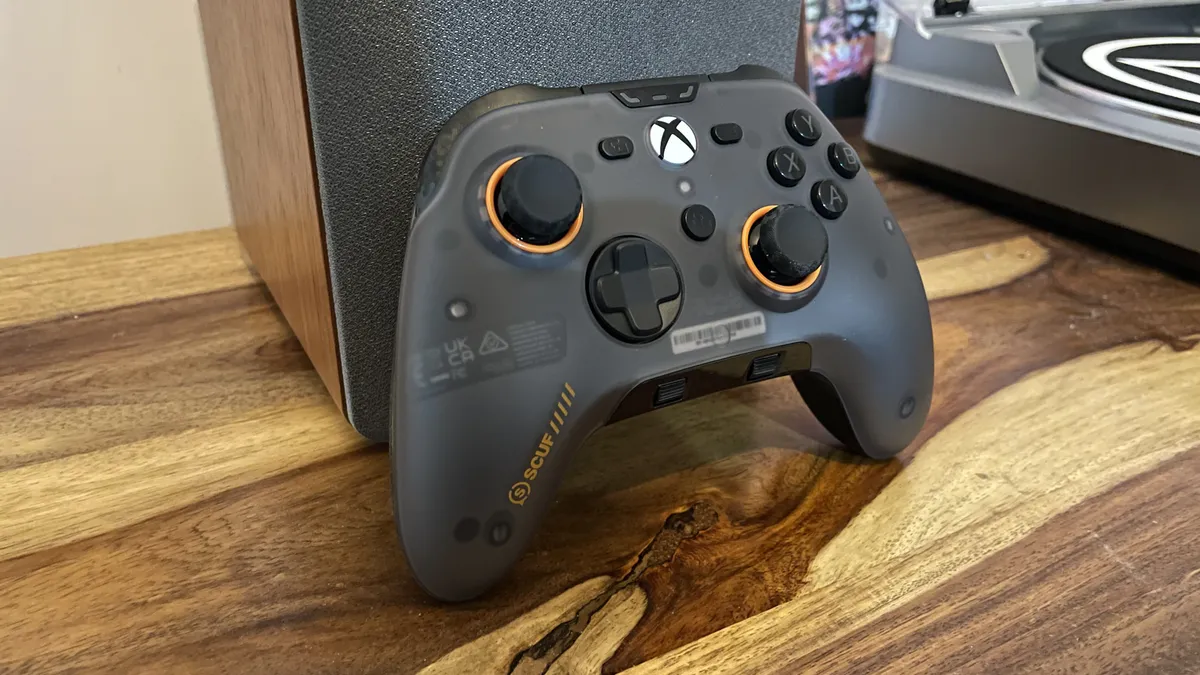


✅ You're not bothered by a cable: It might be an obvious thing to say, but our best wired controller pick is, err, wired. For some, that's a big deal; for others, no worries at all.
✅ You want excellent switches and impeccable ergonomics: The Scuf Valor Pro feels great in the hands, with superb clicks and clacks in all the right places.
❌ You're on a budget: Given the feature set here, a $100 asking price isn't too teeth-clenching. But you can pick up a great wireless controller with fewer doohickeys for much, much less.
The best wired PC controller is the Scuf Valor Pro. Yes, it's a wired controller in 2026, and yes, you can pick up plenty of great wireless controllers for its $100 price point. But the truth is, the Scuf Valor Pro is so darn good at its job, it has to take the best wired controller spot in this guide.
The Valor Pro does not reinvent the wheel. What it does, however, is refine the wired asymmetric controller recipe to such a point that it makes much of the competition look a little old-fashioned.
The sticks, for example, are Hall effect, which means they're immune to stick drift over time. You can also pop the thumbsticks off the top and install differently-sized replacements, complete with a tall "wiggly stick" (our reviewer Jacob's words, not mine) included as part of the package. It's not just the sticks that can be customised, either, as the magnetic faceplate can be popped straight off the front to be replaced by a differently-colored model of your choosing.
The triggers can also be set to a clicky configuration, or a traditional long throw, which is a feature we've enjoyed on many premium wireless controllers like the Razer Wolverine V3 Pro 8K PC above. All the buttons are incredibly satisfying and clicky, but also easy to press—especially the bumpers, which extend around the top of the controller, making them easy to press while your finger rests on a trigger.
Anyway, the major disadvantage of the Valor Pro is the lack of wireless connectivity, which you've probably already guessed by the fact that it's in the wired section. At the time of review, it was also limited to a 250 Hz wired polling rate, but Scuf has since released a firmware update that boosts it to 1,000 Hz, fixing our other major complaint. Which is all to say that, should a cable be of no concern, the Scuf Valor Pro is the wired controller to beat right now, and we can't say fairer than that.

Click through to read our full Scuf Valor Pro review.
Controller FAQ
Can you use a console controller on PC?
The short answer is yes. The slightly longer answer is that you might need to perform a little fiddling the first time you set it up—although after that it will just be a case of plugging it in.
How to set up your controller on PC:
Is PC gaming better with a controller?
This might seem an utterly offensive question to ask in the annals of PC Gamer, but it remains true that certain PC games are far better played with a controller than the classic keyboard and mouse combo.
Sports games are the most obvious, as anyone who has tried to play FIFA using the strange keyboard/mouse control scheme can attest to. But there are other titles, specifically those which were primarily designed for consoles whose control schemes are so unwieldy away from a pad that playing them any other way is a pain.
For example, you could play Elden Ring without a controller, but using a pad on a PC feels far better. Oh, and for racing games? You really want one of the options above, although of course, you could go all out and get a full-on racing wheel instead.
How we test controllers
Ignore those who seem to think every game is best with a mouse and keyboard. Assassin's Creed Valhalla is not best played with a keyboard. Street Fighter 5 is not best played with a keyboard. True, we play most games with a mouse and keyboard, but for PC gamers with ranging tastes, a good controller is a must.
Soulslikes work particularly well on a controller, and we try to test a wide variety of games when we have pads in our hands. Our testing process involves slotting the controller into our day-to-day gaming activities and seeing if it can hold its own against the competition.
This could go from taking a spin around a course in F1 25, to firing off a few million rounds in Borderlands 4, to platforming in Celeste. Testing even involves trying out the controller on games that are generally considered better on mouse and keyboard (the horrors, I know). After all, a good controller doesn't just give a competitive edge in some environments; it adds meaningfully to the way you spend those late nights, when you just need to relax and put your feet up.