

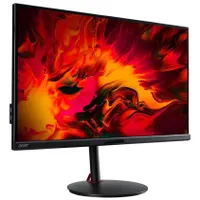
This Acer 28-inch 4K 144Hz IPS monitor I use daily is ridiculously cheap at $400
Acer's XV282K is a great way to join the high-resolution gaming club.
Keep up to date with the most important stories and the best deals, as picked by the PC Gamer team.
You are now subscribed
Your newsletter sign-up was successful
Want to add more newsletters?
Every Friday
GamesRadar+
Your weekly update on everything you could ever want to know about the games you already love, games we know you're going to love in the near future, and tales from the communities that surround them.
Every Thursday
GTA 6 O'clock
Our special GTA 6 newsletter, with breaking news, insider info, and rumor analysis from the award-winning GTA 6 O'clock experts.
Every Friday
Knowledge
From the creators of Edge: A weekly videogame industry newsletter with analysis from expert writers, guidance from professionals, and insight into what's on the horizon.
Every Thursday
The Setup
Hardware nerds unite, sign up to our free tech newsletter for a weekly digest of the hottest new tech, the latest gadgets on the test bench, and much more.
Every Wednesday
Switch 2 Spotlight
Sign up to our new Switch 2 newsletter, where we bring you the latest talking points on Nintendo's new console each week, bring you up to date on the news, and recommend what games to play.
Every Saturday
The Watchlist
Subscribe for a weekly digest of the movie and TV news that matters, direct to your inbox. From first-look trailers, interviews, reviews and explainers, we've got you covered.
Once a month
SFX
Get sneak previews, exclusive competitions and details of special events each month!
Acer Nitro XV282K | 28-inch | 4K | 144Hz | IPS | $499.99 $399.99 at Newegg (save $100)
If you're looking for a cheap 4K monitor upgrade but you also want lots of gaming features, then the Acer Nitro XV282K is well worth considering. The IPS panel is bright and colorful, and supports AMD's FreeSync Premium for a maximum refresh rate of 144Hz. There are better choices for HDR gaming, as it's only rated for HDR400, and the preset modes aren't great, either. There are two HDMI 2.1 for consoles and graphics cards, along with a DisplayPort and USB connections. You even get an integrated KVM switch.
This particular 4K monitor by Acer isn't the most well-known of its models, probably because the Nitro brand is targeted more toward 1080p gaming and its original MSRP was in the highly competitive area of $900.
It can be found a lot cheaper than that now, and this deal makes it even more of a bargain. And you're getting a lot of monitor for your money. The 28-inch 4K panel is bright and crisp, displaying colors accurately and quickly.
Acer claims a response time (grey-to-grey) of 1 millisecond and while it's not quite that fast in real situations, it's more than enough for most PC gamers. With a maximum refresh rate of 144Hz and support for AMD's FreeSync Premium, your eyes will thank you for the tear-free smooth images.
It's not the very best gaming monitor you can get, especially when it comes to HDR (high dynamic range), but it's perfectly okay. It's rated to VESA HDR400 which is about as good as any IPS panel can get. It's the preset modes in the monitor's control panel that let it down the most, as without some additional configuration, they don't look very nice.
Fortunately, these are easy to adjust and you can even install a small app on your PC to configure it from within Windows.
In terms of connectivity, there's lots on offer with two HDMI 2.1, one DisplayPort 1.4, and a host of USB ports all tucked underneath the screen. That does make them a little fiddly to get to, but how often do you need to change cables anyway? To top it all off, Acer even included a KVM switch, too.
This Nitro XV282K is one of the monitors I use for all my daily work and gaming, and it fits my needs perfectly. But don't just take my word for it, check out our sister site Tom's Guide for its review on Acer's great monitor.

Keep up to date with the most important stories and the best deals, as picked by the PC Gamer team.

Nick, gaming, and computers all first met in the early 1980s. After leaving university, he became a physics and IT teacher and started writing about tech in the late 1990s. That resulted in him working with MadOnion to write the help files for 3DMark and PCMark. After a short stint working at Beyond3D.com, Nick joined Futuremark (MadOnion rebranded) full-time, as editor-in-chief for its PC gaming section, YouGamers. After the site shutdown, he became an engineering and computing lecturer for many years, but missed the writing bug. Cue four years at TechSpot.com covering everything and anything to do with tech and PCs. He freely admits to being far too obsessed with GPUs and open-world grindy RPGs, but who isn't these days?


