
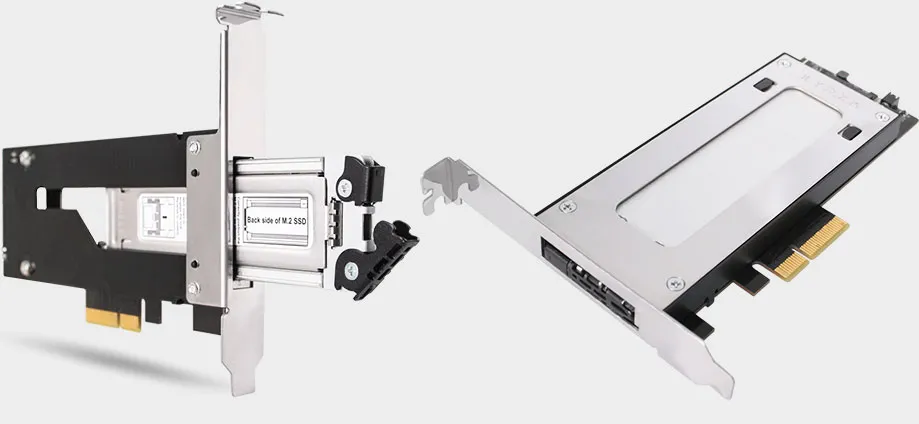
This add-in card lets you yank M.2 SSDs from your gaming PC while it's running
A neat way to add a portable NVMe SSD to your PC if you're missing an M.2 slot.
Keep up to date with the most important stories and the best deals, as picked by the PC Gamer team.
You are now subscribed
Your newsletter sign-up was successful
Want to add more newsletters?
Every Friday
GamesRadar+
Your weekly update on everything you could ever want to know about the games you already love, games we know you're going to love in the near future, and tales from the communities that surround them.
Every Thursday
GTA 6 O'clock
Our special GTA 6 newsletter, with breaking news, insider info, and rumor analysis from the award-winning GTA 6 O'clock experts.
Every Friday
Knowledge
From the creators of Edge: A weekly videogame industry newsletter with analysis from expert writers, guidance from professionals, and insight into what's on the horizon.
Every Thursday
The Setup
Hardware nerds unite, sign up to our free tech newsletter for a weekly digest of the hottest new tech, the latest gadgets on the test bench, and much more.
Every Wednesday
Switch 2 Spotlight
Sign up to our new Switch 2 newsletter, where we bring you the latest talking points on Nintendo's new console each week, bring you up to date on the news, and recommend what games to play.
Every Saturday
The Watchlist
Subscribe for a weekly digest of the movie and TV news that matters, direct to your inbox. From first-look trailers, interviews, reviews and explainers, we've got you covered.
Once a month
SFX
Get sneak previews, exclusive competitions and details of special events each month!
Depending on when you built your PC, it might not have an M.2 slot, leaving you unable to add a sleek and fast NVMe SSD to your setup. You could always upgrade your motherboard, but that's not exactly a quick and easy fix. Icy Docks solves the dilemma with its new ToughArmor MB840M2P-B, an add-in card for M.2 drives.
Icy Dock is not the first to offer such a product, but this one stands out because it supports hot-swapping drives (via Tom's Hardware). That means you can add and remove M.2 SSDs while your PC is still powered on.
It's not a feature you can take advantage of if using the SSD as your main drive, but as secondary storage, it's fair game. Jamming an SSD into the AIC (or yanking one out) is presumably easy as well—the removable drive tray doesn't require any tools, you just plop a drive into it, then slide the tray into the AIC. That's much easier than a motherboard swap.
The enclosure is made of aluminum and acts as a giant heatsink. There's also a thermal pad included, to help whisk heat off your SSD and transfer it to the aluminum housing.
Icy Dock designed its ToughArmor card for PCIe 3.0 x4 slots, though it's also compatible with longer x8 and x16 slots. It supports a wide range of M.2 SSDs as well, including WD's SN750 and Samsung's 970 Pro, two of the best SSDs for gaming. I count drives from 30 different manufacturers in Icy Dock's compatibility list.
The big question mark here is pricing. Icy Dock hasn't revealed the MSRP, and it doesn't look like it's in stock anywhere just yet. For reference, the 2.5-inch SATA version sells for $64.99 on Amazon, which is a bit steep. Add-in cards for M.2 drives that lack hot swap support typically run around $15 on the lower end.
Keep up to date with the most important stories and the best deals, as picked by the PC Gamer team.
Paul has been playing PC games and raking his knuckles on computer hardware since the Commodore 64. He does not have any tattoos, but thinks it would be cool to get one that reads LOAD"*",8,1. In his off time, he rides motorcycles and wrestles alligators (only one of those is true).


