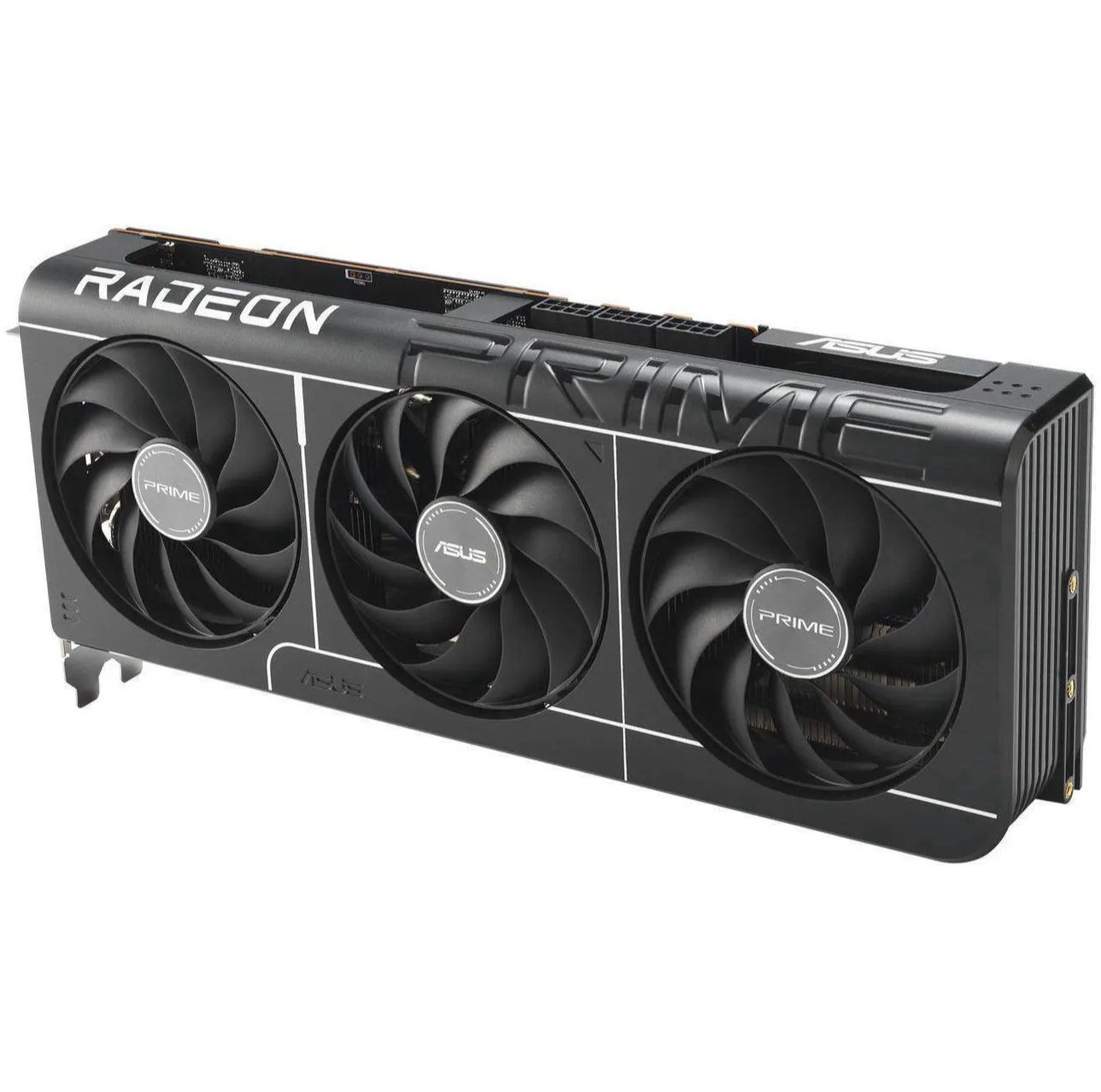
An extremely well put together graphics card that could make cheaper models blush. It's cool, quiet and the overclocking headroom is wild. Thing is, it's not a good time to buy any RTX 5080, especially not a super-premium one such as this.
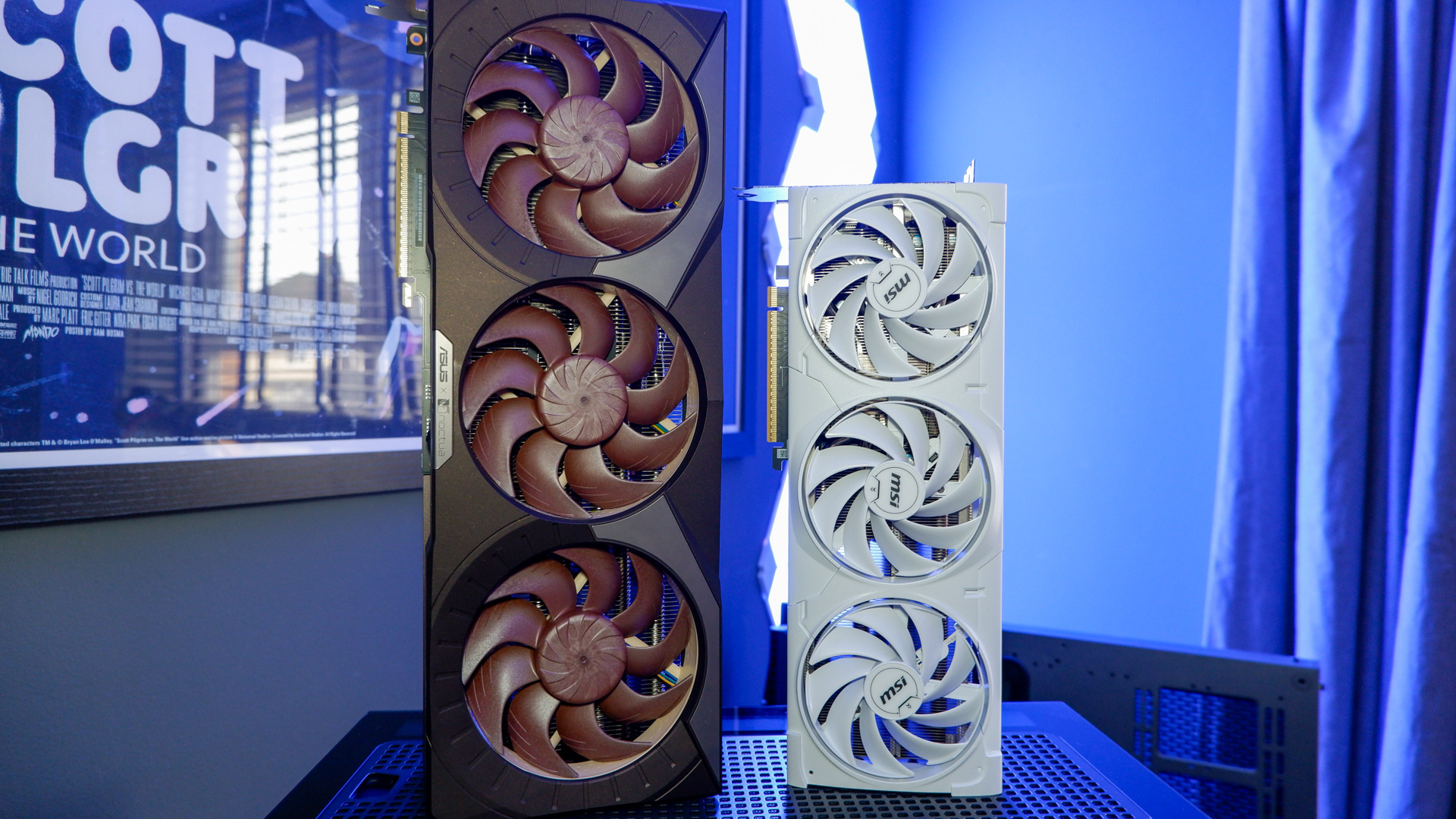
The Asus GeForce RTX 5080 Noctua Edition is claimed to be the "quietest graphics card in its class" and I don't doubt it's in the running. Though upon first removing it from its box, I was sure it had earned itself at least one accolade: it's easily the largest graphics card I've ever tested. Just a year or two ago, I would have laughed at sheer heft of the RTX 4080 Founders Edition—it looks practically pint-sized next to the Noctua Edition.
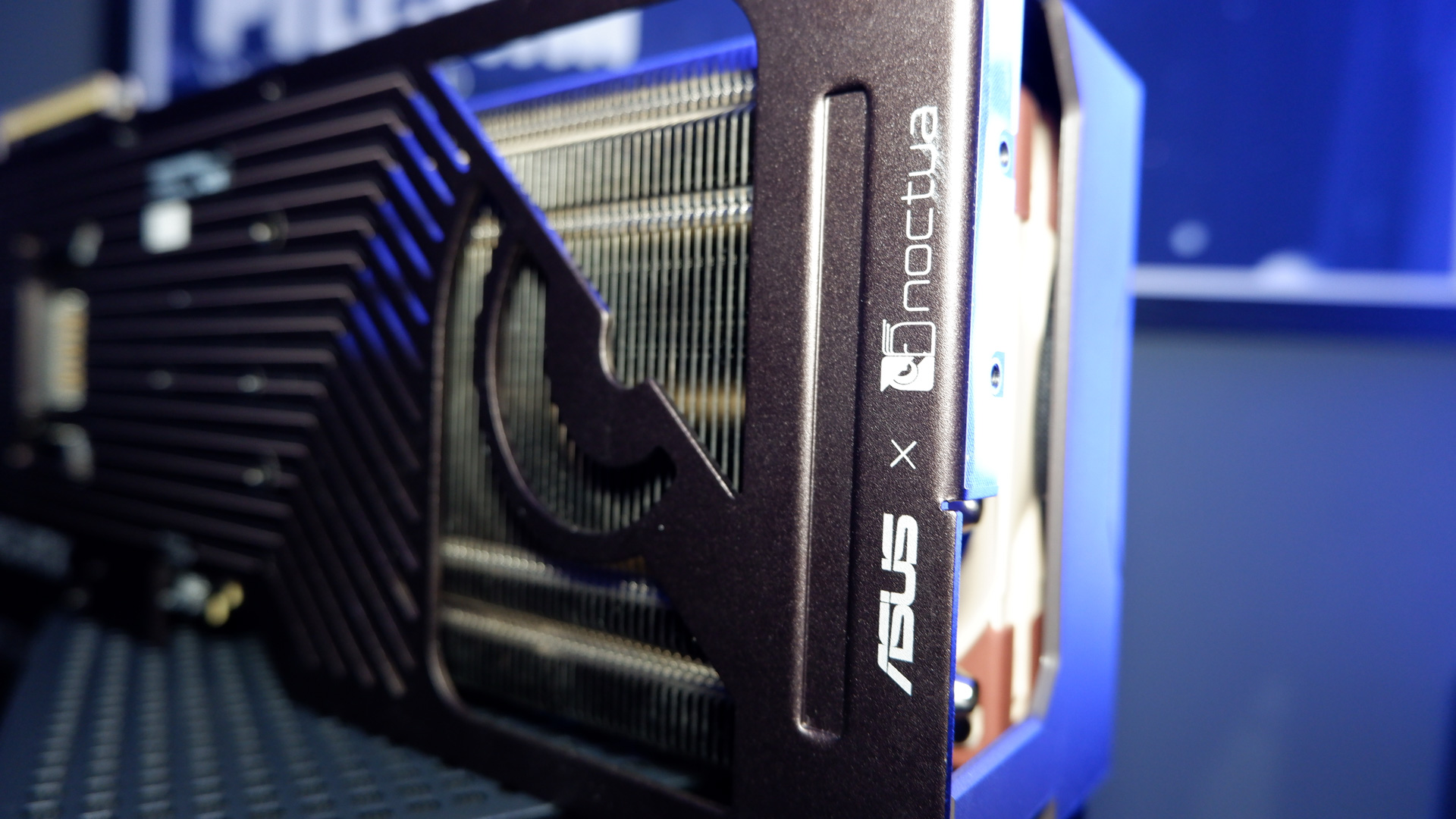
This colossus is the product of a partnership between Asus and Noctua. The cooling company is providing three of its NF-A12x25 120 mm fans for the shroud here, including a splash of brown that we don't see on a GPU too often. I think it looks great, with an almost steampunk appearance on account of its massive heft and unusual colourway. It even sparkles a little in the light, which is a nice touch.
Though its powerful look is a limit on what you can pair with it. It's very easy to clash given it's sporting Noctua's telltale brown, unless you pair it with more Noctua brown.
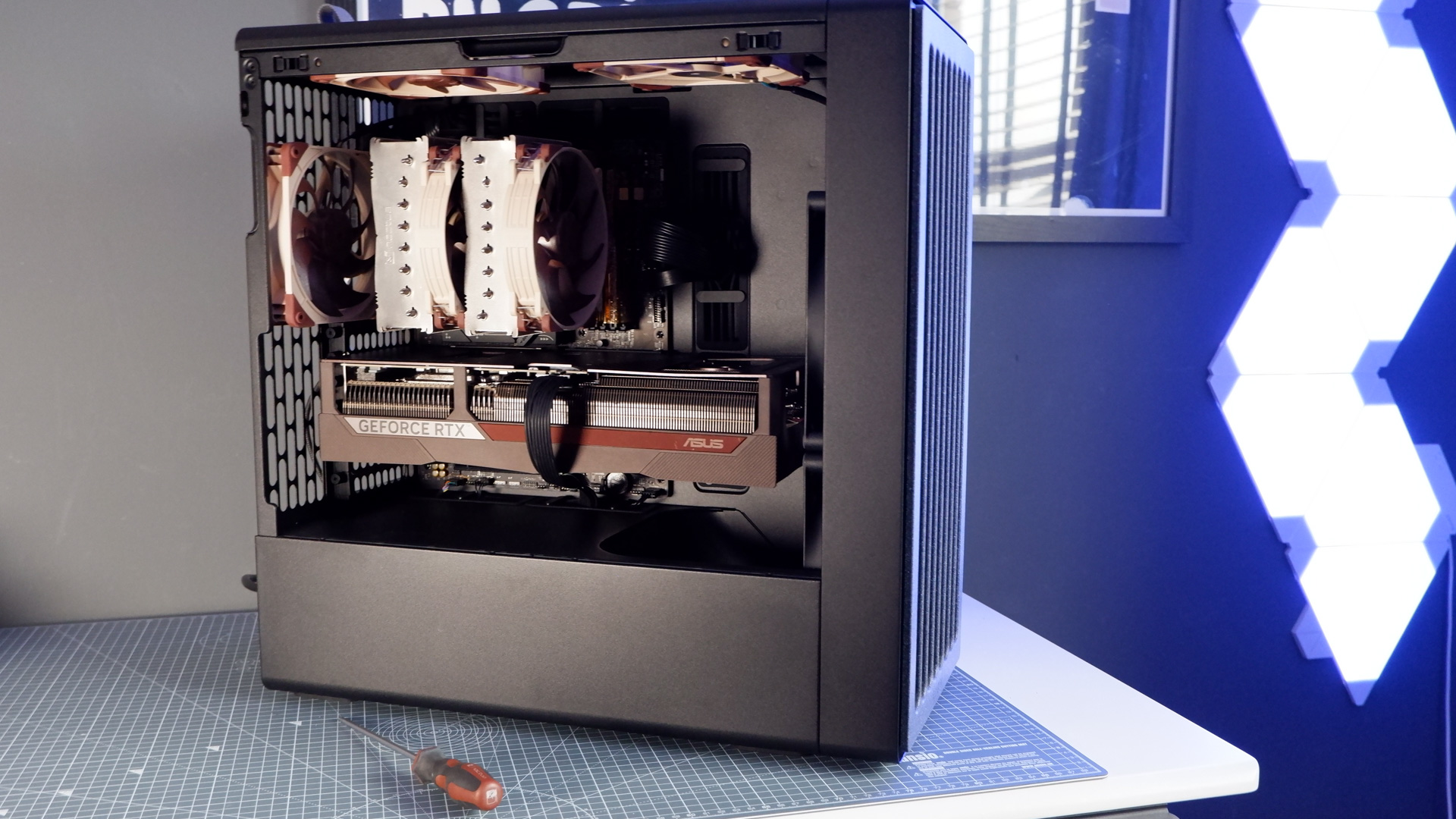
So that's what I did. I paired the RTX 5080 Noctua Edition with the only kit I could think to: the Noctua NH-D15 G2 cooler and a couple NF-A14x25 G2 fans. All loaded into the Havn BF 360. A gorgeous combination, if I dare say myself.
RTX 5080 Noctua Edition specs
(Image credit: Future)
GPU: GB203 CUDA cores: 10752 Memory: 16 GB GDDR7 GPU clock speed: 2700 MHz / 2655 MHz (Extreme profile) Memory speed: 30 Gbps Dimensions: 303 x 121 x 49 mm Weight: 2.607 kg / 5.74 lbs Price:$1700/£1560
But it's also extremely easy to build an ugly PC with this card. I moved it over to our MSI/Cyberpower test system for benchmarking, which is all-white and bathed in RGB lights, and the RTX 5080 looks absolutely horrid. I had to avert my eyes for the remainder of the tests.
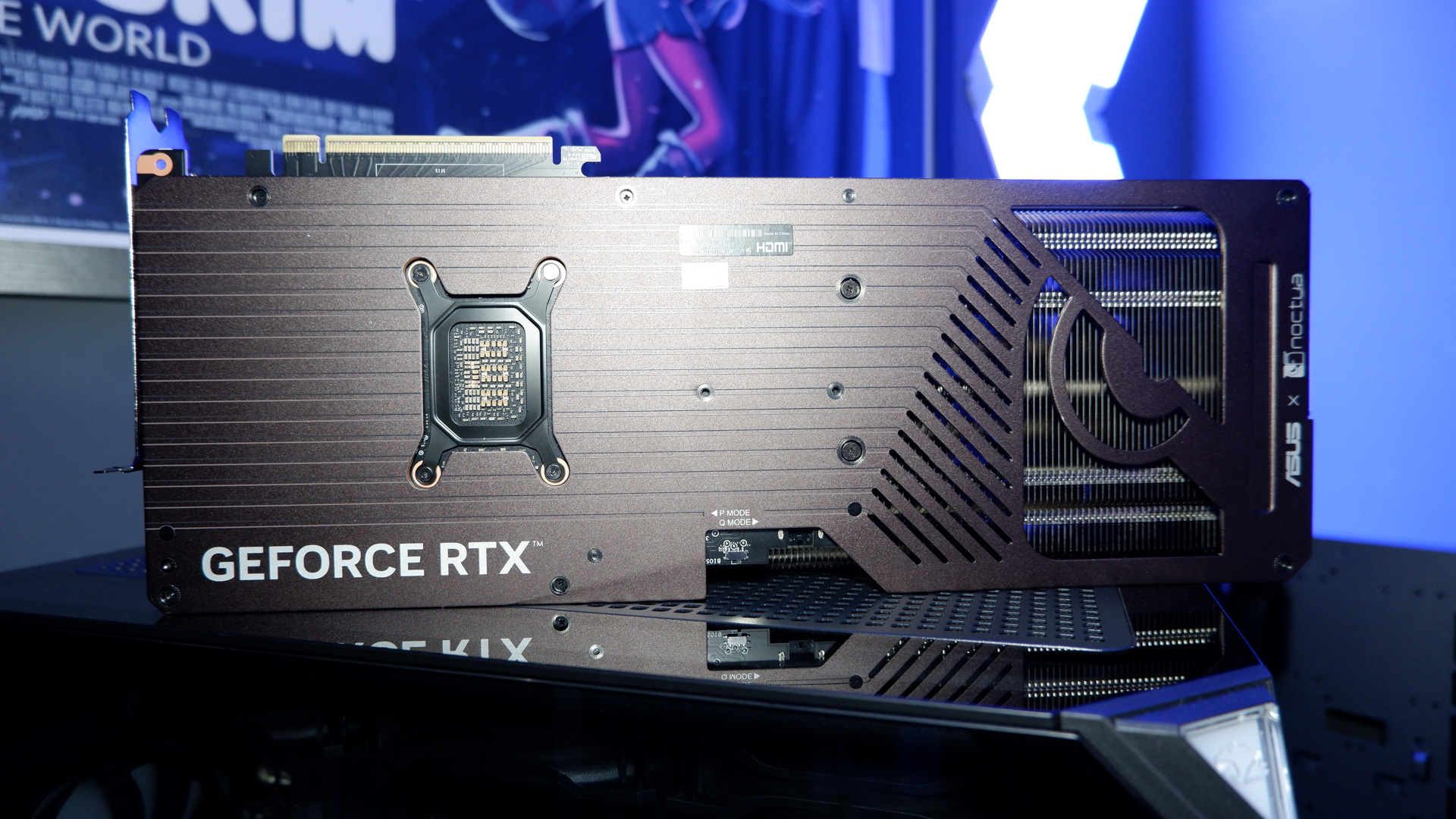
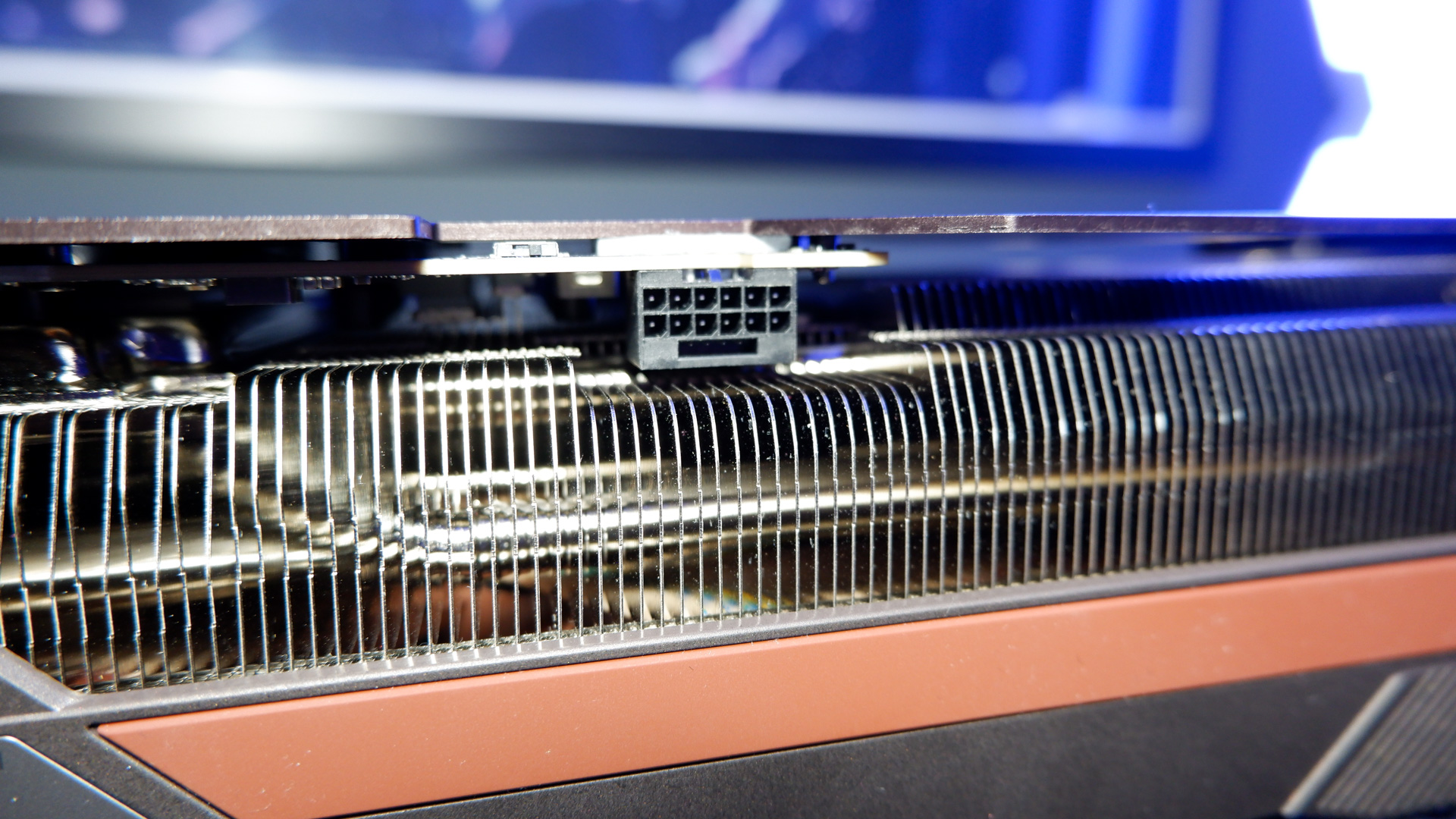
Weighing in at 2.607 kg—enough that I weighed it on my human scales, not my kitchen scales—this card features a huge heatsink riddled with heat pipes. Four of these heat pipes run the length of the card, which, at 385 mm, is only able to fit inside very spacious cases. The rest culminate near the vapour chamber that sits atop the GPU.
One of the less spoken about but important parts of a graphics card's construction is the thermal interface material (TIM). This card offers a phase-change thermal pad to keep an even contact between the heatsink and GPU at all times, and ideally, over a long period of time. The card has a lapped contact plate atop of the GB203 GPU, a technique that Asus calls MaxContact. It reckons this alone knocks up to 2 °C off.
The biggest gaming news, reviews and hardware deals
Keep up to date with the most important stories and the best deals, as picked by the PC Gamer team.
Image 1 of 5
(Image credit: Future)
(Image credit: Future)
(Image credit: Future)
(Image credit: Future)
(Image credit: Future)
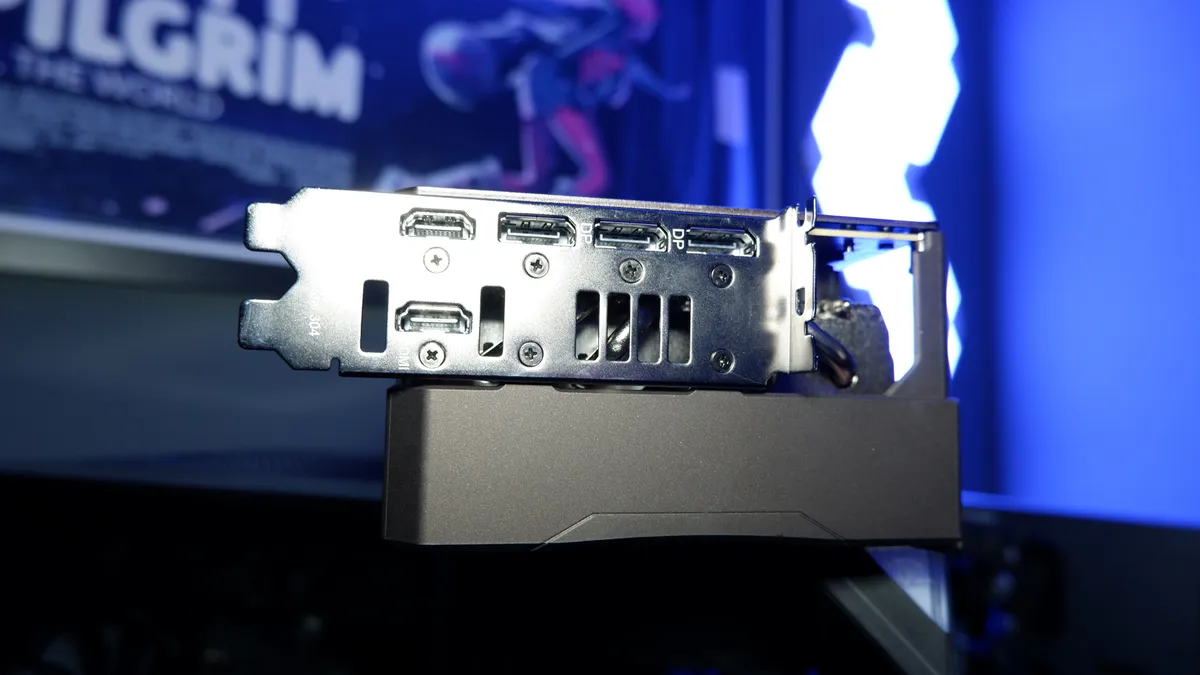
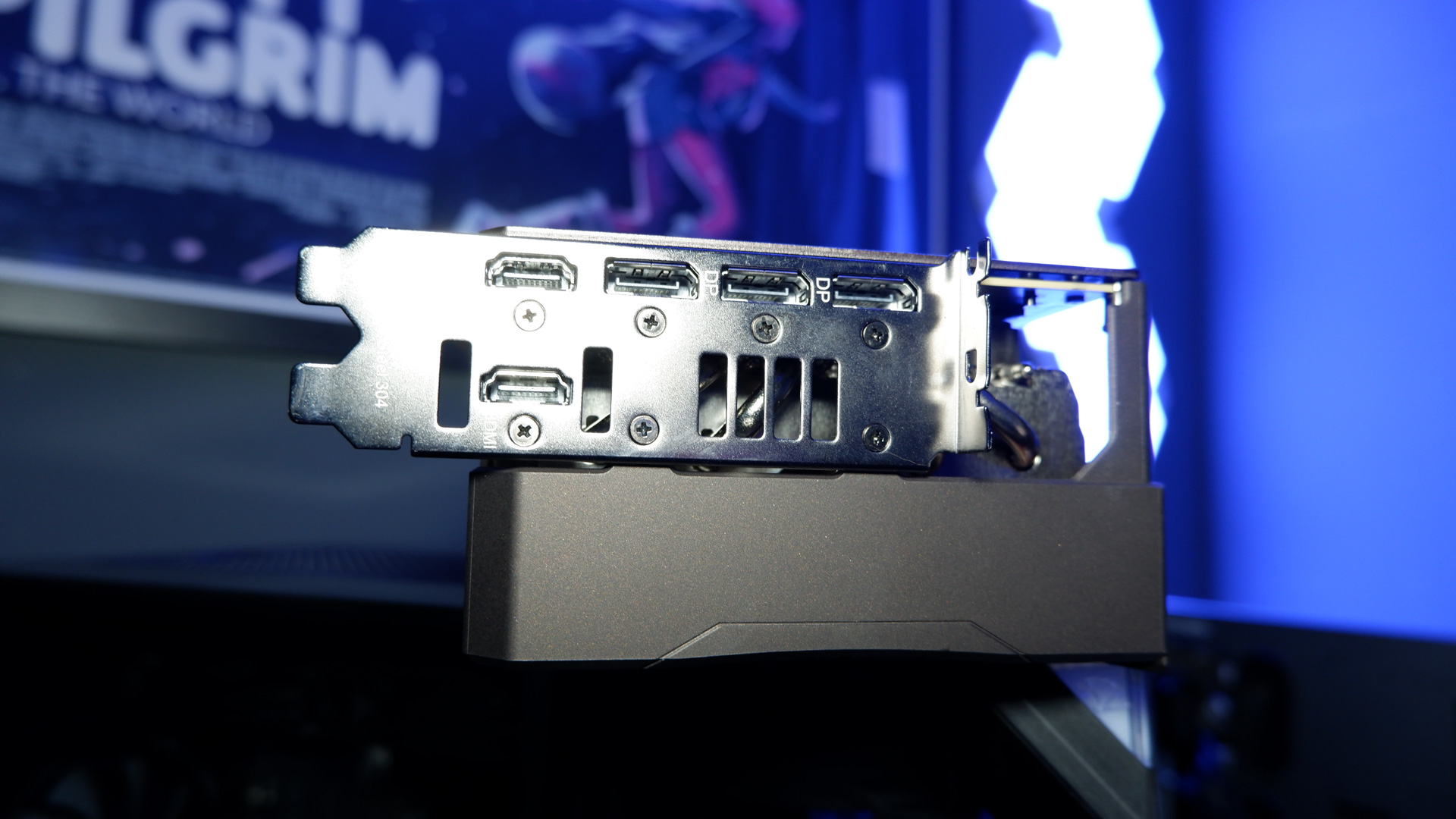
For I/O, this card includes two HDMI 2.1 ports (one above the other) alongside three DisplayPort 2.1 ports, which run the remaining length of the two-slot bracket. It's absolutely a four-slot card, however, measuring 388 x 80 x 138 mm by my own measurements
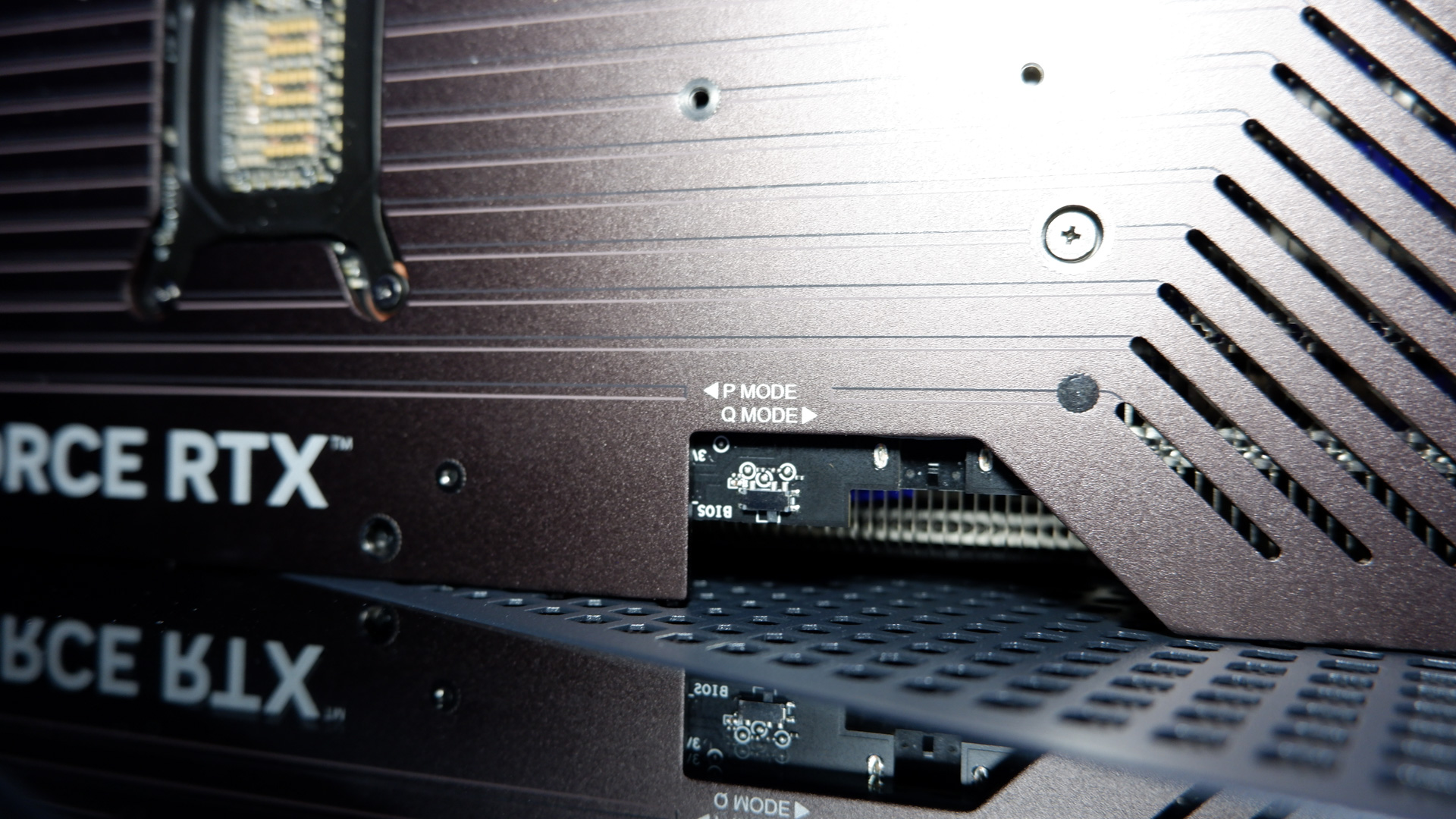
The graphics card offers two BIOS modes: Performance and Quiet. These are switched via a tiny switch near the 16-pin connector. The Quiet mode keeps the clock speed at 2,700 MHz. The Performance mode sets it to 2,730 MHz.
Performance - Asus GeForce RTX 5080 Noctua OC Edition
RTX 5080 Asus Noctua Edition (performance mode)
22443
RTX 5080 Asus Noctua Edition (quiet mode)
22940
RTX 5080 MSI Ventus 3X OC White
21669
07,50015,00022,50030,000
Overall index score
3DMark Port Royal Data
Product
Value
RTX 5080 Asus Noctua Edition (performance mode)
22443
RTX 5080 Asus Noctua Edition (quiet mode)
22940
RTX 5080 MSI Ventus 3X OC White
21669
GPU index score
Overall index score
RTX 5080 Asus Noctua Edition (performance mode)
16311
13779
RTX 5080 Asus Noctua Edition (quiet mode)
16353
13738
RTX 5080 MSI Ventus 3X OC White
15675
13452
05,00010,00015,00020,000
3DMark Time Spy Extreme Data
Product
Value
RTX 5080 Asus Noctua Edition (performance mode)
16311 GPU index score, 13779 Overall index score
RTX 5080 Asus Noctua Edition (quiet mode)
16353 GPU index score, 13738 Overall index score
RTX 5080 MSI Ventus 3X OC White
15675 GPU index score, 13452 Overall index score
Avg FPS
1% Low FPS
RTX 5080 Asus Noctua Edition (performance mode)
121
93
RTX 5080 Asus Noctua Edition (quiet mode)
122
104
RTX 5080 MSI Ventus 3X OC White
123
106
037.575112.5150
Black Myth Wukong (1080p High) Data
Product
Value
RTX 5080 Asus Noctua Edition (performance mode)
121 Avg FPS, 93 1% Low FPS
RTX 5080 Asus Noctua Edition (quiet mode)
122 Avg FPS, 104 1% Low FPS
RTX 5080 MSI Ventus 3X OC White
123 Avg FPS, 106 1% Low FPS
Avg FPS
1% Low FPS
RTX 5080 Asus Noctua Edition (performance mode)
130
111
RTX 5080 Asus Noctua Edition (quiet mode)
131
114
RTX 5080 MSI Ventus 3X OC White
133
114
037.575112.5150
Black Myth Wukong (1440p High + Upscaling (quality)) Data
Product
Value
RTX 5080 Asus Noctua Edition (performance mode)
130 Avg FPS, 111 1% Low FPS
RTX 5080 Asus Noctua Edition (quiet mode)
131 Avg FPS, 114 1% Low FPS
RTX 5080 MSI Ventus 3X OC White
133 Avg FPS, 114 1% Low FPS
Avg FPS
1% Low FPS
RTX 5080 Asus Noctua Edition (performance mode)
93
81
RTX 5080 Asus Noctua Edition (quiet mode)
93
82
RTX 5080 MSI Ventus 3X OC White
92
81
0255075100
Black Myth Wukong (1440p High) Data
Product
Value
RTX 5080 Asus Noctua Edition (performance mode)
93 Avg FPS, 81 1% Low FPS
RTX 5080 Asus Noctua Edition (quiet mode)
93 Avg FPS, 82 1% Low FPS
RTX 5080 MSI Ventus 3X OC White
92 Avg FPS, 81 1% Low FPS
Avg FPS
1% Low FPS
RTX 5080 Asus Noctua Edition (performance mode)
56
49
RTX 5080 Asus Noctua Edition (quiet mode)
56
49
RTX 5080 MSI Ventus 3X OC White
54
48
015304560
Black Myth Wukong (4K High) Data
Product
Value
RTX 5080 Asus Noctua Edition (performance mode)
56 Avg FPS, 49 1% Low FPS
RTX 5080 Asus Noctua Edition (quiet mode)
56 Avg FPS, 49 1% Low FPS
RTX 5080 MSI Ventus 3X OC White
54 Avg FPS, 48 1% Low FPS
RTX 5080 Asus Noctua Edition (performance mode)
2161.54
RTX 5080 Asus Noctua Edition (quiet mode)
2139.47
RTX 5080 MSI Ventus 3X OC White
2284.56
07501,5002,2503,000
Samples per min
Blender 4.3.0 (Junkyard) Data
Product
Value
RTX 5080 Asus Noctua Edition (performance mode)
2161.54
RTX 5080 Asus Noctua Edition (quiet mode)
2139.47
RTX 5080 MSI Ventus 3X OC White
2284.56
Avg FPS
1% Low FPS
RTX 5080 Asus Noctua Edition (performance mode)
104
75
RTX 5080 Asus Noctua Edition (quiet mode)
103
81
RTX 5080 MSI Ventus 3X OC White
103
76
037.575112.5150
Cyberpunk 2077 (1080p RT Ultra) Data
Product
Value
RTX 5080 Asus Noctua Edition (performance mode)
104 Avg FPS, 75 1% Low FPS
RTX 5080 Asus Noctua Edition (quiet mode)
103 Avg FPS, 81 1% Low FPS
RTX 5080 MSI Ventus 3X OC White
103 Avg FPS, 76 1% Low FPS
Avg FPS
1% Low FPS
RTX 5080 Asus Noctua Edition (performance mode)
110
79
RTX 5080 Asus Noctua Edition (quiet mode)
110
86
RTX 5080 MSI Ventus 3X OC White
182
126
050100150200
Cyberpunk 2077 (1440p RT Ultra + upscaling (quality)) Data
Product
Value
RTX 5080 Asus Noctua Edition (performance mode)
110 Avg FPS, 79 1% Low FPS
RTX 5080 Asus Noctua Edition (quiet mode)
110 Avg FPS, 86 1% Low FPS
RTX 5080 MSI Ventus 3X OC White
182 Avg FPS, 126 1% Low FPS
Avg FPS
1% Low FPS
RTX 5080 Asus Noctua Edition (performance mode)
68
55
RTX 5080 Asus Noctua Edition (quiet mode)
66
55
RTX 5080 MSI Ventus 3X OC White
70
56
020406080
Cyberpunk 2077 (1440p RT Ultra) Data
Product
Value
RTX 5080 Asus Noctua Edition (performance mode)
68 Avg FPS, 55 1% Low FPS
RTX 5080 Asus Noctua Edition (quiet mode)
66 Avg FPS, 55 1% Low FPS
RTX 5080 MSI Ventus 3X OC White
70 Avg FPS, 56 1% Low FPS
Avg FPS
1% Low FPS
RTX 5080 Asus Noctua Edition (performance mode)
35
28
RTX 5080 Asus Noctua Edition (quiet mode)
34
28
RTX 5080 MSI Ventus 3X OC White
34
28
010203040
Cyberpunk 2077 (4K RT Ultra) Data
Product
Value
RTX 5080 Asus Noctua Edition (performance mode)
35 Avg FPS, 28 1% Low FPS
RTX 5080 Asus Noctua Edition (quiet mode)
34 Avg FPS, 28 1% Low FPS
RTX 5080 MSI Ventus 3X OC White
34 Avg FPS, 28 1% Low FPS
Avg FPS
1% Low FPS
RTX 5080 Asus Noctua Edition (performance mode)
175
126
RTX 5080 Asus Noctua Edition (quiet mode)
170
128
RTX 5080 MSI Ventus 3X OC White
180
132
050100150200
F1 24 (1080p Ultra high) Data
Product
Value
RTX 5080 Asus Noctua Edition (performance mode)
175 Avg FPS, 126 1% Low FPS
RTX 5080 Asus Noctua Edition (quiet mode)
170 Avg FPS, 128 1% Low FPS
RTX 5080 MSI Ventus 3X OC White
180 Avg FPS, 132 1% Low FPS
Avg FPS
1% Low FPS
RTX 5080 Asus Noctua Edition (performance mode)
120
95
RTX 5080 Asus Noctua Edition (quiet mode)
118
95
RTX 5080 MSI Ventus 3X OC White
123
98
037.575112.5150
F1 24 (1440p Ultra High) Data
Product
Value
RTX 5080 Asus Noctua Edition (performance mode)
120 Avg FPS, 95 1% Low FPS
RTX 5080 Asus Noctua Edition (quiet mode)
118 Avg FPS, 95 1% Low FPS
RTX 5080 MSI Ventus 3X OC White
123 Avg FPS, 98 1% Low FPS
Avg FPS
1% Low FPS
RTX 5080 Asus Noctua Edition (performance mode)
178
129
RTX 5080 Asus Noctua Edition (quiet mode)
177
130
RTX 5080 MSI Ventus 3X OC White
266
156
075150225300
F1 24 (1440p Ultra high +upscsaling (Quality), 2x FG) Data
Product
Value
RTX 5080 Asus Noctua Edition (performance mode)
178 Avg FPS, 129 1% Low FPS
RTX 5080 Asus Noctua Edition (quiet mode)
177 Avg FPS, 130 1% Low FPS
RTX 5080 MSI Ventus 3X OC White
266 Avg FPS, 156 1% Low FPS
Avg FPS
1% Low FPS
RTX 5080 Asus Noctua Edition (performance mode)
62
49
RTX 5080 Asus Noctua Edition (quiet mode)
62
50
RTX 5080 MSI Ventus 3X OC White
64
50
020406080
F1 24 (4K Ultra High) Data
Product
Value
RTX 5080 Asus Noctua Edition (performance mode)
62 Avg FPS, 49 1% Low FPS
RTX 5080 Asus Noctua Edition (quiet mode)
62 Avg FPS, 50 1% Low FPS
RTX 5080 MSI Ventus 3X OC White
64 Avg FPS, 50 1% Low FPS
Avg FPS
1% Low FPS
RTX 5080 Asus Noctua Edition (performance mode)
149
68
RTX 5080 Asus Noctua Edition (quiet mode)
150
70
RTX 5080 MSI Ventus 3X OC White
145
67
037.575112.5150
Homeworld 3 (1080p Epic) Data
Product
Value
RTX 5080 Asus Noctua Edition (performance mode)
149 Avg FPS, 68 1% Low FPS
RTX 5080 Asus Noctua Edition (quiet mode)
150 Avg FPS, 70 1% Low FPS
RTX 5080 MSI Ventus 3X OC White
145 Avg FPS, 67 1% Low FPS
Avg FPS
1% Low FPS
RTX 5080 Asus Noctua Edition (performance mode)
144
69
RTX 5080 Asus Noctua Edition (quiet mode)
149
69
RTX 5080 MSI Ventus 3X OC White
141
66
037.575112.5150
Homeworld 3 (1440p Epic + upscaling (quality)) Data
Product
Value
RTX 5080 Asus Noctua Edition (performance mode)
144 Avg FPS, 69 1% Low FPS
RTX 5080 Asus Noctua Edition (quiet mode)
149 Avg FPS, 69 1% Low FPS
RTX 5080 MSI Ventus 3X OC White
141 Avg FPS, 66 1% Low FPS
Avg FPS
1% Low FPS
RTX 5080 Asus Noctua Edition (performance mode)
132
66
RTX 5080 Asus Noctua Edition (quiet mode)
136
68
RTX 5080 MSI Ventus 3X OC White
129
67
037.575112.5150
Homeworld 3 (1440p Epic) Data
Product
Value
RTX 5080 Asus Noctua Edition (performance mode)
132 Avg FPS, 66 1% Low FPS
RTX 5080 Asus Noctua Edition (quiet mode)
136 Avg FPS, 68 1% Low FPS
RTX 5080 MSI Ventus 3X OC White
129 Avg FPS, 67 1% Low FPS
Avg FPS
1% Low FPS
RTX 5080 Asus Noctua Edition (performance mode)
103
65
RTX 5080 Asus Noctua Edition (quiet mode)
102
66
RTX 5080 MSI Ventus 3X OC White
102
65
037.575112.5150
Homeworld 3 (4K Epic) Data
Product
Value
RTX 5080 Asus Noctua Edition (performance mode)
103 Avg FPS, 65 1% Low FPS
RTX 5080 Asus Noctua Edition (quiet mode)
102 Avg FPS, 66 1% Low FPS
RTX 5080 MSI Ventus 3X OC White
102 Avg FPS, 65 1% Low FPS
Avg FPS
1% Low FPS
RTX 5080 Asus Noctua Edition (performance mode)
188
54
RTX 5080 Asus Noctua Edition (quiet mode)
190
55
RTX 5080 MSI Ventus 3X OC White
184
55
050100150200
Metro Exodus Enhanced Edition (1080p Ultra) Data
Product
Value
RTX 5080 Asus Noctua Edition (performance mode)
188 Avg FPS, 54 1% Low FPS
RTX 5080 Asus Noctua Edition (quiet mode)
190 Avg FPS, 55 1% Low FPS
RTX 5080 MSI Ventus 3X OC White
184 Avg FPS, 55 1% Low FPS
Avg FPS
1% Low FPS
RTX 5080 Asus Noctua Edition (performance mode)
148
49
RTX 5080 Asus Noctua Edition (quiet mode)
147
49
RTX 5080 MSI Ventus 3X OC White
140
48
037.575112.5150
Metro Exodus Enhanced Edition (1440p Ultra) Data
Product
Value
RTX 5080 Asus Noctua Edition (performance mode)
148 Avg FPS, 49 1% Low FPS
RTX 5080 Asus Noctua Edition (quiet mode)
147 Avg FPS, 49 1% Low FPS
RTX 5080 MSI Ventus 3X OC White
140 Avg FPS, 48 1% Low FPS
Avg FPS
1% Low FPS
RTX 5080 Asus Noctua Edition (performance mode)
91
41
RTX 5080 Asus Noctua Edition (quiet mode)
91
41
RTX 5080 MSI Ventus 3X OC White
85
40
0255075100
Metro Exodus Enhanced Edition (4K Ultra) Data
Product
Value
RTX 5080 Asus Noctua Edition (performance mode)
91 Avg FPS, 41 1% Low FPS
RTX 5080 Asus Noctua Edition (quiet mode)
91 Avg FPS, 41 1% Low FPS
RTX 5080 MSI Ventus 3X OC White
85 Avg FPS, 40 1% Low FPS
Index score
Duration (sec)
RTX 5080 Asus Noctua Edition (performance mode)
5196
19.242
RTX 5080 Asus Noctua Edition (quiet mode)
5192
19.257
RTX 5080 MSI Ventus 3X OC White
4770
4770
01,5003,0004,5006,000
Procyon generative image creation Data
Product
Value
RTX 5080 Asus Noctua Edition (performance mode)
5196 Index score, 19.242 Duration (sec)
RTX 5080 Asus Noctua Edition (quiet mode)
5192 Index score, 19.257 Duration (sec)
RTX 5080 MSI Ventus 3X OC White
4770 Index score, 4770 Duration (sec)
Avg FPS
1% Low FPS
RTX 5080 Asus Noctua Edition (performance mode)
122
85
RTX 5080 Asus Noctua Edition (quiet mode)
123
85
RTX 5080 MSI Ventus 3X OC White
123
63
037.575112.5150
The Talos Principle 2 (1080p Ultra) Data
Product
Value
RTX 5080 Asus Noctua Edition (performance mode)
122 Avg FPS, 85 1% Low FPS
RTX 5080 Asus Noctua Edition (quiet mode)
123 Avg FPS, 85 1% Low FPS
RTX 5080 MSI Ventus 3X OC White
123 Avg FPS, 63 1% Low FPS
Avg FPS
1% Low FPS
RTX 5080 Asus Noctua Edition (performance mode)
125
84
RTX 5080 Asus Noctua Edition (quiet mode)
125
84
RTX 5080 MSI Ventus 3X OC White
195
101
050100150200
The Talos Principle 2 (1440p Ultra +upscaling (quality), 2x FG) Data
Switching between the Quiet and Performance modes doesn't result in any major changes for performance or noise levels. A frame or two in Cyberpunk 2077 at most. That checks out, not only because of the small increase in clock speed between the two, but how much further the RTX 5080 can be pushed with an actual overclock. You can slap a couple hundred MHz more without even thinking about it—let alone with a beefy card such as this.
In fact, I slapped on a 400 MHz core offset and a 1,000 MHz memory offset onto the Noctua without thinking about it. I added an extra 10% power, too—the Noctua Edition offers up to 25%. In Metro Exodus Enhanced Edition, that earned me eight more frames on average right there. I barely lifted a finger.
Overclocking - Asus GeForce RTX 5080 Noctua OC Edition
The three G2 fans shut down when the card is under 50 °C. They start back up again at 55 °C. Even when this happens, they generate very little noise—not all that noticeable when I'm sat at my desk playing a game. A large fan can shift more air at slower speeds compared to smaller fan, and the Noctua Edition has very large fans compared to most. With low RPM and low noise, my test bench is actually too loud to pick up a specific reading for the Noctua card on my noise meter; the card operates quietly enough as to fade into the background hum of the PC.
Thermals - Asus GeForce RTX 5080 Noctua OC Edition
Peak temperature (°C)
Average temperature (°C)
RTX 5080 Asus Noctua Edition (performance mode)
61
59
RTX 5080 Asus Noctua Edition (quiet mode)
61
58
RTX 5080 MSI Ventus 3X OC White
72
69
020406080
Thermals Data
Product
Value
RTX 5080 Asus Noctua Edition (performance mode)
61 Peak temperature (°C), 59 Average temperature (°C)
RTX 5080 Asus Noctua Edition (quiet mode)
61 Peak temperature (°C), 58 Average temperature (°C)
RTX 5080 MSI Ventus 3X OC White
72 Peak temperature (°C), 69 Average temperature (°C)
Peak power (watts)
Average power (watts)
RTX 5080 Asus Noctua Edition (performance mode)
370
352
RTX 5080 Asus Noctua Edition (quiet mode)
371
350
RTX 5080 MSI Ventus 3X OC White
395
335
0100200300400
Power Data
Product
Value
RTX 5080 Asus Noctua Edition (performance mode)
370 Peak power (watts), 352 Average power (watts)
RTX 5080 Asus Noctua Edition (quiet mode)
371 Peak power (watts), 350 Average power (watts)
RTX 5080 MSI Ventus 3X OC White
395 Peak power (watts), 335 Average power (watts)
4K frames per J
1080p frame per J
RTX 5080 Asus Noctua Edition (performance mode)
0.27
0.71
RTX 5080 Asus Noctua Edition (quiet mode)
0.27
0.71
RTX 5080 MSI Ventus 3X OC White
0.27
0.72
00.20.40.60.8
Performance per watt Data
Product
Value
RTX 5080 Asus Noctua Edition (performance mode)
0.27 4K frames per J, 0.71 1080p frame per J
RTX 5080 Asus Noctua Edition (quiet mode)
0.27 4K frames per J, 0.71 1080p frame per J
RTX 5080 MSI Ventus 3X OC White
0.27 4K frames per J, 0.72 1080p frame per J
RTX 5080 Asus Noctua Edition (performance mode)
2801
RTX 5080 Asus Noctua Edition (quiet mode)
2805
RTX 5080 MSI Ventus 3X OC White
2654
07501,5002,2503,000
Average clock speed (MHz)
GPU frequency Data
Product
Value
RTX 5080 Asus Noctua Edition (performance mode)
2801
RTX 5080 Asus Noctua Edition (quiet mode)
2805
RTX 5080 MSI Ventus 3X OC White
2654
As for temperatures, it's nothing short of exceptional that the GB203 GPU was never seen above 61 °C during an extended run of Metro Exodus: Enhanced Edition. That's 11 °C lower than the MSI RTX 5080 Ventus 3X OC White, which is nothing short of spectacular, and moreover is not particularly impactful on performance—the two cards performed more or less the same in many tests.
Though what is impressive is that, even when overclocked and drawing more power and running at a significantly higher clock speed, the Noctua Edition kept its cool. Temperature difference in my testing was negligible, which suggests thermals are not going to be any sort of restriction on most realistic overclocking aspirations.
Image 1 of 2
(Image credit: Future)
(Image credit: Future)
Buy if...
✅ You genuinely plan to overclock: You can really push the RTX 5080 GPU, and that's especially true of the Noctua Edition with up to 25% higher power limits and a cooling solution that can totally hack it.
Don't buy if...
❌ You want bang for your buck: You're getting a lot of card for your money here, no doubt, but compared to an RTX 5070 Ti, it's just absurd.
Those sorts of thermal bragging rights are what you're paying the big bucks for here. And you will be expected to pay the big bucks.
The RTX 5080 Noctua Edition is available to purchase for $1,700/£1,560. That's on the expensive side for an RTX 5080 today, though not by as much as you'd expect. The sorry state of the high-end GPU market means that this is not totally out of the ordinary—the RTX 5080 Founders Edition is $1,629—and the Noctua Edition is around $335 more than the cheapest RTX 5080 I've seen.
I have doubts about whether it's worth buying any version of an RTX 5080 right now, let alone a high-end model over $300 more than most. That's not to say the RTX 5080 Noctua Edition isn't something impressive. It absolutely is. I've been waiting to test it myself since I first laid eyes on it at Computex in May, 2025, and it looks even better in a build befitting its majesty. The GB203 GPU is crying out for an overclock, and the headroom offered by this cooling solution is superb.
To review the card itself, and not the market, it's a great pick. Unfortunately, we can't just take value for money out of the equation, and on that front, I'd still rather an RTX 5070 Ti for not quite half price, but not far off either.
An extremely well put together graphics card that could make cheaper models blush. It's cool, quiet and the overclocking headroom is wild. Thing is, it's not a good time to buy any RTX 5080, especially not a super-premium one such as this.
Jacob earned his first byline writing for his own tech blog, before graduating into breaking things professionally at PCGamesN. Now he's managing editor of the hardware team at PC Gamer, and you'll usually find him testing the latest components or building a gaming PC.
You must confirm your public display name before commenting
Please logout and then login again, you will then be prompted to enter your display name.