

GeForce Experience Beta update adds screenshots, new options for streamers
Keep up to date with the most important stories and the best deals, as picked by the PC Gamer team.
You are now subscribed
Your newsletter sign-up was successful
Want to add more newsletters?
Every Friday
GamesRadar+
Your weekly update on everything you could ever want to know about the games you already love, games we know you're going to love in the near future, and tales from the communities that surround them.
Every Thursday
GTA 6 O'clock
Our special GTA 6 newsletter, with breaking news, insider info, and rumor analysis from the award-winning GTA 6 O'clock experts.
Every Friday
Knowledge
From the creators of Edge: A weekly videogame industry newsletter with analysis from expert writers, guidance from professionals, and insight into what's on the horizon.
Every Thursday
The Setup
Hardware nerds unite, sign up to our free tech newsletter for a weekly digest of the hottest new tech, the latest gadgets on the test bench, and much more.
Every Wednesday
Switch 2 Spotlight
Sign up to our new Switch 2 newsletter, where we bring you the latest talking points on Nintendo's new console each week, bring you up to date on the news, and recommend what games to play.
Every Saturday
The Watchlist
Subscribe for a weekly digest of the movie and TV news that matters, direct to your inbox. From first-look trailers, interviews, reviews and explainers, we've got you covered.
Once a month
SFX
Get sneak previews, exclusive competitions and details of special events each month!
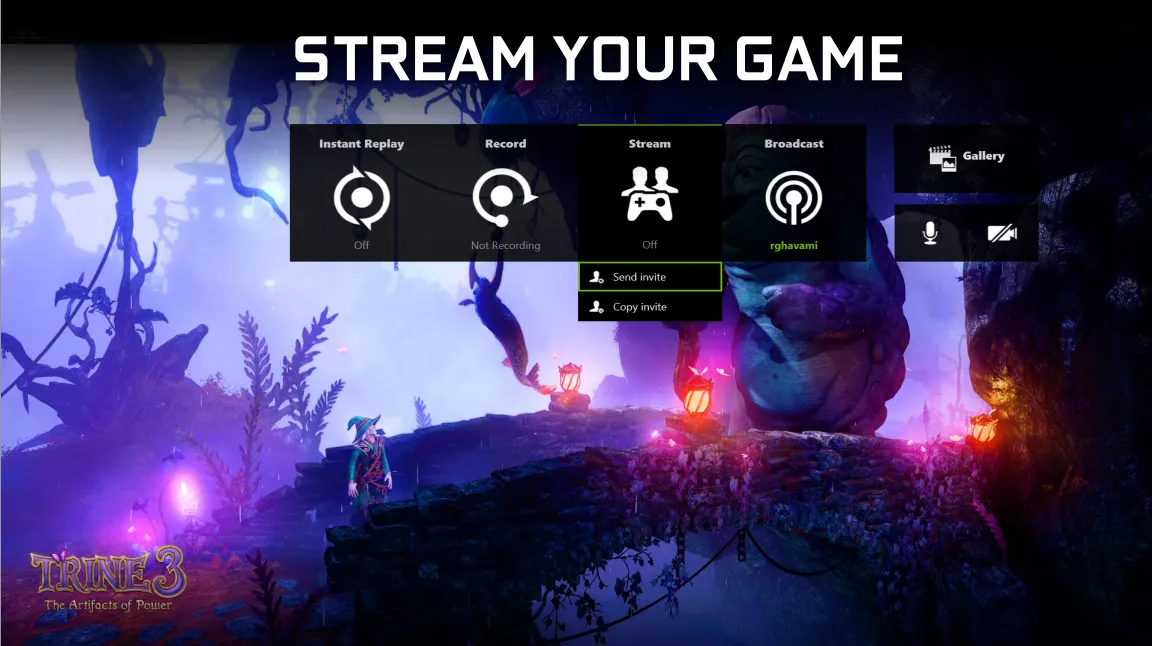
Nvidia has updated its GeForce Experience Beta by adding in screenshot capture and editing, as well as a number of broadcasting features for Twitch and YouTube live streamers.
Screenshot capture comes in addition to the existing video capture feature. You can edit and upload your screenshots without leaving the game, and Nvidia has partnered with Imgur to enable image uploading with resolutions up to 4K. In order to do this you'll first need to sign in to your Imgur account or via social media in the GeForce Experience options.
Editing options available to you in the software include being able to adjust brightness, contrast, digital vibrancy, and you're also able to crop images. The maximum file upload size is 15MB, but this should be enough for most 3840x2160 screenshots. In addition, you'll now be able to view your recent screenshots and videos in a gallery, where you'll easily be able to select files for sharing and editing.
For the live streamers, Nvidia has included the ability to stream with a custom overlay, and there's now an on-screen viewer count which is enabled via an option in the Overlays section of Experience. In order to improve your stream's quality, you can now select your nearest Twitch server to make the most out of your upload speed.
The latest update to the GeForce Experience Beta can be found on GeForce's website, where you'll also find all the other minor changes and fixes listed. If you're a streamer, will these features sway you from OBS as the go-to software?
Keep up to date with the most important stories and the best deals, as picked by the PC Gamer team.

