





This article was published in the Holiday 2015 issue of Maximum PC. For more trusted reviews and feature stories, subscribe here. We have updated the pricing at the time of online posting (1/27/2016).
Assembling the cage
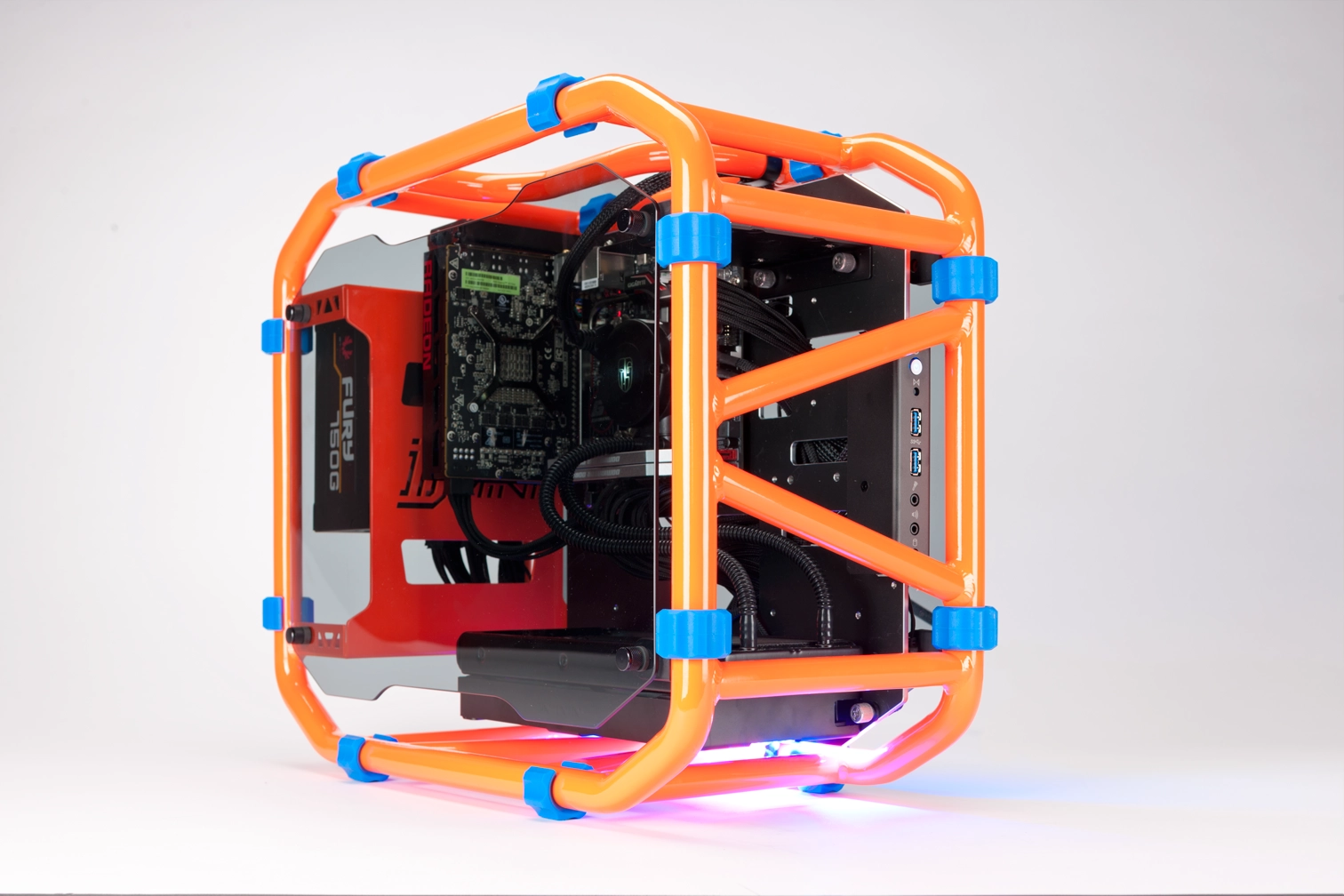
Most of the time, our builds end up in PC cases that encloses the guts on all six sides. Even if there is a side panel window, five out of six sides remain mostly or totally opaque. That means that the case is on display, not the parts. Since the case is only a fraction of the cost of the PC, it’s a shame to hide all those parts away behind sheets of black steel or aluminum.
We wanted to try out this open-air case because it gives us a chance to look at those parts that are too often hidden away. But with beauty comes pain. An open-air case like this one presented some unique challenges for our build.


Even with those challenges, we were happy with the final result.
Rounding up the parts
When we set out to do this build, we wanted to include some shiny-new, recently released parts. This, of, course meant we had to go with Skylake; we’ve been overdue for a build that used Intel’s latest architecture. For graphics though, we had a choice to make: we could go lower-end with the recently released GTX 950, or go bigger with the AMD’s R9 Nano.
Guess which way we went? More power is sexier, so we went with the Nano, which fit really well in this mini-ITX build. It’s been a minute since we went with an AMD GPU in one of our monthly builds, and the Nano felt like the obvious choice for this form factor.
The CPU and GPU found their home on the Gigabyte GA-Z170N motherboard, which supports DDR4 and offers up a wireless connection with an included mini-PCIe Wi-Fi card. We had an EVGA Z170 board on hand, but for this build, we felt that the included Wi-Fi capability was a good reason to choose one board over the other. We do wish that the mobo came with on-board power and reset buttons like the EVGA model does. Since this is a Z170 board, we had to go with DDR4 memory. We got a couple of 8GB sticks of 2666MHz Corsair Dominator for the job.
All of our parts found a comfy, airy home in the In Win D-Frame Mini. We really liked this model with its orange-and-blue frame, but the D-Frame also comes in black-and-red and red-and-black. The cool thing about the case is that there’s no clear top or bottom; the only thing you need to worry about is access to ports and buttons.
The 750W power supply is plenty for the assortment of parts we chose, and since mini-ITX is limited to one GPU, there’s no need to worry about extra headroom for SLI or Crossfire. However, the extra wattage does allow for single-GPU upgrades, or the addition of some spinning drives.
| Part | Street Price | |
|---|---|---|
| Case | In Win D-Frame Mini (orange/blue) | $270 |
| Motherboard | Gigabyte GA-Z170N-Gaming 5 | $150 |
| CPU | Intel Core i7-6700K | $414 |
| Memory | 16GB (2x 8GB) Corsair Dominator Platinum DDR4 2666 | $125 |
| GPU | Radeon R9 Nano | $500 |
| PSU | BitFenix Fury 750G 80 Plus Gold | $120 |
| SSD | Samsung 850 Evo 2TB | $620 |
| CPU Cooler | Deepcool Maelstrom 240K | $160 |
| Total | Row 8 - Cell 1 | $2,359 |
All prices reflect market pricing at time of writing.


